
baipgmmeifmofkcilhccccoipmjccehn
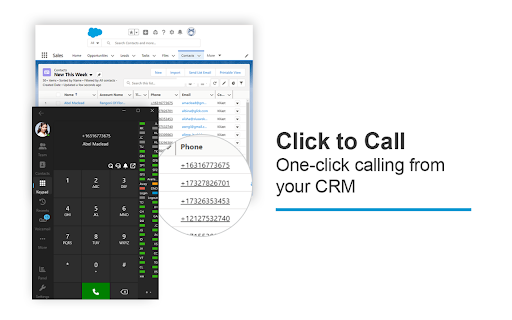
The 3CX browser extension provides click2call from any website or CRM system for 3CX PBX users. The 3CX browser extension provides click2call from any website or CRM system for 3CX PBX users. With the 3CX extension, Click2Call functionality enables telephone numbers on any webpage or CRM system to be ‘hyperlinked’ allowing a simple click to initiate the call instead of copying and pasting. When setting up the extension, the extension options include the choice for the number to be passed to the 3CX Web Client or 3CX Softphone for Windows. Additionally, included within the settings is an ‘Exclusion list’ where you can set specific URLs in which you do not want the numbers to be ‘hyperlinked’. Important: This extension is only for use with 3CX V20, and is not a standalone extension.

IT Glue Chrome Extension
Quickly and securely access all of your IT Glue passwords, create passwords, and preview your assets right from within Chrome. With the IT Glue Chrome extension, you’ll have instant access to IT Glue information whenever you need it. You can quickly and securely access all of your IT Glue passwords, create passwords, and preview assets right from within the browser extension. This means no more switching pages and no more copy/paste of usernames and passwords to sign in to websites and services. The extension also supports Single Sign-On (SSO), should your organization have it enabled. Now you can also experience the AI-powered efficiency of IT documentation with the Smart SOP Generator. Smart SOP Generator Open your IT Glue Chrome extension, click Smart SOP Generator in the menu and hit 'Start Recording'! Our feature seamlessly captures your screen, keystrokes, and clicks, making documentation effortless. Plus, you can preview your capture in real-time on the panel to your right, ensuring everything looks just right as you go! Need to remove a screenshot? Just click the trash icon to delete it instantly. You can also expand or shrink the preview panel whenever you need more workspace. If you close the panel your capture is stored locally on the browser should you wish to resume. When you're ready to save your SOP, simply hit ‘Finish,’ give it a title, and choose an Organization. That’s it! Your document is automatically saved in a special folder called SOP Generator and opens right away for easy access. You can edit, publish and move your SOP at any time. Passwords: - Create, access and view passwords within the extension - all passwords that are saved in IT Glue will be available - Password creation: ability to create business personal and team based passwords in the extension - Password autofill: usernames and passwords stored in IT Glue are automatically populated in login fields - Password auto-creation: When creating a new password (team-based or business personal password), users will be auto-promoted to add their passwords to IT Glue Search: - Quick search: access any item in IT Glue via the Search feature, not just passwords on any webpages by pressing "Q" - Globally search for any passwords your account has permission to access Security: - The extension also supports Single Sign-On (SSO), should your organization have it enabled. - At-rest and in-transit encryption of passwords keeps your data safe - Sign in once and go: Share a sign-in session between the IT Glue web app and IT Glue Chrome extension for maximum time savings

FOP2 Extension
FOP2 Extension for Asterisk PBX. Manifest version 3 version. View status of your Asterisk PBX extensions directly in Chrome Shows desktop notifications and configurable popups on new or connected calls. Converts phone numbers in any web page into click to call links, using your Asterisk's PBX extension. What's new in 1.0.1: Support for panel contexts and dial prefix. What's new in 1.0.3: Add panel context and dial prefix in options What's new in 1.0.3: Better number matching to avoid dates, make unregistered extensions invisible What's new in 1.0.5: Fix deprecated desktop notifications What's new in 1.0.6: Context menu to dial selected text. What's new in 1.0.7: Shows UTF8 Characters in button labels What's new in 1.0.8: Small bugfix to make buttons display on FOP 2.28 or older What's new in 1.0.9: Improved settings: open popup link on notification click. Improved phone matching. What's new in 1.1.0: Configurable protocol handler in click to call numbers. Popup content so you can display CRM info directly in the call notification. Click to all on extension list for using it as a quick company directory. What's new in 1.1.1: Fix duplicate/triplicate context menu entries. What's new in 1.1.2: Fix utf8 decoding on desktop notification What's new in 1.1.3: Convert numbers to click 2 call now works on most dynamic content What's new in 1.1.4: Bugfixes to prevent warnings and errors on console What's new in 1.1.5: Convert numbers to click 2 call on dynamic content now follows user configuration instead of being always on. Oops! What's new in 1.1.6: Prevent double popups on connect on FOP2 server version 2.31.20 and up What's new in 1.1.7: Add ability to run javascript functions instead of opening popups What's new in 1.1.8: Fix for connected popups sometimes not being fired What's new in 1.1.9: Remove tabs and unlimitedstorage permissions from extension as they were not needed. Remove jquery dependency from background process. What's new in 1.2.0: Also converts callto: and tel: links to FOP2 click to call if no protocol handler is configured in options. What's new in 1.2.1: Fixed bug that freezed some pages when trying to detect phone numbers on them. Honour click2call setting for tel: and callto: links (do not enable them if setting is turned off). What's new in 2.0: Manifest version 3 version. Uses sidepanel. What's new in 2.1: Find phone numbers general improvements. New option "Search Links" that will keep original links on elements and add an extra click 2 call element instead of overwriting it. Fixes on call origination with empty callerid. (Thanks to Convergent Communications for these updates) What'2 new in 2.2: Improvements in Desktop notifications, popup content and variables shown. What'2 new in 2.3: Ability to dial any number by using the filter/search box.

Passbolt - Open source password manager
Passbolt extension for the open source password manager for teams. Passbolt is an open source password manager designed for collaboration. You can securely generate, store, manage and monitor your team credentials. Get access to all of your logins and passwords from multiple browsers or even your mobile phone. Create strong random passwords, thanks to the fully customizable password generator, and share them instantly with your team. Passbolt is built on top of an open API made for developers and agile teams. Passbolt is extensible and yet usable by everyone. No technical knowledge is required to use it. This is why Passbolt is trusted by small businesses, as well as government offices, regulated industries, and privacy-conscious organizations: Boost collaboration & productivity: - Easily share one password, or a folder with a single user or a group of users; - Use personal or shared tags to identify passwords and secrets; - Give specific access rights to a user or group; - Get detailed reporting on access & change history. Security by design. Audited and certified: - True end-to-end encryption; - Interoperable cryptography based on OpenPGP; - Full control your own encryption key; - Access revocation that actually works; - Regularly audited by independent auditors. Made in Europe. Privacy by default: - Host it in our cloud, located in Europe; - Or self-host it for full data ownership; - No tracker, no strings attached. Passbolt source code comes under an AGPL license (yes even the commercial version) and is publicly available. You are free to audit it, contribute to it, or redistribute it. This add-on is required to use the software, in order to provide advanced security features as well as functionality such as password auto filling on web pages. Get started now: https://www.passbolt.com/cloud/signup Check the source code: https://github.com/passbolt

Devolutions Password Manager
Form filler that obtains entries from Remote Desktop Manager, Devolutions Server, and Devolutions Cloud The Devolutions Password Manager extension complements Remote Desktop Manager and Devolutions workspaces such as Devolutions Server and Devolutions Cloud, enabling users to securely inject passwords into websites from entries stored in their vaults, and to view and copy sensitive information like credit card details, contacts, and more. This extension provides users with a simple way to automatically connect to websites without ever having to remember a password.
