
baciplbchhojjmlgfpenindejajmldpg
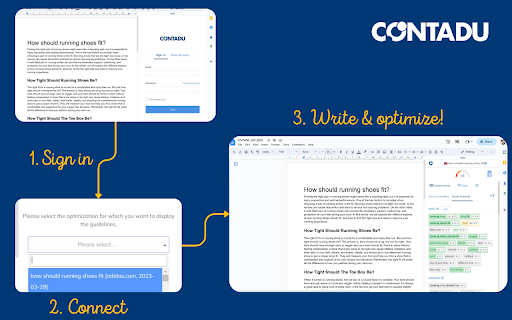
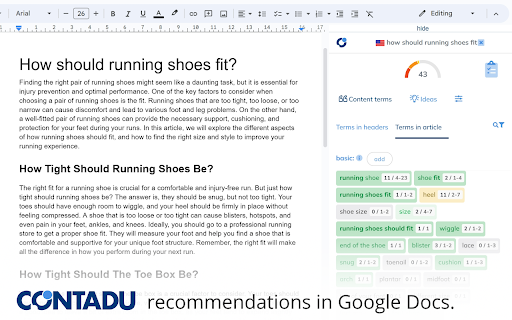
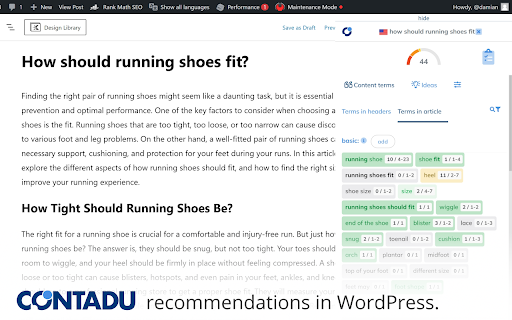
Show NLP optimization recommendations in your favorite editor/CMS. Currently supports Google Docs, Wordpress and Shopify products. Use of the extension requires a CONTADU/NeuronWriter account. 1. Open the Google Docs/Wordpress/Shopify(products) editor. 2. Log in to your account. 3. Select the analysis you want to connect to the editor. 4. Write and optimize using the tips in the sidebar.

SEO Minion
SEO Minion helps you in your daily SEO tasks such as On-Page SEO analysis, Broken Link Checking, SERP Preview and more The tool helps you with the following tasks - (1) Analyze On-Page SEO - analyze the HTML of any webpage and view useful information that will help you optimize the On-Page SEO as well as alert you to any issues. (2) Highlight All Links - quickly see all the links (internal & external) for any webpage (3) Check Broken Links - check every link on a webpage and get a report of any links with issues (5) SERP Preview - preview your website on a real Google search result and update this in real time (6) Google search location simulator - view non-personalized google search results for one keyword on two different location/language combination. (8) HTML v/s DOM - analyze the differences between the HTML source code and the rendered DOM to check if your JS library is causing any SEO related issue (9) Analyze Structured Data - analyze the structured data on the webpage We add features based on user feedback. If you'd like us to add any new features, please email us at akash@seominion.com. You can view the change-log for every version update at https://seominion.com/news

SEOcrawl SEO Extension
SEOcrawl is an SEO Extension that allows you to analyze the most important SEO Factors (metadata, headings...) in a single click. SEOcrawl is an SEO extension whose main objective is to help you in your day to day to be more efficient, agile and get better results for your projects. SEO title and meta description previewer and its appearance in search results. Summary of all headings (h1, h2, h3), recommendations for improvements and error identification. Identification of all the internal and external linking of the url with their respective anchor text, link status code... Section dedicated 100% to hreflang codes and to ensure that all your international SEO strategy is well implemented. Preview of Facebook and Twitter social tags (open graph and twitter tags) to ensure that our page is correctly previewed on social networks. Real-time check of the Search Console indexing API for a given url (status code, canonical declared and read by Google, last Google crawl and much more... The star! Discover all the keywords for which a url ranks and its detailed performance with trends directly from the browser by visiting that particular url. Discover from 0 to 100 the health status of that url with a list of recommendations of errors, warnings and all explained in detail so you can act immediately and improve the health of your website in a few steps.

SEO Pilot
SEO Pilot helps you in your daily SEO tasks such as On-Page SEO analysis, Link Checking, Tags and Assets Preview and more Made by marketers, SEO Pilot is an SEO Tool geared at helping you optimize your content for SEO and quickly generate new content at scale. SEO Pilot provides accurate SEO metrics and metadata right where you need it. It allows you to check on-page meta-data and display the primary SEO metadata for any website page for the best SEO. Analyze On-Page SEO 1. Page Metadata - Retrieve the main Meta Tags and metadata for any webpage including Meta Tags, Canonical URL, and more to help you spot and resolve any SEO Issues. 2. Find Broken Links - Check all Broken Links on a page and categorize them based on HTTP Status Code. 3. Analyze Every Link (Internal & External) - Improve the search visibility and rank of your website by assessing your internal & external links, enabling you to improve the quality of your links. 4. Extract Heading Structure - Clear and concise headings are important for SEO. They help users navigate the content and find what’s relevant to them. 5. Retrieve Image Data - Get key SEO information about your images such as the alt text, image size (to ensure image has been compressed), and more. 6. Social SEO tags - Verify OpenGraph and Twitter Card metadata so your content appears the way you want it on social. Contact Information Extractor 1. Email Addresses - Extract all emails found on the page and export them to CSV. Build lists and use them for outreach campaigns or to suggest partnerships. 2. Social Profile URLs - Understand a site’s social presence by extracting 15+ social URLs. 3. Phone Numbers - Automatically scan the page for phone numbers and export them so you can reach out to site owners. Ring ring. SEO Article Writer / AI Writer (Paid Feature) 1. Overview - Our AI Writer enables you to take an existing page as inspiration to generate a new article. Want to take an existing top-ranking page and create something similar or want to re-write some of your existing pages? No problem, our AI Writer does exactly that. Sign up for a paid plan on SEOPilot.io to access this feature! 2. AI Writing Process - creating an article is a simple three step process: a) Extract Headings - Retrieve headings from an existing webpage inside your current browser tab. b) Refine Your Article Outline - Customize the headers (H1-H6) to suit your needs. Remove, re-write, or add your own new headings. c) Generate the Article - Our AI Writer will then craft an SEO-optimized article based on your input. You can then export and publish your article on your website or wherever you need. SEO Pilot replaces all the popular SEO tools (paid or non-paid) in the Chrome store. People Also Ask Section (PAA) on google search page a) After enabling PAA feature from the SEO Pilot Extension settings, a section will appear at the right side of the google search page. That section shows People Also Ask questions as a list. b) You can change the extraction level (from level 1 to level 5) to get more People Also Ask questions. c) You can download the data as CSV. The data points are PAA, Description and URL. Search Results on google search page a) Below the PAA section, there's another section named Search Results. b) You can download the Organic Search Results as CSV. The data points are TITLE, Description and URL. Permissions explained: Allow this extension to read and change all your data on websites you visit - This is necessary to retrieve all of the necessary HTML and SEO metadata from any page in which you open the extension.

Hexomatic
The no-code, data extraction and work automation platform. Unleash the power of data with the Hexomatic Chrome extension. Instantly analyze websites and gather essential insights to speed up your sales, marketing, and research tasks. Key Features: - Tech Stack Analyzer: Discover the building blocks of any website to identify potential competitors or partners. - Domain Whois Lookup: Quickly access domain registration details to inform your business strategies. - Content Analyzer: Evaluate the effectiveness of website content with a single click. - Screenshot Capture: Create professional-quality screenshots for presentations or reports. - QR Code Generator: Instantly generate QR codes for any web page. - Grammar & Spelling: Detects grammar and spelling mistakes - Accessibility audit: Check page compliance with accessibility standards Automate Your Workflow Hexomatic is more than just an extension. It's a powerful automation platform that lets you build custom workflows to streamline tasks and boost productivity. Start saving time and making smarter decisions today with Hexomatic!
