
baafhiocpgpaahonnkhkhbkggbhmefld
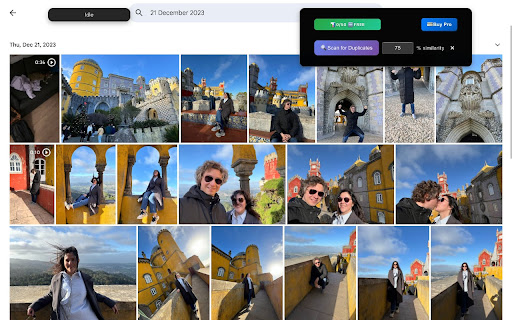


Quickly find and delete duplicate and similar photos and videos in Google Photos! Free up space and organize your photo library with our privacy-focused extension! KEY FEATURES: - Scan and detect duplicate and lookalike photos and videos in your Google Photos - Let AI choose or manually choose which images to keep or delete, by size, resolution, shoot date or date of upload or name - See actual sizes and resolutions of photos and videos, how much space do they take - All changes sync across your devices via Google Photos - Accidentally deleted a photo? Recover it easily from Google Photos Trash 100% Private Your photos never leave your browser. All processing happens locally on your device. Developed with ❤️ in Barcelona and Tallinn

Google Photos Bulk Downloader & Deleter
Automatically downloads and/or deletes all photos and videos from Google Photos. Google Photo Bulk Downloader is designed to automate the download of your precious photos and videos from Google Photos. No more tedious manual downloading—this extension does the work for you! 🎉 🌟 Key Features ✅ Auto Download and/or Delete Photos & Videos – The extension automatically opens each image or video, simulates the shortcut Shift + D, and saves them to your computer. 💾 ✅ Smart Navigation – After downloading, it presses the right arrow key to move to the next media file. ✅ Hands-Free Operation – Once started, it continues downloading without manual intervention until the set limit is reached. 🏆 ✅ Set Your Download /Deletion Limit – Choose how many photos and videos you want to download in one session. 🎯 ✅ Fast & Efficient – Optimized for smooth and quick batch downloads and deleting. ⚡ ✅ User-Friendly – Simple, clean interface with just one click to start the process. 👌 🎯 How It Works? 1️⃣ Open Google Photos in your Chrome browser. Show the items to process (Home, Album, etc). Or select the first photo from which to start downloading or removing 2️⃣ Adjust the delay if needed and set a Base folder name. Choose the desired mode (download only, download + delete, or delete only). Click on Start in the extension to start the process. 3️⃣ The extension will: 🔹 Click the first photo/video to open it. 🔹 Simulate Shift + D to download and/or simulate the click on the trash icon to delete the item. 🔹 Press the right arrow key to move to the next media. 🚀 Why Use Google Photo Bulk Downloader? 🔹 Save Time – No need to download photos one by one. 🔹 Effortless Process – Just start it and let it run! 🔹 Perfect for Backups & Clean – Keep your memories safe on your local storage and free up valuable space on Google Photos Start saving your memories with one click! Download Google Photo Bulk Downloader now and enjoy hassle-free bulk downloads! At the same time you will free up valuable space on Google Photos! 🔥🎞️

Google Photos Cleaner
Easily find and clean up your Google Photos with powerful filters for date range, file orientation, and media type. Google Photos Cleaner – Fast, Smart, and Simple Google Photos Cleaner Managing thousands of photos in Google Photos can be overwhelming. Google Photos Cleaner is a lightweight Chrome extension that makes it easy to organize, filter, and delete unwanted photos. Free up storage, save time, and keep your photo library tidy with just a few clicks. Whether you want to remove old files, organize photos by type, or quickly select multiple items, this tool is built to simplify Google Photos management. 1. Select All for Quick Cleanup Stop deleting photos one by one. With Select All, you can instantly select all photos in your view and delete them safely. Perfect for: • Clearing unwanted images quickly • Organizing large photo collections • Performing bulk actions in seconds Find exactly the photos you need with the Date Range Filter. Narrow down your library by: • Specific years, months, or days • Recent uploads or old photos • Seasonal memories or project-specific files This feature ensures you can delete or manage files without scrolling endlessly. Target exactly the images or videos you want to manage. Filter your library by file type: • Photos (JPEG, PNG, etc.) • Videos (MP4, MOV, etc.) • Large files taking up storage • Screenshots or GIFs Efficient filtering lets you focus on the files that matter and remove the ones you don’t. Why Users Should Install Google Photos Cleaner • Save Time: Manage hundreds or thousands of photos in minutes. • Organize Efficiently: Quickly find and filter the exact files you want. • Free Up Cloud Storage: Remove unwanted photos and videos in bulk. • User-Friendly: Simple, clean interface with no technical expertise required. • Safe and Secure: All actions are performed locally in your browser; your photos never leave your device. How It Works 1. Install Google Photos Cleaner from the Chrome Web Store. 2. Open your Google Photos library. 3. Use Select All, Filter by Date Range, or Filter by File Type to choose files. 4. Delete or organize your photos in bulk. 5. Enjoy a clutter-free Google Photos account. Perfect For • Casual users with large photo libraries • Professionals managing visual content • Families looking to organize shared memories • Anyone who wants to free up Google Photos storage quickly Installation Instructions 1. Click Add to Chrome on the Web Store page. 2. Open the extension from your Chrome toolbar. 3. Use filters or select all photos to clean up your library instantly. Q: Is it safe? A: Yes. All operations happen locally in your browser. Your photos are never uploaded elsewhere. Q: Can I undo deletions? A: Deleted files go to your Google Photos trash for 30 days. Restore anytime within that period. Stop spending hours managing Google Photos manually. Install Google Photos Cleaner now to select, filter, and clean your photo library efficiently, free up storage, and enjoy a perfectly organized photo library.

Bulk Select Google Photos
Select multiple photos on Google Photos with just one click and then bulk delete, download, archive, share etc. Bulk Select Google Photos is a powerful extension that enhances your experience on Google Photos by allowing you to easily select multiple photos at once for efficient management. Key Features: * Bulk Selection: Quickly select multiple photos with a single click. * Easy Management: Easily download, archive, share or delete google photos. * User-Friendly Interface: Provides visual feedback by displaying an 'ON' badge during photo selection and an 'OFF' badge when not. * Privacy: Works 100% locally and only on photos.google.com. Nothing leaves your browser. How to Use: 1. Open Google Photos: Navigate to photos.google.com in your browser. 2. Click the Extension Icon: Click on the Bulk Select Google Photos extension icon to start selecting photos. 3. Scroll Through Your Photos: As you scroll, the extension will automatically select photos for you. 4. Pause Selection: Click the extension icon again to pause the selection process. 5. Resume Selection: Click the icon once more to resume selecting photos.

Google Photos Album Batch Downloader
Batch download Google Photos albums, including all photos and videos in the album. Have you ever wanted to quickly back up your entire Google Photos album but were tired of clicking to download each photo individually? Or perhaps you're frustrated with the inconvenience of using the official ZIP archives Google uses for downloads? "Google Photos Album Bulk Downloader" is designed for this purpose. It's a simple, efficient browser extension that lets you easily download all the photos and videos in your Google Photos albums, whether they're your own or shared with you. Key Features: Smart Scan and Recognition: The extension automatically scans the currently open Google Photos page, accurately identifies and counts all the photos and videos, and clearly displays them on the interface. Download in High Definition: We're committed to preserving your most precious memories. The extension retrieves and downloads high-resolution image files (up to 4K resolution) and original video files, not thumbnails or compressed versions. Flexible Download Categories: You can freely choose the content you want to download based on your needs. Whether you want to back up your entire album (including photos and videos), save all photos in bulk, or download individual video clips, all with just a single click. No compression, no bundling (What You See Is What You Get). Unlike the official packaged download method, this extension downloads each photo and video directly to your computer as a separate file. No more decompression required. After downloading, you'll see all the original JPG/PNG images and MP4 videos in a folder, making management more convenient and intuitive. Simple and Intuitive Interface: We've meticulously designed a simple, clean user interface without any unnecessary distractions. The entire process—from scanning to selection to downloading—is clear and straightforward, ensuring a smooth and comfortable experience with no learning curve. Download Progress Visibility: During the download process, you'll see a clear progress indicator (e.g., "5 / 29") to keep track of the download status in real time, eliminating the need for waiting. Instructions: Open the Google Photos album page you want to download in Chrome. Click the extension icon in the top-right corner of the browser to launch the downloader. The extension will automatically scan all media files on the page and display the total number of photos and videos. Choose to download "All," "Photos Only," or "Videos Only." Click the "Start Downloading" button, and all files will begin saving to your browser's default download folder. Focus and Purity: We do one thing and do it well—help you easily download your photo albums. No ads, no extra features, just the core value. Privacy and Security: Your privacy is paramount. This extension runs entirely on your browser; we don't collect, store, or view any of your photos or personal data. You're in complete control. If you're looking for a simple, fast, and privacy-respecting way to bulk download Google Photos, this extension is the perfect choice.
