
apoiemgcpdkhlanfadkhffcmcfjpijfm

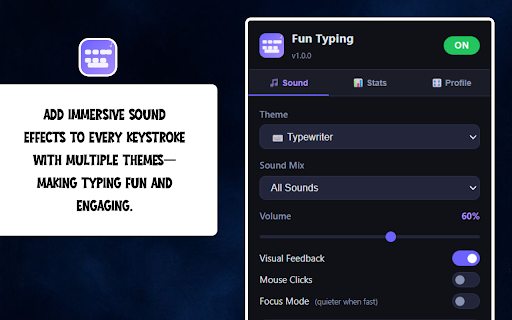

Make every keystroke fun — sound themes, visual effects, typing stats, and more! Fun Typing transforms your everyday typing into an immersive, satisfying experience. Every key you press triggers a rich, professionally synthesized sound effect - with seven distinct themes ranging from nostalgic typewriter clicks to anime-style chimes, retro arcade beeps, calming ASMR tones, and more. Whether you're writing emails, coding, filling forms, or chatting online, Fun Typing makes your keyboard feel alive. Each theme is built from scratch with unique synthesized audio, giving every keystroke its own character: • Typewriter - classic mechanical key clicks and carriage returns • Retro - 8-bit arcade sounds straight from the golden age of gaming • Sci-Fi - futuristic dual-tone synths and digital pulses • ASMR - soft, whispery tones for a calm, focused typing experience • Bubble - light, airy pops and liquid-drop sounds • Nature - organic rustling and water droplet acoustics • Anime - bright, energetic chimes with musical flair • Per-Key Sounds - every letter, number, symbol, and special key has its own unique sound within each theme • Pitch Shift - raise or lower all sounds by up to 12 semitones • Pitch Variation - add randomized pitch variance for natural, organic feel • Intonation - simulate rising/falling speech melody as you type • Focus Mode - volume auto-reduces when you type fast, keeping you in flow • Uppercase Boost - capital letters play slightly louder and higher pitched • Mouse Click Sounds - optional click audio on every mouse press Floating emoji animations appear near your cursor on every keypress, matching your current theme - typewriter pages, retro game sprites, sci-fi rockets, nature leaves, anime stars, and more. Save and load named sound profiles for different moods or workflows. Switch between your "focus session" profile and your "gaming" profile with one click. Profiles store pitch, variation, and intonation settings independently. Disable Fun Typing on specific websites where you need silence — password managers, banking sites, or any site of your choosing. Add sites by hostname with one click directly from the settings page. Back up all your settings, profiles, and stats as a JSON file. Restore or transfer your setup to another device or browser profile instantly. Toggle Fun Typing on or off from any page with Alt+T — no need to open the popup. Perfect for quickly silencing sounds during calls or meetings. Fun Typing uses Chrome's Offscreen Audio API with pre-loaded AudioBuffer caching — all 72 sounds per theme are decoded into memory at startup so there is zero latency or delay between keypress and sound. A silent keep-alive node prevents Chrome from auto-suspending the audio context, ensuring sounds play instantly even after long pauses. ★ YOUR PRIVACY, PROTECTED No data is collected, transmitted, or shared. All settings, profiles, and stats are stored locally on your device using Chrome's built-in storage. Fun Typing never reads page content, never accesses your accounts, and never communicates with any external server. Turn your keyboard into an instrument. Install Fun Typing today.

Blooket Hacker - any page
A comprehensive utility tool for Blooket platforms on any page. Blooket Hacker - any page Master your Blooket experience with the ultimate utility tool that works on ANY website! This extension streamlines how you join games and enhances your visual experience on Blooket. No more copy-pasting numbers manually—just highlight and go. ✅ Auto-Scan & Highlight (Universal): Automatically detects Blooket Game IDs (6-8 digit numbers) on ANY webpage (like Google Classroom, Discord, or Zoom chat). Detected codes are highlighted—simply hover and click to join instantly! ✅ Enhanced Theme (Dark/Neon Mode): Transforms Blooket.com with a stunning, custom-built Dark Neon theme. Reduces eye strain and gives the interface a premium, pro-hacker aesthetic. (Toggleable in settings). ✅ Smart Auto Answer: Includes a simulation tool that attempts to detect question structures and highlights potential answers for testing purposes. ✅ Context Menu Integration: Right-click any selected text on any page and choose "Search on Blooket" to find games or info instantly. ✅ One-Click Join: Found a code? Just select it, and a "Join Game" tooltip appears immediately. ----------------------------------------------- This extension is a utility tool designed to improve accessibility and user experience. It does not bypass authentication or compromise user data. Install now and level up your game session!

Reaction sound
For more rich web surfing with sound and visual effects This extension add following things: 1. Copy sound and popup. 2. Two types of dynamic keyboard typing sound. 3. Mouse click sound(both up and down). All settings can be turned on and off in the popup window. Click the icon located at the top right of your display. * Right after installing this extension, it will not apply to tabs that are already open. Refresh or open a new tab. * This extension may not work on some pages, such as the new tab page or the extension management page. * If you don't refresh or reopen the tab, the effect will stay while you turn off the extension. Get the full Windows version that works everywhere, not just in browsers like Chrome or Edge. More types of sound assets are included. 6 keyboard sounds, 8 mouse sounds and 3 copying sound. Itch.io link: https://tkappdeveloper.itch.io/reation-sound Gumroad link: https://tkappdev.gumroad.com/l/reaction-sound

Keyboard ASMR
Bring your typing to life with satisfying, realistic typing sounds! Keyboard ASMR lets you pick from authentic mechanical keyboard switch sounds — from Holy Pandas and Banana Splits to Gateron Reds, MX Blues, and classic Typewriter clicks. Perfect for focus, flow, or just fun. I’ve added some of my favorite keyboard sound profiles and am looking for more — suggest yours on Discord if you’ve got great ASMR typing samples! 🛠️ Features • Choose from preloaded mechanical keyboard, typewriter, and focus-sound profiles • Lightweight, smooth, and easy to use • Volume control, per-site mute option, and subtle white-noise-like ambience • Light and dark themes available • Manifest V3 compliant — built for performance and long-term support • Tap the Discord button in the header to jump straight into our feedback channel → https://discord.gg/2jcP6RBTPq 🧠 Getting Started After install, hard-refresh any already-open tabs to activate the keyboard click sounds: • Windows: Ctrl + Shift + R • Mac: ⌘ + Shift + R 🔒 Limitations a. Doesn’t run on restricted pages (like the Chrome Web Store) due to content-script rules b. Doesn’t work in the address bar/omnibox (by design) 💬 Got ideas or found a bug? Join our Discord to share feedback, suggest new sound packs, vote on upcoming typing sound profiles, report issues, and preview builds. 👉 https://discord.gg/2jcP6RBTPq 6.1.4 Changelog - Improved Google Docs and iframe keyboard capture reliability - Added key-category compatibility for editors and complex pages - Added opt-in diagnostic reports and privacy-safe aggregate analytics support - Added regression tests for sound profiles, Google Docs capture, key categories, and bundled profile loading - Improved profile loading reliability and removed the popup inactive notice 6.1.1 Changelog - FIX: double-sound issue resolved for certain browsers 6.1.0 Changelog - Key events added (Key down, Key up, Key pressed) - Only Key down events kept active

KeyboardSounder
it can achieve the sound effect of a mechanical keyboard when typing on web pages in the browser it can achieve the sound effect of a mechanical keyboard when typing on web pages in the browser
