
apdmjpaeikhnflphogcijfgboljadpka
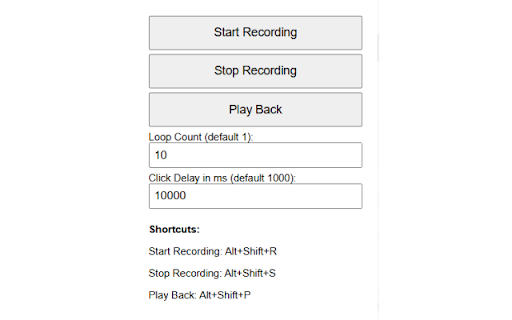
Record and replay clicks, including dropdown interactions. Lets you record mouse clicks and replay over a user-defined set number of iterations, and a user-defined click delay. Works with dropdown/dynamic page elements and can record/playback across page loads/refreshes. Also records and plays back copy/paste keyboard actions. Simply set your loop count (the number of times the script will run your click sequence before completing), and the click interval (default is 1000ms - 1 second - you can reduce this figure to click faster ie setting this to 1ms means the script will repeat your click sequence 1000x per second, or you can extend this if you need longer delays between clicks ie if you need to wait for page elements to load before a click is actioned). Then record your click sequence, and play it back according to your playback settings, either using the button on the extension window or using the Hotkeys: (NOTE: The + symbol denotes that these keys need pressing at the same time to action the Hotkey, not that you need to actually press the '+' key also) NOTE: YOU MUST REFRESH THE WINDOW YOU WISH TO WORK-ON AFTER INSTALLING THE EXTENSION, IN ORDER FOR THE SCRIPT TO BE INJECTED PROPERLY. THIS IS THE MOST COMMON REASON FOR THE MACRO NOT RESPONDING/WORKING. TO CHECK THAT THE SCRIPT AS INJECTED, USE F12 ('INSPECT' FUNCTION) AND CHECK THE 'CONSOLE' TAB FOR THE MESSAGE 'Macro Recorder: Content script loaded.' - THIS MEANS THE SCRIPT IS LIVE, AND SHOULD WORK ON THAT PAGE.

SiteMacro
SiteMacro is intended for automating simple actions performed on websites, e.g. to automatically click "Not now" after logging into a website, or to automatically accept the terms of use of a free WiFi frequently used. In these cases, visit the page you want to automate, click the SiteMacro toolbar button, choose "Record Macro" and perform the task to execute on the site (e.g. fill forms, click links or buttons). If your task does not include leaving the site, you then have to click "OK" in the red notification bar, otherwise leaving the site will confirm the macro. Once you visit the page again, SiteMacro will re-execute the recorded steps. Alternatively, you can manually start the macro through the SiteMacro toolbar button.

Fox Auto Clicker
Create and run browser macros to automate repetitive web tasks. • Capture mouse‑click sequences (position, timing, and delay). • Save macros locally per domain – no cloud storage, no tracking. • Replay saved macros with optional loops and adjustable delays. • Edit recorded positions, timing, and domain filters directly in the panel. - Domain‑based macro organization with filtering. - Minimal UI mode for distraction‑free operation. - Resizable panels with dual‑corner grips and floating edit/inspector windows. - Configurable delays for natural‑looking execution. - 100 % local – all data stays on the user’s machine. 1. Click the Capture button – the extension records every click you make on the current page. 2. Stop recording; the macro appears in the list with its coordinates and timestamps. 3. Press Play to replay the macro; you can set the number of repetitions and delay between clicks. 4. Edit any macro to change positions, timing, or the domain it applies to. Privacy - All macro data is stored locally in the browser’s storage. No data is sent to any server. - Support If you like the extension, consider supporting the developer at ☕ https://buymeacoffee.com/panat.siriwong.

easy-web-macro-extension
Record your web actions and replay them with a single click Record your web actions and replay them with a single click

Macro-Maker
Enables you to store five text macros that you can quickly copy to clipboard. This extension allows you to store 5 different text-based macros (such as email messages, instant messages, code snippets) that you can - with one button - copy to your clipboard so that you can paste the text into whatever application you need to.
