
apdjbegjkjdlblplgiibfimmpfaakfde
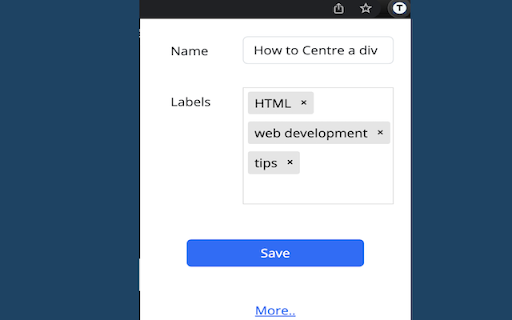

A new better way of searching and managing your bookmarks Innovative Chrome Extension designed to revolutionise your bookmarking experience. TagifyBookmarks uses tags to save and retrieve Bookmarks. Major features: 1. Quick Search: Directly From the Search Bar 2. Effortless Tagging : No need to organise into folders 3. Easy Search: Autocomplete and Suggestions 4. Intuitive Search: No folder hierarchy to remember 5. AutoSync With Chrome Bookmarks: no need to manually migrate all your bookmarks 6. Flexible Tag Management 7. Privacy and Security 1. Quick Search: Directly From the Search Bar Searching for specific bookmarks is a breeze with TagifyBookmarks. The extension integrates seamlessly with your browser's search bar, allowing you to search for bookmarks using tags directly. Simply enter a tag in the search bar, and TagifyBookmarks will instantly display all relevant bookmarks associated with that tag. TagifyBookmarks simplifies the process of bookmarking by allowing you to add tags to your bookmarks effortlessly. With just a few clicks, you can assign relevant tags to your bookmarks, enabling you to categorize and organise them according to your preferences. 3. Easy Search: Autocomplete and Suggestions Simply start entering a tag in the search bar, and TagifyBookmarks will instantly display all relevant tags and bookmarks associated with the entered letters. It will also show suggestions of related tags. Simply start entering tags in any order , TagifyBookmarks will efficiently find your Bookmark 5. AutoSync With Chrome Bookmarks Your tagged bookmarks stay in sync with your already saved chrome bookmarks, ensuring that you have access to your organised bookmarks wherever you go. When you add a new tagified bookmark or install the extension for the first time, TagifyBookmarks syncs with your already saved chrome bookmarks. TagifyBookmarks offers a comprehensive set of tools for managing your tags. You can create new tags, edit existing ones, and even delete tags that are no longer needed. This flexibility ensures that your tagging system evolves with your changing needs. 7. Privacy and Security TagifyBookmarks does not send your bookmarks to a backend server. The bookmarks are only saved in your local system and synced with chrome bookmarks. For more details on how to use visit our website : https://www.tagifybookmarks.com/how-to-use

Bookmark Search Plus
Enhanced bookmark management with search and tagging functionality Bookmark Search Plus (BS+) – The Ultimate Bookmark Manager & Bookmark Search Tool for Chrome 🔍🚀 Tired of scrolling through endless bookmarks? Bookmark Search Plus (BS+) is the ultimate bookmark manager that helps you quickly find, organize, and search for bookmarks. Say goodbye to cluttered folders and hello to an efficient, tag-based bookmark search tool for Chrome! ✨ Key Features: ✔️ Instant Bookmark Search – Quickly locate bookmarks by title, URL, or hashtags (#tags). ✔️ Tag-Based Bookmark Manager – Categorize bookmarks flexibly without relying on deep folder structures. ✔️ Dynamic Recent Bookmarks List – Instantly access the last 5 visited bookmarks for quick retrieval. ✔️ Fast Keyboard Shortcut: Mac: ⌥ Option + B Windows/Linux: Alt + B ✔️ Optimized Search Algorithm – Get the most relevant results in seconds. ✔️ Dark Mode Support – Seamlessly switch between light and dark themes. ✔️ Easy Bookmark Labeling – Use #tags in bookmark titles for effortless filtering. 📌 Why Choose Bookmark Search Plus? 🔹 No more digging through folders – Quickly find bookmarks using intelligent search. 🔹 Flexible organization – Use tags to categorize bookmarks across different topics. 🔹 Fast & Lightweight – Minimal impact on browser performance. 🔹 Perfect for power users, researchers, and productivity lovers!

PutAway Tab Management
Manage your tabs easily PutAway - A new way to manage your tabs and bookmarks from your New Tab screen. You can create collections, and drag and drop tabs to it to bookmark. PutAway saves all your Data as bookmarks in a separate folder - "Other Bookmarks > PutAway". So all your Data is accessible from anywhere via google chrome, and is automatically synced between all devices just like your bookmarks. Features - - Drag and Drop Tabs to bookmark - Create/Delete/Rename bookmark collections - Save Session or Bookmark tab from extension button. - Dark Theme, Color coded items. - Share Bookmark Collection - Archive collections - Small and elegant Quick links bar. This project is completely free and open sourced at Github - https://github.com/mannprerak2/putaway Feel free to look at the source code, create issues and even submit PRs!

Bookmark tags
Adds tags to bookmarks. Improves search and more. Extension provides some additional functionality compared to default bookmark manager. This extension allows you to do following things: * add tags for any bookmark * search bookmarks by tag, folder or title/url words * bulk bookmark operations (open bookmarks, move them to folder, add or remove tag) * find potential duplicate bookmarks * show all used tags Unlike many other extensions, this one uses default browser's bookmarks storage and handles tags as part of a title. So it is possible to add some tags when creating new bookmark by just writing several #tags to its title.

ChromTag - tag your bookmarks
Tag your bookmarks with #hashtag! With ChromTag, you can quickly find the bookmark you need. You can just add a #hashtag to your bookmark title or edit it directly in the extension. You don't have to worry about your data loss or privacy because ChromTag uses the browser's native bookmarks. 1.8 (2024-01-25) - Increased font and window sizes - Added a button for creating a new bookmark 1.4 (2014-05-29) - Better support for non-latin characters 1.2 (2014-01-10) - Sorting folders and tags by name - Searching - Bookmark editor
