
apdcmpdaikhdnelhamcmfdphokkgppie


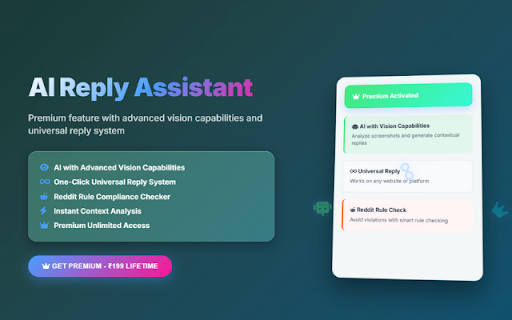
Your free AI assistant to help you write, edit, and think faster. WritePro is your all-in-one AI-powered writing assistant built to help you create, polish, and publish smarter content, faster. 🦾 (Hero Feature) AI Vision Reply Assistant See any webpage (like emails, WhatsApp chats, Facebook posts, or Reddit comments) and get instant AI-generated replies. ✅ Fact-Checking Verify your content with real-time, accurate information. 🧠 Natural Language Generation Produce text that feels natural, human, and engaging. ✍️ Grammar & Style Enhancement Fix tone, grammar, and clarity to polish your writing. 🌐 Real-Time Data Access Get fresh, relevant content powered by the latest web data. 🚀 YouTube Shorts SEO Generate perfect titles, descriptions, hashtags, and tags in one click. 📝 Instagram Caption Generator Create catchy captions with 20–30 trending hashtags. 💼 LinkedIn Post Writer Write professional posts that increase your reach and visibility. ⌛ Productivity Tools Organize, sort, and plan your tasks and goals like a pro. 📊 TikTok Trend Analyzer Discover what’s trending and tailor your content accordingly. 🕶️ AR/VR Content Planner Plan immersive content for futuristic platforms. 🧬 Authenticity Checker Test how natural or "human" your content sounds. 🎮 Gaming & Discord Content Generator Create tailored content for gamers and Discord communities. 🧪 Currently in testing — your feedback will shape what comes next. Try it and let us know what you think!

Quillbot: AI Writing Assistant to Grammar Check, Paraphrase & Translate
Write better emails, essays and messages with Quillbot's Grammar Checker, Paraphrasing Tool, Generative AI, Summarizer and more! Quillbot for Chrome: AI Writing Assistant, Grammar Checker, and Paraphrasing Tool Quillbot is a multilingual writing assistant extension that helps you write clearly, quickly, and with more control, right where you work. This AI writing assistant combines a Grammar Checker, paraphrasing tool, and AI writing tool to improve your writing in real time. From quick emails to full drafts, Quillbot helps you say what you mean without overthinking it. ➤ How It Works Install the extension and keep writing like you normally do. Quillbot works in the background, ready when you need it. Write in any text field across the web, then highlight text or open the toolbar to get instant suggestions. You can fix grammar, use the sentence rewriter to adjust phrasing, or generate new text with the AI text generator. Everything happens in one place, so you don’t have to copy, paste, or switch tabs. ➤ Privacy and Data Safety Your writing is personal. We treat it that way. Quillbot processes only what’s needed to provide suggestions and does not sell your data. Our systems are designed with modern security standards in mind, and we continuously improve how we handle and protect user information. You stay in control of what you write and what gets changed. ➤ Key Features A writing productivity tool that does more than just fix typos; it helps you communicate better. ✓ AI Writing Assistant Get real-time suggestions as you write. Improve clarity, tighten structure, and keep your ideas moving without stopping to edit. ✓ Grammar Checker Catch grammar, spelling, and punctuation issues instantly. Get clean, readable writing immediately to improve communication. ✓ Paraphraser Rewrite text to sound clearer, more concise, or more natural. Adjust tone without losing your original meaning. ✓ Sentence Rewriter Quickly reshape awkward or unclear sentences into communication that reads smoothly and lands the point. ✓ AI Cursor Access Quillbot’s AI tools directly where you write. Use the AI Cursor to generate text, refine drafts, and take action without leaving the page. ✓ AI Text Generator Draft emails, outlines, or full responses in seconds when you need a starting point—or a reset. ✓ Tone and Clarity Suggestions Understand how your writing comes across. Make it more direct, more polished, or more conversational as needed. ✓ Multilingual Writing Tool Write and edit across languages, including English, Spanish, French, German, Portuguese, and Dutch. ✓ Translation Translate text as you write or edit, helping you communicate clearly across languages. ✓ In-Page Editing Make changes directly in emails, docs, and forms. No switching tabs or breaking your flow. ✓ GIF Insertion Drop in relevant GIFs directly from the editor to add context or personality to your messages. ✓ AI Image Generation Create images from prompts without leaving your workflow—useful for quick visuals, drafts, or ideas. ✓ Custom Modes Tailor writing style to your needs, whether that’s formal, simple, or aligned to your voice. ➤ Use Cases Quillbot works for anyone who writes—and wants fewer rewrites. ✓ Professionals Send emails and updates that get to the point faster and don’t need a follow-up to clarify. ✓ Students and Researchers Turn rough drafts into clear, structured writing without losing your original ideas. ✓ Marketers and Creators Adjust tone across channels without rewriting everything from scratch. ✓ Multilingual Writers Write confidently across languages with built-in support and suggestions. ➤ Why Quillbot? Quillbot focuses on improving your writing—not replacing it. It works directly where you write, so you don’t lose time switching tools. Suggestions are fast, practical, and easy to apply. You get more than surface-level fixes, with support for tone and clarity when you need it. And with frequent updates, the extension keeps getting better at helping your writing do its job. ➤ Free vs Premium Start with the essentials. Upgrade when you want more control. ✓ Free Plan Includes: • Grammar checker and basic corrections • Limited paraphrasing tool access • Core writing suggestions • Multilingual writing support ✓ Premium Unlocks: • Full paraphrasing and rewriting capabilities • Expanded modes for tone and style • Advanced tone and clarity insights • More detailed, sentence-level suggestions ➤ Supported Languages Quillbot supports writing and editing in English, Spanish, French, German, Portuguese, and Dutch, with continued expansion to additional languages over time. Get Started Install Quillbot in seconds and start improving your writing immediately. Write faster. Say it better. Keep your voice intact.

Compose AI: AI-powered Writing Tool
Accelerate your writing with AI Generate any text using AI. Autocomplete your sentences where you type. With Compose AI, you can write emails, create documents, and chat faster. We use artificial intelligence to automate the writing process. Prompt AI to generate any text, where you already write. Get suggestions for new ways to say something. Draft entire emails from a few words. You can do all that with just one tool. Compose AI is a holistic, AI-first writing solution: ⚡ Type // to generate text using AI 🏄 Autocomplete sentences across different websites ✍️ Rephrase sentences to make them friendlier, more professional, shorter, or longer 🎯 Reply to emails with a click 📄 Generate full-length emails from short phrases ➤ Compose Anything Type // to generate any text. Prompt our AI to write blog posts, marketing copy, paragraphs, sentences, headlines, topical information, research and more. ➤ Autocomplete Our extension’s core feature is Autocomplete. Just hit Tab to take a completion and save time typing. ➤ Compose Email Compose Now is an AI assistant for writing messages. It's great for drafting quick replies or generating ideas you can edit to make your own. To open, press Option+G (or Alt+G). ➤ Easy Email Reply Professionally reply to emails with a single click! Like magic, generated responses will reference the context from the original email. ➤ Rephrase With Rephrase, you can change how you word your sentences without having to rewrite anything. Highlight a text to shorten, expand, reword, or make something sound more friendly or formal. We’re always working to improve your experience with Compose AI. If you have any questions or feedback, we’d love to hear about them at support@compose.ai

Textero AI: Your Personal AI-Powered Writing & Research Assistant
Textero is an AI-powered writing assistant that helps you create high-quality content faster and easier. Textero is an AI Writer Chrome extension that helps you create professional content right in the browser. Keep your grammar in check, support the originality of your work with AI and plagiarism detection, paraphrase any text to say exactly what you mean, and conduct quality research fast. Get start-to-finish writing assistance with our AI Essay Writer! ✒️ Grammar Checker: immediately set high standards with pristine grammar, spelling, and punctuation. Get stylistic improvement suggestions for better readability. 📋 AI Summarizer: save time and capture the essence of long papers in a handy bullet point format. Preserve the quality of your research and don’t miss any key details. 🔃 Paraphraser: rework and humanize your text while keeping its original meaning intact. Go beyond synonyms and enjoy contextual-based paraphrasing. ✅ Essay Grader: pinpoint areas for improvement before turning your essay in or get through multiple student works fast while preserving the quality of your feedback. ⚠️ Plagiarism Checker: detect any accidentally copied or generatively rephrased content for proper citation to meet the highest academic standards. 🤖 AI Detector: reveal generated text from popular and new AI models like ChatGPT, GPT-4, Bard, Google-Gemini, Bing, Claude, LLaMa, and others. ⚙️ How do you get started working with our writer extension? Download the Textero AI Writer extension from the Chrome Web Store and allow the browser to add it. Activate the tool window by opening the Extensions tab (click the puzzle piece icon in the upper right corner) and begin your professional writing journey — it’s that easy! Who will benefit from working with our AI writing extension? 🧑🎓 Students can improve their essays on every level, from grammar and readability to originality. 📚 Writers can avoid writer’s block, preserve authenticity, and clean up their manuscripts. 👔 Professionals can quality-control and summarize their paperwork and correspondence. 🧑🏫 Educators can grade faster and catch academic dishonesty to uphold high classroom standards. 🧑🔬 Researchers can keep up with the latest developments in their field for academic integrity. 🤳🏻 Content creators can deliver clear and original content plans, scripts, and captions. Write like a pro with Textero! ✅ Multilingual: manage your writing in up to 9 languages, including English, Spanish, and German. ✅ Seamless workflow: effortlessly move through the writing stages from finding an essay topic to writing to editing to proofreading — with our support. ✅ All tools in one place: Essay Checker, Grammar Check, Essay Paraphraser, Text Summarizer, and more! No more jumping tabs. ✅ Constant updates: we continue to improve our features to improve user experience and give you better results. 🎁 Get high-quality service with our basic features… ➤ Dependable grammar check ➤ 2 paraphrasing modes ➤ 2 summary format options ➤ Plagiarism and AI detection with no false positives ➤ Supports PDF, DOC, DOCX, RTF, ODT, and TXT file formats for upload 🏆 …upgrade to Pro or Unlimited on our site and unlock your full potential! ➤ Advanced grammar check ➤ Additional paraphrasing and summarizing modes ➤ Detailed breakdowns of any AI-generated or plagiarized content ➤ Free Essay Writer, context-aware AI writer-and-editor for papers up to 20K words ➤ AI Research Assistant for clear and simple access to and handling of academic sources 🔒 Privacy and Data Your privacy is critically important to Textero. We do not pass your personal data to third parties, and we never will. We will always provide a detailed explanation of what data we ask from you and why. We aim for full transparency on how we gather, use, and share your personal data. Read our full Privacy Policy: https://textero.io/privacy-policy. Get acquainted with our Terms and Conditions: https://textero.io/terms-conditions. Feel free to share your experience or follow us for useful content here:

WriteMe.ai - AI powered writing assistant
Prepare to witness the next big transformation in your writing experience on your favorite Browser, using WriteMe.Ai Google Chrome Extension. WriteMe.Ai’s Google Chrome Extension Features: We have got some amazing features in WriteMe.Ai Google Chrome Extension for a better, smoother and more streamlined writing experience using AI. Next Line Suggestions to incorporate fresh, new ideas in your text Built-in Grammar Checker to edit, polish and perfect your text Write Complete Article to create long form content in a jiffy Popular Use Cases to write unique content for certain use cases in minutes How to Setup WriteMe.Ai’s Google Chrome Extension: All you will need to do is: Download the WriteMe.Ai Google Chrome Extension Pin the WriteMe.Ai Google Chrome Extension to Your browser Launch the WriteMe.Ai Google Chrome Extension and Log In After Downloading Here are the next steps you need to follow to use WriteMe across all websites to use WriteMe.ai’s extension Step 1: Once you have successfully installed the extension, go to your extensions settings Pin WriteMe.Ai extension on your browser. Create a new document to start using WriteMe.Ai or go straight to the web app. You can also set your preferences for using WriteMe.Ai on different websites by going to the Extensions Settings page. Step 2: Move your cursor over the text and select any text between 30 to 300 characters length. WriteMe.Ai icon will appear under the highlighted text. Click on the WriteMe.Ai icon to open the toolbar (ribbon). Step 3: The ribbon will show you available actions you can take. Choose any option to get Next Line Suggestions, view Use Cases, use Grammar Tools, or Write Complete Article using WriteMe.Ai. Chrome Extension Launched Access 40+ use cases & templates Supports 30+ languages and 20+ tones Write sales & marketing emails that get replies Discover ideas & write engaging content for blog Generate creative, catchy copies for social media Write product, job, profile, video descriptions Generate interesting caption ideas for Instagram post In-built native plagiarism checker (powered by Copyscape) Workflow and team management features WriteMe Extension is now Draggable New “WriteMe” Button to get text answers for anything Now Data is copied auto on Click Using Append Function* Input Unlimited Text Utilize the capabilities of GPT-3.5 and GPT-4 now. Drag and Drop Extension: Take the extension anywhere with you! Drag and drop the extension anywhere on the page and continue making edits. Enjoy more writing freedom! "WriteMe" button can help you with emails, social media posts, ad copies, and more! You don't have to waste time searching for the right use case; just use the WriteMe option to get something written for you. Use the new WriteMe button to find text-based.
