
apbbkgiadnodlonfadecfkpjkfakklnf


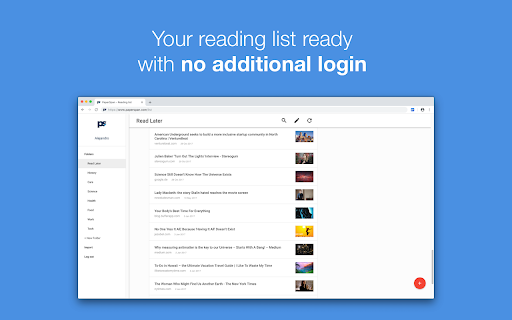

Read It Later app to read more and finish your reading list - to use the web for better you. Save your interesting articles from Desktop, Phone or Tablet. Read or Listen to them even offline, comfortably. PaperSpan’s iOS and Android apps comes with enhanced capabilities to easily pickup your articles and finish reading them. No ads, no suggestions. With this extension, * Save articles directly to a folder. Create a new folder. * Save articles of current page, or a link within a page. * Save from sites otherwise not possible with bookmarklets. This extension will be a helpful companion to your PaperSpan account for better saving & organizing capabilities. Got something to say? Feel free to drop us a line. We’re always listening to your suggestions to improve PaperSpan!

Tagpacker's "Pack It" Button
Organize bookmarks your way. Faster than ever with the "Pack it" button. Use the "Pack it" button to quickly save bookmarks side-by-side while browsing. Whenever you find an interesting website that you want in your collection, just click on the blue Tagpacker icon. Once you click it, a sidebar will open where you can tag and comment on your bookmark before saving it. To save bookmarks you can *use the keyboard shortcut Ctrl + Shift + Z or *right-click website elements (like videos or links) To easily find bookmarks you saved on Tagpacker just type 'tp ' in your browser address bar A complete list with all features is available at https://tagpacker.com/features

TabMate
TabMate helps you manage the tab clutter. Easily switch between tabs, save & restore set of tabs or windows, and more. TabMate helps you manage tab clutter and be more productive. Stash a set of tab/windows that you want to save for later and easily restore them when needed. Use quick switcher to search among open tabs and stashes and switch to them. Drag and drop the tabs to rearrange them with in windows or stashes. Name stashes so you can easily remember the purpose for each set of tabs. Easily send tabs to named stashes through right click context menu. Common usages: - Quickly search and switch between all the open tabs and stashes - Save the pages you've visited during your research session and restore all of them later. - Logically group all the pages you visit often and load each group when needed. - Easily manage existing open tabs by saving unnecessary tabs as a session.

Raindrop.io
Manage bookmarks, highlights, annotations and tabs. Save Anything from the Web Clip articles, photos, videos, PDFs and pages from the web and apps. Organize with Ease Thematic collections, suggested tags and custom filters. Sort items by date, title, site or manually by drag'n'drop. Full-Text Search & Permanent Library Entire content of every web-page and PDF that you’ve saved is fully searchable. Even if a page you’ve saved is taken down, you’ll still have a copy of it. For Teams and Individuals Enable access to your collection by team members or entire web. Permissions let you control who can access each of your collections. Take Your Bookmarks Everywhere Securely access the bookmarks you’ve saved in from anywhere — even outside of the browser. Extension for all popular browsers. Apps for Android, iOS, macOS and Windows. More than 2,600 integrations and programatic access through API. Private by Default Your privacy comes first. We keep your data safe, never sold. 256-bit encryption protects you while syncing. No tracking or intrusive advertising. 13 years in a business.

Inoreader: Read-later and RSS extension
Save articles for later and keep up with your favorite feeds. Discover, preview, and follow RSS feeds while organizing your content. With Inoreader, information comes to you the minute it’s available. Follow your favorite websites, social media feeds, podcasts, blogs, and newsletters – all in one place. Save articles for later, discover inspiring content, and make your time online more meaningful and productive. Enhance your workflow with the Inoreader browser extension without leaving your tab: • Save web pages to read or revisit later. • Annotate texts directly in your browser. • Monitor your unread counter at a glance. • View feeds and tags with recent updates. • Detect and follow RSS feeds effortlessly. • Preview RSS channels in a clean format. • Send articles to Team channels. Inoreader is a trusted RSS and news reader, recognized by professionals and casual users worldwide for its powerful features and intuitive design. It’s a one-stop solution for discovering, organizing, and sharing content online. Access Inoreader on inoreader.com or stay connected with our mobile apps for iOS and Android. Here’s what you get with Inoreader’s Free plan: • One hub for everything: Follow websites, Google News alerts, Reddit feeds, podcasts, blogs, and more. • Real-time updates: Get new content as soon as it’s published without relying on algorithms. • Distraction-free reading: Enjoy articles in a clean, ad-free environment. • Personalized experience: Choose from different themes, layouts, sorting, and grouping options to fit your preferences. • Smart organization: Keep your feeds and articles tidy with folders and tags. • Active reading tools: Highlight, annotate, and take notes while reading. • Content discovery: Explore curated sources and trending articles on different topics. • Save and archive content: Collect web pages and articles to read later. • Article search: Find items quickly across your feeds, folders, and tags. Take your experience to the next level with Inoreader Pro: • Advanced automation: Apply custom filters and rules for precise content curation. • Monitoring feeds: Track specific keywords or phrases in 30 languages. • Web feeds: Follow websites without native RSS support. • Track changes: Get notified for updates to any webpage. • Social feeds: Follow Facebook pages and Telegram channels; sync YouTube subscriptions. • Email newsletters: Receive newsletters in Inoreader without cluttering your inbox. • Offline access: Catch up with the latest news on the go with mobile offline mode. • Public article search: Discover content from all publicly available sources in Inoreader. • Article translation: Instantly translate content into 30 languages. • Text-to-speech: Listen to articles in 30 languages. • Audio player: Create playlists and enjoy podcasts in the background while multitasking. …and so much more! We’re constantly adding features and improving based on user feedback. Got a question or an idea? We’d love to hear from you. Reach out at support@inoreader.com.
