
aolcjkmljbcnonmpeldgadleoaalhbmj
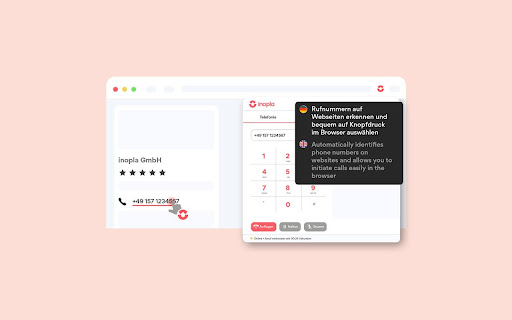
Connect your Business Telephony with Browser Click-to-Dial. Connect your Business Telephony with Browser Click-to-Dial. The inopla browser extension converts all phone numbers into dialable links and allows comfortable dialing with just one click. • Works with different VoIP providers • Free of charge • Dialpad • Numerous additional functions in combination with inopla • Optional CRM integrations (Salesforce, Pipedrive, Zendesk) You can use our browser extension with your provider or in combination with the inopla VoIP PBX or ACD. A wide range of additional functions are available to you with inopla. Learn more: https://www.inopla.de/

VoIP Office Call
Use VoIP Office to call numbers in Chrome. Use VoIP Office to call numbers in Chrome. Allows click to dial from any webpage that has a valid phone number or phone number format.

Channels Click to Call
Channels automatically highlights phone numbers on websites and allows you to call them with just a click! Turn phone calls into your main advantage with Channels Click-to-Call widget. From handling calls with maximum flexibility to providing excellent customer service, Channels makes it easy to turn phone calls into your main advantage. ANSWER ON-THE-SPOT CUSTOMER CALLS Our Click-to-Call widget comes with a powerful link under which you’ll find all crucial customer details that will help you lead the call even when you’re unprepared. eCOMMERCE INTEGRATIONS Channels integrates with your favorite eCommerce platforms such as Shopify and Magento and pulls customer data from them to show you it right when your customers are calling. With details such as their Full name, company, role, phone number, and latest orders, you won’t have to ask endless questions to identify your customer and their issue and you’ll be able to get straight to the point of the conversation. MAKE ONE-CLICK CALLS FROM ANY WEBPAGE YOU WANT Channels gives you an option to turn on auto-highlighting for phone numbers. This allows you to make phone calls simply by clicking on the phone numbers you see on any webpage you are. It can save you tons of time and come in handy especially when you’re using tools like Pipedrive (that Channels integrates with!) where you store your clients’ details along with their phone numbers. This way, you don’t have to switch between various software and you can make calls in the most flexible way. MAKE YOU LIVECHAT MORE VERSATILE Channels integrates with LiveChat to make it an even better solution. Namely, we all know that chat has its limitations and not every issue can be resolved through text. Thus, whenever you get stuck during a conversation and want to move the talk over the phone or get back to your customer by calling, you can simply send them a Callback request and collect their phone number, directly in Channels. This will help you keep everything organized and will make it easier for you to call them back. WORK ON CUSTOMER HAPPINESS WITH IVR Channels comes with an IVR. IVR is a piece of software that lets your customers make calls accordingly to their issue by choosing a tone on a keypad. Therefore, using an IVR, you can connect your customers directly to the right customer service rep and limit the number of times when you have to redirect your customers or, even worse, put them on hold. Keep them happy by making it easy to resolve their issues and don’t make them spend too much time on pointless waiting. HANDLE PHONE CALLS WHEREVER YOU ARE Besides Channels Click-to-Call widget that is available in the Chrome Web Store, you can also get Channels Mobile app (on Android and iOS) that lets you take business phone calls no matter where you. This way, your office won’t be the only place where you’re ready to assist your customers and no case will turn out to be unreachable. GO GLOBAL, CALL GLOBAL Channels makes it easy for you to connect with your worldwide customers. That’s because we offer international phone numbers from more than 60 countries. Using them, you can appeal to customers from all over the world and make it easy for them to contact your company. If you combine it with the Toll-free numbers that we offer, you’ll make it a no-brainer for your customers to call your support center in case of an issue. On top of that, Channels remembers that - especially - a customer support center should save your business some money and not make it spend more. Thus, you’ll find only affordable call rates, so in case you want to make outbound calls, it won’t ever hurt your budget. LOOSE NO IMPORTANT DETAIL In Channels, you’ll find an option to record every call you make. This way, you can rewind any important conversation you had and recall important information. Plus, we store your call recordings even up to 365 days, so you don’t have to worry whether you’ll “have them for long enough”. MONITOR CALLS LIVE Sometimes you want to have access to an ongoing call without being a part of it. It comes in handy when you have to onboard new representatives or coach them. In such a case, you can make use of live-listing which allows you to monitor every call live without actually being present during the call. START NOW WITH A 7-DAY FREE TRIAL Channels comes in two, simple pricing plans which you can check at channels.app/pricing. Yet, to make it easier for you to start, you can signup for a 7-day trial and use Channels for free with no limitation for 7 days. We don’t require a credit card upfront so there’s really no reason why you shouldn’t try it out yourself!

Logimeter Click to Call
The Logimeter Click to Call extension allows a User to highlight a number on a web page and request a call is made to it. Logimeter Click to Call Extension allows you to dial any number from a web page in your Chrome browser without any integration. The Logimeter Click to Call extension allows a User to highlight a number and request a call be made to it. Logimeter will first call the User's phone and invite them to speak to the highlighted number by pressing 1 on their dial pad. When 1 is pressed, the highlighted number is contacted and the two parties are connected. All calls are recorded and the call records and recordings are made available in a Logimeter web dashboard called xTracker. Users receive access to this web dashboard when they register for the Logimeter Click to Call service This service is currently only available in South Africa. Is your team working from home? With the Logimeter Click to Call you will have all the metrics required to measure your team activity, regardless of their location. You will know how your customers are being dealt with by listening to the call recordings. Plus you will not need to invest in cellular contracts for your users as the calls come into the user’s phone and connect them to the desired number. Therefore all the billing is done centrally. With the Logimeter web dashboard xTracker, you will also be able to see the activity of each team member, and with the added Post Call Survey function you can capture additional information that captures and displays the call outcomes. To get started, install the extension, pin it to your taskbar and click on the red phone icon.. To use the service, you first need to open an account with Logimeter. To do this, you need to click on the Click to Call Registration email link and you will receive an email response from the Logimeter sales team. When you have signed an agreement and opened your account, you will be emailed your Username and will be asked to create a password. When you have completsales@logimeter.comed this process you enter your username, password and whichever phone number you wish to receive your requested calls on. Once this is completed you will receive the login successful popup. When you see a telephone number you wish to call via the extension, you right click on the number and the pop-up will display. You will see it includes the number you entered when you registered for the service. If you wish to edit the number the service calls, you can change it at any time. Once you click on ‘Call’ your entered phone number will ring and when you answer it, Press 1 on your phone and the selected number will be called. If you do not press 1, the service will not call the requested number. If you have any issues with this service please send an email to support@logimeter.com and a case will be opened and assigned to a support representative. Logimeter will get back to you asap.

VoIPstudio
VoIPstudio Chrome extension This Extension allows to make and receive phone (VoIP) calls directly in Chrome web browser. It simplifies making outbound calls when browsing Internet by converting phone numbers into clickable links. Use full potential of VoIPstudio Business Phone system without installing any additional software on your PC - all within your Chrome session. VoIPstudio is an award-winning VoIP system that offers businesses of all sizes a scalable communication solution. It’s inexpensive, easy-to-use, offers a full suite of PBX features, and is fully integrated for CRM. Best of all, you can try it for free with our 30-day, no-risk trial.
