
aoekgchdbojkdkgokpcgakfefffikebk
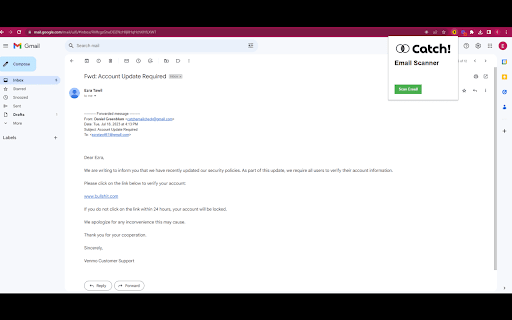


Catch! Email Scanner is a Chrome extension that utilizes AI-powered email scanning to verify if an email is a potential scam or not. With the help of advanced natural language processing, the extension quickly identifies suspicious patterns and content in emails, providing real-time feedback to users. By empowering users to detect potential scams in their inbox, Catch! Email Scanner offers increased security and peace of mind, helping users avoid phishing attacks and fraudulent emails.

Chrome Web Store
Add new features to your browser and personalize your browsing experience.

Snap Environment Switcher
Switch between environments and modes in complex solutions like AEM. The Snap Environment Switcher Extension, also known as Exadel Environment Switcher for AEM, allows you to add projects with their corresponding environments (like DEV, QA, STG, PROD) and modes (like Publish, Edit, Admin). You can also specify relationships between environments and modes so that the environments will change alongside the modes. With Snap Environment Switcher/Exadel Environment Switcher for AEM, you can: - create an unlimited number of projects - configure several modes and environments - easily switch back and forth between your modes and environments - switch between environment domains - create several sub-environments (an environment with the same name that corresponds to another mode) - set up a relationship between your sub-environments and modes, so when you change the mode, the sub-environment and domain will change automatically, too - switch to a new mode or environment in a new tab - share plugin configurations between team members through the Import and Export operations - keep track of your current operating state—you’ll never be confused about which project, environment, and mode you’re in

Jira worklog
Extension to log work into jira This extension can be used to register work into jira tasks without entering to your company's jira webpage. You just need to add the hostname of the jira webpage and the tasks where you usualy register work, for example daily meetings, current working task, refinements or bugs and you can register work with just one click on each task. The extension only stores the jira url and the tasks, any other credentials or authentication needed must be done in the actual jira webpage.

GitHub File Diff
View diffs of files and directories on GitHub. To use this extension, go to a file or directory in GitHub and click the **History** button. Then, click on any commit. The extension will override the click to show the diffs of only the relevant files instead of GitHub's default behavior of showing the entire commit's diff. This is especially helpful when a commit is very large and GitHub only shows a partial diff or none at all. To get the regular view, simply refresh the page.
