
anlcblpmlnecbomgkbmfngcpbaciipml
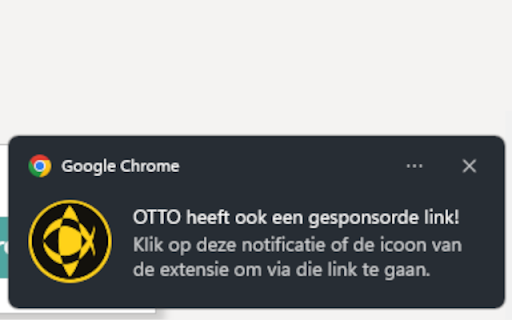

Wordt eraan herinnerd om relevante websites via gesponsorde C.S.V. Alpha links te bezoeken Wordt eraan herinnerd om relevante websites via gesponsorde C.S.V. Alpha links te bezoeken. Wanneer je een website bezoekt waarvoor een gesponsorde Sponsorkliks link voor C.S.V. Alpha bestaat, krijg je een notificatie te zien dat er een gesponsorde link bestaat. Als je op die notificatie klikt, wordt de website opnieuw geladen met de gesponsorde link en krijg je een notificatie te zien dat je nu C.S.V. Alpha sponsort als je iets op deze website koopt. Je kunt ook in de instellingen van deze extensie ervoor kiezen om, in plaats van klikbare notificatie te krijgen, automatisch doorgestuurd te worden naar de gesponsorde link wanneer je een website bezoekt.

VVGmap
Export unexplored tiles from VeloViewer as a map overlay for Garmin devices. This extension works on veloviewer.com website only. It adds an 'IMG' button to the download section on the Map Settings popup (Routes and Activities pages). Clicking the button will export all unexplored tiles in the current map view as an IMG file under the name of 'vvgmap.img'. All you need to do next is to connect your Garmin device to the computer and put the 'vvgmap.img' file directly into the 'Garmin' folder on the device. Next time you want to update your grid simply overwrite this file with the newly exported one. Do not upload more than one vvgmap file to your device. If you do though, still only one of them will be loaded. A new grid layer should be visible immediately after disconnecting the device. By default gridlines are solid, dark red and 1 pixel thick. The grid layer is visible on map scales up to 12km. If the grid is not visible then go to Profile -> Navigation -> Map -> Map Information and click 'VVGmap unexplored tiles' to enable the map. This extension uses an external API to generate IMG files. In case of bigger areas (thousands of tiles) it may take up to several seconds for the process to complete. During this time the 'IMG' button will remain disabled.

Parcelbound: Personal Shopper
Place personal shopper orders easier with our extension and see what our different international shipping carrier costs are too! Use our Parcelbound Chrome extension to make submitting "personal shopper orders" easier. We provide you with other features like "shipping calculator", "currency converter", "USA Google search", and more. We will keep on innovating and improving our Chrome extension to make it even more robust! :) - Personal Shopper Order Service - Shipping Calculator - Currency Converter - Google USA Search Parcelbound provides international users with their own USA shipping address that they can then use to purchase items from their favorite USA stores. We then provide package consolidation services, and ship these packages internationally saving customers up to 75% on international shipping costs. Learn about more our services and sign up for a Parcelbound account from www.parcelbound.com Customers that use the personal shopper order service consent to data collection from the Parcelbound Chrome extension so orders are received successfully. The data that is collected is first name, last name, email address and password so you are able to log in to your account from the Parcelbound Chrome extension. The order information that you enter for your personal shopper order is then sent to your account once the order is submitted from the Parcelbound Chrome extension.

Spending Buddy
It's hard to gauge if a product is worth buying by just looking at the price tag. However, when you think about it in terms of how many hours you'd have to work in order to purchase it, it changes your perspective on the value of the product entirely. Just enter your yearly or hourly wage and start highlighting prices on your screen. Spending Buddy will automatically calculate the number of hours of work the price tag equals. This tool is especially useful for chronic online shoppers or people looking to become more frugal with their purchases. It only works when you highlight prices and numbers, so you can leave it on and highlight text as you normally would.

QS Metadata Explorer
QS Metadata Explorer is a free and open Chrome extension designed to support Qlik Sense developers, analysts, and administrators in… QS Metadata Explorer is a free and open Chrome extension designed to support Qlik Sense developers, analysts, and administrators in understanding, auditing, and optimizing their applications. It integrates directly with your existing Qlik Sense session using the official Enigma.js library, ensuring that all operations are performed locally in your browser without exposing your data to any external service. ✅ No data leaves your environment ✅ No third-party servers or APIs involved ✅ Compatible with Qlik Sense SaaS (cloud) and on-premise deployments Explore and manage all types of Qlik Sense metadata: - Scripts (view and export script metadata) - Data Models (inspect structure and fields) - Sheets & Visualizations (list, search, and analyze sheet objects) - Fields, Dimensions, Measures, and Variables - Bookmarks and Stories - Users and Automations Format and beautify the expressions. Export metadata and data directly to Excel (.xlsx) files for documentation, auditing, or analysis. Capture screenshots of Qlik Sense sheets as PNG images for quick sharing or reporting. Automatically analyze your Qlik Sense applications and receive optimization hints: - Detect synthetic keys and circular references. - Identify unused fields in the data model. - Check granularity of data for modeling quality. - Validate whether QVDs/Parquet are used where possible. - Detect large or inefficient objects that may affect performance. - Flag sheets with excessive visual objects (>15 objects). - Ensure complex expressions are pre-calculated in scripts for performance. - Suggest splitting QVF files for heavy data loads. - Promote use of Master Items for design consistency. Optimization checks include both automatic detection and manual best-practice guidelines to help you continuously improve your Qlik applications. - A library of pre-built, reusable Qlik load scripts and expressions to accelerate development, including: - Master Calendar (time dimension template) - Generic Load (dynamic data loading) - Recursive Folder Scan (scan and load files from subfolders) - WildMap Expressions - Variable Population from Tables Each function is available with: 📘 Documentation (detailed usage info) 📋 One-click copy to clipboard ⬇️ Download for reuse in your environment - Runs entirely client-side in your browser - Uses your existing authenticated Qlik Sense session - No additional authentication required - No communication with external servers - This is a personal and community-driven project, not an official Qlik product. - It is provided free of charge and will remain free forever. - Use at your own risk – while care is taken to ensure reliability, it is not officially supported by Qlik.
