
angipbimgemcngiinfnmidalapaeajlh

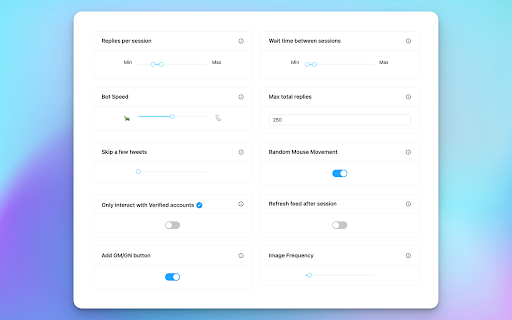
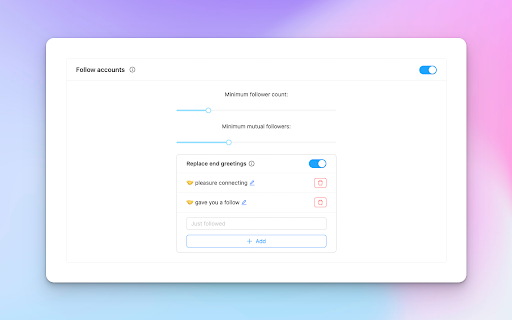

Automatically scrolls, replies, likes, follows, retweets to tweets based on settings. Built for X / Twitter. Ready to take your reply game to a whole new level on X / Twitter ? Let this extension do the work while you sit back and relax. Press "START" and watch it reply to Good Morning & Good Night tweets on the timeline for you. Features: - Automatically scrolls - Automatically replies to tweets containing a GM or GN - Automatically likes the tweet before replying - Uses username to reply for a friendly touch - Customizable and unlimited greetings: ☀️, ☕️, 🥐 - Many customizable parameters & settings Try it now - for FREE!!

ChatGPT Automation - Auto ChatGPT on chatgpt.com
Auto ChatGPT for your prompts at scale. Batch generate and auto-download responses and images on ChatGPT.com. ChatGPT Automation is an Auto ChatGPT tool built to fully automate your workflow on OpenAI's chatgpt.com. No more manually typing prompts one by one — let ChatGPT run automatically. This extension turns ChatGPT into a batch-processing engine, allowing you to auto-submit prompts, auto-generate content, and auto-download results at scale. 🔥 What ChatGPT Automation does Auto ChatGPT prompts continuously without manual interaction Batch generate AI text, images, and visual content Automatically download results with smart file naming Handle long prompt queues safely with smart random delays 🤖 Auto ChatGPT Batch Processing Queue dozens or hundreds of prompts and let ChatGPT Automation automatically: - Submit prompts to ChatGPT - Wait for generation to complete - Move to the next prompt No clicks. No babysitting. 🎨 Image to Image Transformation Batch transform and enhance images using AI with text prompts Chain mode: automatically use the previous generated image as input for the next prompt 🧩 Ingredients to Text Mode Upload reference images and batch-process them with prompts Auto-add character images based on filename matching ⚙️ Professional Automation Controls - Smart Random Delay System to avoid rate limits - Configurable min/max delay between prompts - Auto Download once generation completes with custom folder organization - Auto-rename files based on prompt content - Max Retries on failure — automatically retry failed prompts - Multiple outputs per prompt (1–4) 📊 Real-time Queue Monitoring - Live prompt queue with per-prompt status (Queued → Running → Completed) - Visual progress tracking inside the Side Panel - Retry counter per prompt ✅ Perfect for - Content creators and copywriters - AI image and visual producers - Automation & productivity users - Anyone who wants to Auto ChatGPT at scale

Reply Wizard - Customizable AI Reply Generator for Twitter and LinkedIn
Reply Wizard listens to your prompt! Grow your socials with customisable, engaging replies. Works for X, LinkedIn and YouTube. Reply Wizard listens to your prompt! Grow your socials with customisable, engaging replies. Works for X, LinkedIn and YouTube. The first reply tool you can customise with your own prompts! It takes time to think of cool tweets and interesting replies, right? Well, not anymore! Press Reply Wizard's button and generate engaging replies based on a prompt provided by you. Edit to your liking and post! 🧩 Install Chrome Extension 📧 Verify Your Email ❓ Provide Your Prompt 𝕏 Go on Twitter or LinkedIn 💬 Start Replying! Sentence generator and reworder: 🔄 Have a reply in mind? Write it and Reply Wizard will reword it. ⚡ Generate punchy sentences based on your prompt 🆕 Need a new prompt? Provide it any time and click 'Save' 🫣 Controversial 👏 Applause 🤔 Disagreement 🤬 Angry 🫣 Provocative ✅ Any moood you can think of - just tell the wizard! Works for: Reply Wizard protects your data: ‣ No risk to be flagged for spam: Everything happens in your browser ‣ Security-first ‣ We'll never compromise your privacy ‣ No access to any sensitive browser data, like passwords or cookies ‣ Data we collect is exclusively used to improve Reply Wizard and bring better replies to you! Try it out with 30 replies for free! Do you like our extension? Please leave a review, it helps us a lot. Thank you and happy growing!

Twitter Reply Generator – ReplyX AI (Smart AI Auto-Replies)
Generate AI-powered Twitter/X replies instantly. Smart auto-replies to boost engagement and save time. Reply X AI – AI Replies for X (Twitter), in One Click Reply X AI is a browser extension that generates smart, contextual replies directly inside X (Twitter) — without leaving the page, without copy-pasting, and without sounding like a bot. No generic templates. No copy-paste. Only replies that actually fit the conversation. 🤖 Automatically analyzes the tweet you’re replying to ✍️ Generates natural, human-like AI replies ⚡ Saves time for creators, marketers, and founders 📈 Helps increase engagement and visibility 🎯 Works directly on X — no extra tabs, no distractions 👥 Perfect for: Content creators Social media managers & marketers Founders & entrepreneurs Web3 / Crypto / Tech communities Anyone who wants to stay active on X with less effort ReplyX AI never posts anything automatically. You always review and approve replies before posting. 🔹 Notes for Chrome Review (safe wording)

BrowserGPT: ChatGPT Anywhere Powered by GPT 4
Write, reword, and translate 8x faster. Reply to emails in a click. Works on Google Docs, Gmail, YouTube, Twitter, Instagram, etc. 🎉 Integrating BrowserGPT, an all-in-one AI copilot powered by ChatGPT. Works across the web. ✍️ Whether generating or rewriting blog posts, brainstorming ideas, translating text, drafting emails & replies, or anything in between – BrowserGPT handles it all as you browse the web – all instantaneously. _______________________________ 🥳 How BrowserGPT Outshines the Competition? ✔️ 120+ AI writing tools to empower your words. ✔️ 10+ proven copywriting formulas, PAS, AIDA, QUEST, etc. ✔️ 50+ languages available. ✔️ 0% plagiarism AI-generated content. ✔️ Backed by 100% up-to-the-minute sources. ✔️ 7 unique tones to cater to different audiences and goals. ✔️ ChatGPT-3.5/4 supported. ✔️ Draft emails & reply in a click. ✔️ Draft social media posts & comments with a click. ✔️ Works on Google Docs. Write like within Notion AI. 🔮 BrowserGPT WORKS DIRECTLY WITHIN 1️⃣ Google Docs - Press "//" to activate our AI-powered toolbar and boost your productivity. - Brainstorm ideas, write AI content, and more–without changing how you work. - Enjoy the Notion AI-like experience right within Google Docs. - ChatGPT for Google Docs 2️⃣ Social media & popular platforms - Support 6+ main social media platforms. - Write engaging posts tailored to your desired tone and messaging. - Generate on-point comments for your posts to fuel interaction. - Get hashtag recommendations to expand your reach. 3️⃣ Search engines - Obtain concise, accurate answers to your questions right within the search engine interfaces you already use. - Find related keywords. - Get additional questions related to your search query. 🧰 A DUAL-SIDED SIDEBAR 1️⃣ Meet Our AI Chatbot - HIX Chat ✔️ Deliver lightning-fast, accurate answers to any of your questions. ✔️ Provide content assistance, suggest ideas, and more. ✔️ A chatbot that remembers your conversations. 2️⃣ ACCESS A TREASURE TROVE OF 120+ WRITING TOOLS ✔️ Paraphrase text, improve flow, and fix grammar and spelling. ✔️ Enhance your work with in-depth insights. ✔️ Simplify language for clear communication. ✔️ Summarize long-form content in seconds. ✔️ Translate text between different languages. ✔️ And so much more. ✍️ Write ANYTHING On Virtually Any Topic And For Any Industry 1️⃣ Social media - Posts; Comments; Hashtag recommendations; Caption suggestions; Video ideas 2️⃣ Marketing - Ad copies; Sales emails; Press releases 3️⃣ Website - Outlines; Blog posts; Home page content; About us pages; Landing pages 4️⃣ E-commerce - Product descriptions; Buying guides; Product reviews; Product comparisons; "Best of" articles 5️⃣ Blog - Blog posts; How-to guides; Tutorials; Listicles; Product Review 6️⃣ News - Up-to-date news articles 7️⃣ Emails - Follow-up; Thank-you; Cold outreach; Replies 1. How To Use BrowserGPT? - Type "//" or highlight text anywhere on browser to display our toolbar. - Simply hit Ctrl + P or Command + P, or click on the extension icon, or simply click the floating BrowserGPT icon at the bottom-right corner of the screen to open our sidebar. 2. Is BrowserGPT free? Yes. BrowserGPT provides users with a limited free usage option. However, for added benefits and expanded usages, you can upgrade. Designed for every workflow - Add the BrowserGPT browser extension for Ultimate AI assistance NOW! 🎉
