
aneilagafcgkdhpgfmllmcmcbjbglgfo
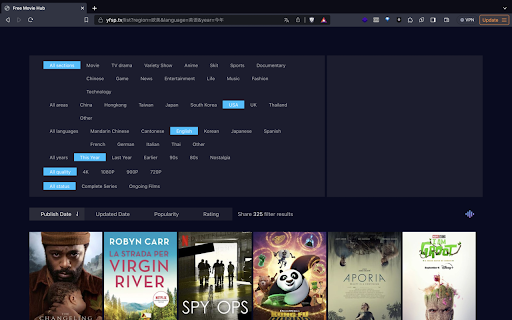


MovieMonk lets you seamlessly browse content from Netflix, Hulu, and recent movie releases in a single interface. 🙋🏻♀️ What Does This Chrome Extension Do? ✅ It navigates to a Free Movie platform (yfsp.tv). ✅ It blocks the advertisements & tracking systems on yfsp.tv, providing an improved user experience. ✅ This Extension is designed with user privacy in mind, requiring only minimal permissions to function. Specifically, it needs permission to access yfsp.tv to remove advertisements and tracking codes. ✅ This extension does not collect or access any user data.

Enjoy Movies Your Way
Family friendly viewing for movies and shows across your favorite streaming platforms. A Safe And Family-Friendly Entertainment Solution Have you ever watched a great movie, but wished they hadn’t used quite so much crude language? Have you ever tried to watch a movie or tv show with your kids but suddenly things go in an unexpected direction, and you can’t fast forward or turn it off fast enough? Have you worried about how increased profanity, violence, and sexual content in entertainment today are impacting your child’s mental health and could increase aggressive behavior? Well, keep reading to discover what we believe is just the right solution for you. A Clean Version Of Movies and TV Shows. Start streaming through Enjoy to mute the crude and abusive language automatically and skip adult content* so you can enjoy cringe-free movie time with your family again. If someone asks, “How can I get a clean version of a movie?” You’ve got the perfect answer. Revolutionize Your Movie-Watching Experience Enjoy Movies Your Way is like a super smart remote control for major streaming platforms. With our extension installed, simply stream a show through the web normally and see filtering enabled! You can stream any movie through the Enjoy app with language filters auto-generated from subtitles. Violence and nudity filters are also available for a growing library of thousands of fully tagged shows. In addition to language, violence, and sexual content, Enjoy can also filter drugs, alcohol, and a dozen other potentially triggering themes (like bullying, suicide, disturbing images, etc.). It can mute the sound, skip sections entirely, and black out or blur the video. Wait, Is This Legal? What about copyright law? Enjoy does not modify the original videos in any way, but instead plays them selectively, which US copyright law allows (ref. Family Movie Act 2005). Therefore, Enjoy does not infringe upon media copyrights and is perfectly legal. Content providers collect their subscription, rental, or purchase fees directly and without interference. Enjoy users are simply exercising their right to see or not to see specific content according to personal preference. Considering the necessity of our service with increasingly inappropriate content in today’s entertainment, we offer it free with all filtering features enabled. Movie Filtering For Everyone Our competitors only offer paid plans, but we believe filtering should be available for everyone for free or at a minimal cost. With the free plan, there will be a 1-minute intermission for every 15 minutes of viewing time. Use that intermission to grab a snack or answer texts! Do you think you might use Enjoy infrequently? Then the free plan might be just right for you. Or, remove the intermission breaks and support what Enjoy is doing by subscribing to the paid plan for only $6 per month. We Have Your TVs and Mobile Covered Too Do you stream on your TV, tablet or phone? Check out our native apps for your TV and mobile devices! See our website for the updated list of supported platforms at myenjoytv.com. Stream Over 360k+ Movies And Shows Through Enjoy You can stream over 360,000 movies and shows through Enjoy, and every show will have at least automatic language filters available! We also have a growing library of thousands of fully tagged shows allowing you to filter all categories of content (i.e. violence, sexual content, etc.). If for some reason the movie you want is not in the database, you can always create the filters yourself using Tag mode**. Or you can reach out to us to request the movie get prioritized for filtering by the Enjoy tagging teams. Movie Aggregator With Advanced Features Enjoy is also a movie aggregator showing you all the places where a particular show is available to stream. Plus, there are more features like playback speed control, robust subtitle translations, and much more. Our content filtering features include language and graphic* content filtering for movies, shows, and even social media videos. * Violence and nudity are only skipped in fully-tagged shows. ** The tag tool is available on all platforms except Roku With the best movie filtering service, take control of the content you stream at home by adding mute and skip filters to the shows you watch. It’s like getting clean versions of movies and shows. A growing library of thousands of movies and TV shows have had graphic content manually tagged. Auto-generated language filters can be applied to any show you stream! We use a scene intensity rating system that allows you to control the types of content you hear and see according to your settings. There are so many features already available like subtitle translation, movie filters, playback speed controls and lots more on the way, all in this easily installed, safe and easy to use app. Try Enjoy's movie filtering services and other features for free. No payment information necessary.

Streaming Hub - Tubi HBO Amazon Prime
Universal streaming companion for Tubi, HBO Max, and Amazon Prime Video. Streaming Hub is the ultimate browser extension for movie and TV show enthusiasts who use multiple streaming platforms. Seamlessly enhance your viewing experience on Tubi, HBO Max, and Amazon Prime Video with powerful video controls and cross-platform search capabilities. Key Features: 🎬 Multi-Platform Support Quick access to Tubi, HBO Max, and Amazon Prime Video Universal search across all supported platforms Platform-specific search options 🎮 Advanced Video Controls Brightness and volume adjustment Playback speed control (0.5x to 2x) Picture-in-Picture mode Fullscreen toggle Subtitle controls Night mode for comfortable viewing ⏱️ Watch Time Tracking Automatic viewing time monitoring Manual timer controls (start, pause, reset) Session-based time tracking 🔍 Smart Search Search across all platforms simultaneously Platform-specific search options Quick access buttons for each streaming service Why Streaming Hub Needs Access to All Websites: This extension requires access to all websites to provide universal video enhancement features. The permissions enable: Cross-platform functionality: Works seamlessly across different streaming sites Universal video controls: Enhances video playback on any website with video content Content script injection: Automatically detects and improves streaming platforms Enhanced user experience: Adds professional-grade controls to your favorite streaming services Privacy & Security: No data collection or tracking All settings stored locally in your browser No external servers or data transmission Open and transparent functionality Perfect For: Streaming enthusiasts who use multiple platforms Users who want enhanced video controls Anyone who enjoys Picture-in-Picture viewing People who track their viewing habits Transform your streaming experience with Streaming Hub - the professional tool for serious streamers!

Unblocked Games — New Tab
Unblocked Games in your favorite browser. Play, explore, relax! Unblocked Games extension will change your new tab page to a powerful and functional game catalog that you can customize. It has tons of games available, weather widget, quick links, bookmarks, relaxing music and much more! Please read carefully: By clicking "add to Chrome", I accept and agree to installing the Unblocked Games — New Tab extension and setting Chrome New Tab to that provided by the service, the Privacy Policy https://gamestabs.com/privacy/ and Terms of Use https://gamestabs.com/terms/ You can uninstall app any time if you don't like it. Settings: - choose one of 15 beautiful cursors; - set any “.png“ or “.jpg“ image as your wallpaper; - you can turn widgets on and off; - select any games for your new tab page; - change measurement units and time format; - colored wallpapers; - night mode (dark theme); - edit your quick links.

Watchlist for Chrome
Track movies and TV shows with the Chrome watchlist extension. Add titles, get ratings, trailers, and release reminders in one place Create and keep your list of movies and TV series in one place. Search films, check ratings, watch trailers, set-up notifications. Love movies and TVs like we do? Try our best tool for all movie buffs and TV series fans. Now you can create and keep your own watch lists directly in your browser. Get our add-on and stop wasting your time for searching and listing movies and TVs in your notebook. No more lost lists or forgotten pixes. With our Watchlist for Chrome you can: - Create and manage your own watchlists; - Search films; - Check ratings on several communities; - Watch trailers; - Set custom notifications up Add movie to your list and favorites. Keep all your wishes and favorites in one place with quick access right from your browser. Use "mark as watched" button to move watched movies to the bottom of the list. View movie or TV details and poster, watch trailer, etc. You can check ratings of most popular movie communities like: 1) IMDB 2) Rotten Tomatoes 3) Metacritic ratings With our customizable notifications and reminders you won't miss premier of new movie or long-awaited episode. This extension also offers user potentially interesting movie based on it's general popularity and interests of the user Everything you've been looking for at your fingertips. v.1.0.4: - Some minor bugs with movie search fixed. - "Mark as watched" feature and button added. Now you can mark any movie as watched and leave it in your watchlist.
