
anbfggngcejgeehlajbmcffmdgofpnfh

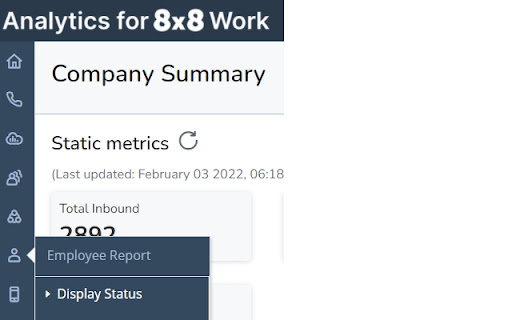
This extension provides will change the functionality of the display status report within 8x8 analytics. This will change the report to make the employee names links hyperlinks that when selected will dial the employees extension using the 8x8 web dialer chrome extension and prefix it with *22 (this is the code used to barge/monitor or whisper in 8x8). We have contacted 8x8 to make this change in their platform but this was unlikely to happen in the near future. As a result we built this extension that allows us to do this until they develop the function for us. For the above extension to work you must have the following : A valid 8x8 account with access to the 8x8 analytics section https://dashboard.8x8.com/dashboard/spa/reports/edisplay# You will also need to be granted the ability to barge monitor or whisper the person you selected or it will just play a message that you do not have the appropriate permissions. The 8x8 desktop app installed https://support.8x8.com/cloud-phone-service/voice/virtual-office-desktop/download-virtual-office-desktop The 8x8 chrome extension installed https://chrome.google.com/webstore/detail/8x8-web-dialer/kflmnoghmmldhkplfhanlkobnjjgikoa?hl=en-US This extension does not give permissions to anything it simply changes the html code of the one page to allow our users to select a person to monitor (if given the appropriate permissions in 8x8).

8x8 Web Dialer
Call any phone number straight from where you are on a web page. Make calls via 8x8 * Making a call is as simple as clicking a button next to a phone number anywhere you are on a web page Once installed, the extension will automatically highlight most phone numbers in your web browser as a blue link. Popup guide: * You can enable the option to send SMS from the plugins settings * Click a phone number and you will have the option to either Call or Send a SMS via 8x8 * You will be redirected to 8x8 Work for Desktop app The 8x8 Web Dialer will save you valuable seconds on each contact you are trying to reach via phone or text message. It’s a great way to save time every day: * Call or text almost any phone number in your web browser with one click. * Save seconds per call and improve your calling accuracy. * Big spreadsheet of numbers to call? Save it as an HTML file or load it into Google Sheets and use the 'Publish to the web' feature, then open it in your browser to create a clickable dialing directory. * On web pages that don't support direct number clicking, simply highlight and right-click on phone numbers to call them. This feature also supports 8x8 Contact Center. If you use the web frequently for research or sales prospecting, this browser extension from 8x8 can save you and your employees hours per year. REQUIREMENTS * Windows 8 and newer, MacOS 10.13 and newer * 8x8 Work for Desktop application https://www.8x8.com/products/apps

D2e Asset Viewer
This extension will underline, in red, key game assets from Descent Second Edition on supported websites. If you hover over those names with your mouse, while holding down the CTRL key, an image of the asset in question will automatically pop up. The CTRL key is required, as it prevents unknown, secret/spoiler information from being viewed inadvertently. This extension helps foster better community communications, as it allows you to see the asset being discussed on various forums; in addition, it facilitates PBF (play by forum). Privacy Policy: This extension does NOT handle user data !!!

Salesforce Explorer - Enhanced Setup
Enhance your Salesforce setup with checks and best practices Supercharge your Salesforce development workflow with intelligent metadata management, duplicate detection, and automated best practices enforcement. Perfect for admins, developers, and architects who want to maintain clean, well-documented Salesforce orgs. 📋 SMART METADATA MANAGEMENT • Automatically adds official Salesforce object descriptions to Object Manager detail views • View the 5 most recently modified fields on any object • See the 10 most recently modified permission sets when creating new ones • Instant context and documentation for standard objects 🔍 DUPLICATE PREVENTION • Automatically detects potential duplicate fields before you create them • Smart similarity matching (60%+ threshold) shows existing similar fields • Prevent technical debt and keep your metadata clean • Real-time validation as you type 🎯 BEST PRACTICES ENFORCEMENT • Customizable guidelines displayed when creating objects, fields, and permission sets • Auto-converts field API names to PascalCase format • Enforces description requirements for fields and objects • Smart placeholders guide users to follow organizational standards ⚙️ DEVELOPER EXPERIENCE • Works seamlessly with Salesforce Lightning's single-page application navigation • Real-time feedback on naming and duplicates • Configurable messages through the options page • Zero disruption to your existing workflow 🏢 PERFECT FOR Developers: → Discover existing fields before creating new ones → Auto-format field names correctly → View recent metadata changes for context → Get instant feedback on potential duplicates Architects: → Enforce design standards across teams → Reduce technical debt from redundant fields → Ensure metadata quality and documentation → Maintain consistency across multiple orgs This extension requires minimal permissions: • Storage: Save your custom preferences and settings • Cookies: Access Salesforce session for API calls • Host permissions: Only for Salesforce domains (*.salesforce.com, *.force.com, etc.) Your data stays secure within your Salesforce org. No external data collection or transmission. 1. Click the extension icon 2. Select "Options" 3. Customize messages for: - New Custom Objects - New Permission Sets - New Custom Fields 🌟 WHY CHOOSE THIS EXTENSION? • 100% focused on Salesforce setup and metadata quality • Built by Salesforce professionals, for Salesforce professionals • Open source and actively maintained Install → Configure your custom messages → Start creating better metadata! MIT License - Free and open source

Younet: Personalized AI to write & respond
Write & Respond Anywhere with Personalized AI model. Introducing Younet chrome extension, a personalized copilot anywhere you need to write or respond! ➤ What is it? Younet is a personalized AI technology that empowers you to write or respond contextually relevant drafts, responses, ideas, and more instantly across any CRM, Email, Text Form, Google Docs, Help Desk, and various other platforms. With this extension you may connect your created AI model and always have it by your side. You'll have the ultimate assistant to tackle complex questions and tasks. Whether you need help writing emails, reading articles, or conducting smart searches, Younet AI is here to assist you. ➤ How to start? Here are some quick start tips: 1. Install the extension and click on it to Login. 2. Once you logged-in, you can now use @younet command to activate extension, the simply ask what you need to write. 3. Select any text or a question on the page you want to receive a response and click Reply with Younet or right mouse click then Reply with Younet. 4. In Gmail it’s fully integrated to use native buttons directly in the email to respond. Experience the power or AI, and take your productivity to new heights. Get started today! ➤ Is it free to use? Yes, current version of Chrome extension and all capabilities of the platform are free to use but require approval by Younet. ➤ Terms and Conditions By installing the extension, you agree to and acknowledge: www.younet.ai/terms-and-conditions www.younet.ai/terms-and-conditions#privacy-policy
