
amlcdofojjmhlcigehnkfdpbeeojeifb

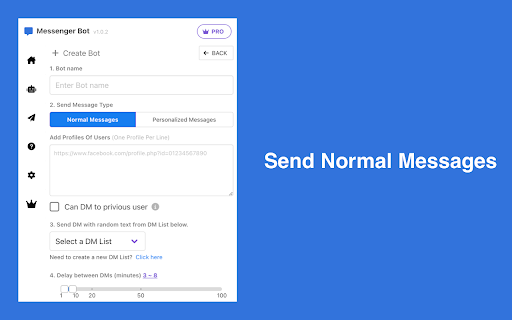
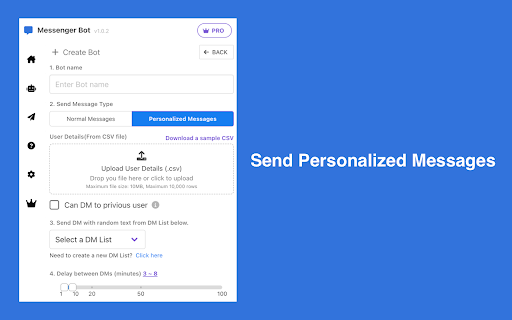
Send bulk private messages automatically to a list of users in the background You can use the tool to send out Bulk Messages to Facebook Users completely Automated. All you need to do is, upload list of facebook Profiles & Messages that you want to send them. It will automatically send private message to each profile. Majority of the user Scrape a Facebook Group and then send out messages to all the members using this tool. To streamline this process, you can utilize our 'Group Extractor - Export Group Members' tool, which allows you to export Group Members from Fb. This tool is fully compatible with the Bulk Message Sender. # Features ✓ Send Mass Private Messages to Facebook Users ✓ Send Hyper Personalized Texts ✓ Customized random text messages ✓ Spin syntax supported ✓ Support Custom Placeholders and and Built-in Placeholders: ✓ Support Estimated time to send the next DM ✓ Support to Export DM History # How to get started? 1. Create a DM List, we have created one for you 2. Create a bot with Facebook User Profiles, and select a DM List 3. Just run the bot, so simple. If the bot is working, and if you restart your browser, you may need to click the pause button to PAUSE the bot first, then click the CONTINUE button to let the bot continue to work. If you have any problems, don't hesitate to contact us at convertscc@gmail.com. In the popup, we offer these extra features: Relevant-Ext: Brief recommendations and introductions to related extensions. # Data Privacy All the data you process is on your local computer and never passes through our servers. https://fbmessengerbot.infwiz.com/privacy

AutoFriends
🌟Introduction🌟 Managing your Facebook™ friends can be time-consuming and tedious, but with AutoFriends, it becomes effortless. AutoFriends is a powerful Chrome extension designed to simplify your Facebook™ experience by automating friend management tasks. Whether you want to add new friends, confirm friend requests, delete unwanted connections, cancel sent requests, or unfriend people, AutoFriends handles it all with just a few clicks. 🌟How It Works🌟 ⏩Install AutoFriends: Add the AutoFriends extension to your Chrome browser. ⏩Log In to Facebook™: Log in to your Facebook™ account. Choose Your Actions: 1.First you need to go to the page according to the task. (for example: if you expect add friend in suggestion section, you should go to the suggestion friend page) 2.Select the desired Task (Add, Confirm, Delete, Cancel, Unfriend) from the AutoFriends interface. 3.Enter the number of friends you want to process 4.Set the interval time (in seconds) 5.If you need set more time interval, you can enable toggle button. it’s working between requests (It is not mandatory to prepare it) (optional) 6.Now click “Start” button 7.You can see it automasion. enjoy! 8.if you click the “Stop task” button, stopped currently running task. ⏩Automate the Process: Sit back and let AutoFriends handle the rest. It will automatically execute your chosen action, saving you time and effort. 🌟Important Notes🌟 This extension was previously called "Friends Add & Confirm". Now it is called AutoFriends. This extension works only with English language in Facebook™. (make sure change language to english in Facebook™). Facebook™ is a trademark of Facebook™ Inc. This extension, namely “AutoFriends" has no connection to Facebook™ inc. Use this extension at your own risk and carefully. The developer is not responsible for any restrictions on your Facebook™ account by using this extension. Using "AutoFriends" Chrome Extension means that you agree to these terms. Facebook auto accept friend request extension, Accept all friend requests fakebook chrome extension, Auto accept friend request Facebook script, Auto send friend request Facebook extension, Cancel sent request, Unfriend all Facebook friends Chrome extension, Delete friends request

Group Extractor for FB™ | Download Facebook™ Group Members
Efficiently extract and download FB group member data with our powerful FB Group Extractor. Ideal for marketing and sales. Get full social media platform group member information with one click. Export user ID, username, verified status, profile URL, profile picture, group biography, friendship status, and join status. 🔹 Why use it 🌟 Marketing and Advertising Businesses use behavioral analytics to personalize ads, increasing engagement and conversion rates with influential social media platform Group Members. 🌟 Content Engagement Data analysis assists leaders in tailoring content to resonate with members and meeting expectations to improve satisfaction and retention. 🌟 User Research Study your customers and see what competitors are doing to better understand customer behavior and make product adjustments. 22Social Connect, Group Member Exporter for FB™, Group Manager, FB Groups - FB Group Extractor, Group Member Extractor for FB™, FB email extractor V3.0, FB Scraper 🔹 How to use it ➤ Open your browser and install the Chrome extension "Group Extractor". ➤ Go to the group page and click on the "Members" tab to see the list of members. ➤ Click on "Start Scraping" to extract the information including name, join date, location, etc. ➤ Download results in a CSV or XLS file, with no data size restrictions.

Group Extractor - Export Group Members
Groups Export Tool to scrape, extract facebook member and export to CSV/Excel with one click Group Extractor, automatically scrape members from facebook groups that you are a member and export them to CSV/Excel files. The extracted data can then be used to generate high-quality leads. # Features ✓ Export Group Members list From any facebook Group that you are a member ✓ Custom Setting: you can adjust request speed, pause mode and enable 'Limit per Extraction' ✓ Export data to CSV/Excel # Which columns are available for export? User Id Username Is verified Group biography Profile URL Avatar URL Friendship status Join status text # FAQ https://fbgroups.converts.cc/#faq If you have any problems, don't hesitate to contact us at convertscc@gmail.com. In the popup, we offer these extra features: Relevant-Ext: Brief recommendations and introductions to related extensions. # Data Privacy All the data you process is on your local computer and never passes through our servers. https://fbgroups.converts.cc/privacy

FriendReq - Bulk Friend Request
MUST READ 1. Make sure you have login to facebook.com. 2. Make sure to use a User account, not a Page account. You can switch the User account by clicking your FB Account Menu. FEATURES - Auto Send friend requests from your user account. - Auto withdraw pending friend requests PRIVACY All data is processed locally on your computer, never passing through our web server, ensuring the privacy of your data. LEGAL NOTICE Facebook™ is a trademark of Facebook Inc., registered in the U.S. and other countries. This project is an independent creation by ExtensionsFox and is not affiliated with Facebook or Facebook Inc.
