
amjmldchkefejkpgebhgioimmfkakgpo
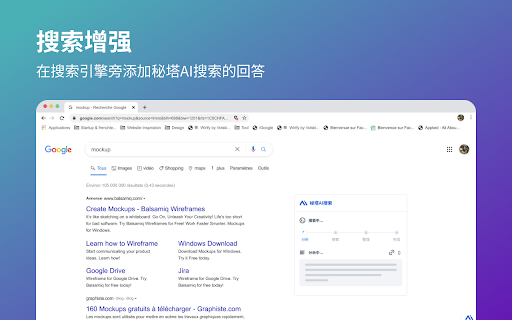
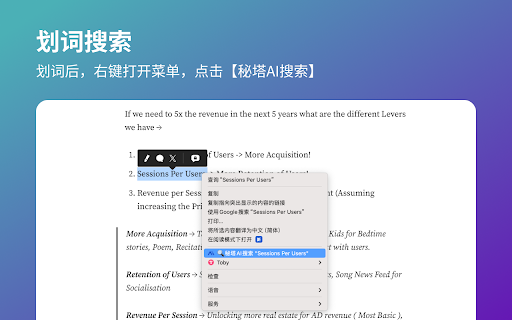
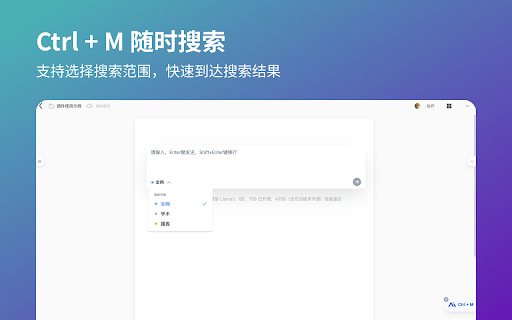
没有广告,直达结果 💁♀️ 介绍: 秘塔AI搜索是一款由人工智能技术驱动的搜索插件,可将网络来源总结生成回答,并用自然语言回复 👉 主要用途: - 搜索增强:在Google、New Bing、百度、搜狗、360等搜索引擎旁边添加秘塔AI的回答 - 搜索提问:发送问题后,AI会提供直接、精准的回答,并包含引用源;自动生成大纲、思维导图 🦾 使用方式: - 点击“添加到Chrome”按钮并将其固定到工具栏 - 按Ctrl+M可打开搜索框 - 用秘塔AI搜索开始提问

Kimi Explorer
Kimi Explorer: Highlight for explanations, explain screen areas, summarize articles, and find inspire writing - All in one! 🔎 Got questions?Highlight and ask Kimi : - Easily highlight the text you have questions about to get context-specific answers without having to switch back and forth between pages while browsing. 🖼️ Selecting an area? Capture to share with Kimi: - Quickly capture page content and ask questions using the screenshot shortcut, enabling seamless problem resolution. 📚 Reading documents? Summarize with Kimi : - Click the floating bubble on the right side or use the shortcut key to quickly summon the dialogue box and summarize the entire document to reduce reading time. 📝 Writing articles? Get inspired by Kimi : - Switch freely between "Sider Panel" mode and "Overlay" mode in the plugin settings page, available at your side in any scenario you need. ⭐️ How to use Kimi? 1. Click "Add to Chrome" in the top right corner and pin Kimi to the toolbar for easy access. 2. Log in to your Kimi account. 3. Press Command⌘/Alt + K to summon Kimi. 4. Start working! 🌘 If you have any suggestions or feedback about the plugin, feel free to leave us a comment, or contact us via email at any time, kimi.extension@moonshot.cn

SeekAll
One Click, Seek All Results for You SeekAll One Click, Seek All Results for You. With SeekAll, searching across multiple platforms is as easy as a single click. Whether you're browsing for fun or working on a project, you'll get comprehensive results instantly. SeekAll Changelog 1.6.3 Fixed some unusable AI searches and added DeepSeek search. 1.6.0 The version optimized the one-click search function by right-clicking after selecting text; added the custom combination function, and you can click the shortcut combination button to search with one click. 1.5.4 The version added category sorting and website sorting functions, you can customize the order you want. 1.5.3 The version modify various small details, optimize the experience, add multi-language interface, and support Chinese and English display. 1.4.1 The version adds the custom search engine function, allowing you to add various search engines you want. 1.4.0 The version adds a sidebar vertical tab mode, allowing you to more easily manage multiple open tabs and tab groups. 1.3.1 The version supports the choice of opening in a new window or a new tab, and is no longer limited to a maximum of 3 selections. SeekAll Supported Search Engines: - AI Search Engines: Perplexity, ThinkAny, Devv, and more. - AI Assistant: ChatGPT, Claude, Kimi, and others. - Traditional Search Engines: Google, Bing, DuckDuckGo, and others. - Social Media Platforms: YouTube, Twitter, FaceBook, and more. Key Features of SeekAll: 🔍 Multi-Engine Search: Enter your query once and get results from multiple search engines at the same time. Easily compare and analyze, saving you time and effort. ⚙️ Customizable Search Engines: Personalize your search experience by adding, removing, and organizing your favorite search engines into categories. Create a search platform that works just the way you like it. 📑 Efficient Tab Management: Vertical tab management in the sidebar lets you quickly switch between tabs and groups, boosting your productivity whether you’re browsing or working. 💻 Flexible Search Options: Choose how you want your search results to open—whether in a new window or tab. Customize your experience with options like displaying follow-up queries or replacing default tabs. Why Choose SeekAll? 🚀 Simplify Your Search Process: No more jumping from one search engine to another. SeekAll brings all the results to you at once, making your search more efficient. 🔒 Privacy Matters: We respect your privacy—SeekAll doesn't store your search data, ensuring your information stays safe. Try SeekAll Today Download SeekAll now and experience a smarter, more efficient way to search the web!

纳米AI助手
全新浏览器AI助手,搭载多家主流大模型,精通搜索、写作、总结 AI助手是360浏览器的智能助手,常驻浏览器侧边栏,整合了国内十余家主流大模型,让您一站式体验多家大模型。 AI助手可以帮助您高效总结、AI搜索、智能分析、精准翻译,还能进行写作和制作PPT,是您工作和生活中解决问题的多面手。 主要功能: 1、网页总结:一键总结页面,提炼核心信息,阅读省时省力 2、AI搜索:搭载360AI搜索能力,快速匹配快速总结 3、划词:词组一划,即可进行搜索、解析、翻译 官网更有数10个智能体可以帮你处理各类需求, 欢迎访问:https://bot.360.com/ AI助手1.0刚上线,低版本内核的浏览器会有兼容问题噢,如有疑问,欢迎随时向我们反馈。

Kimi Sidebar · 划词翻译 / AI 侧边栏 / 一键导出 Markdown
---- Kimi sidebar assistant helps you unswitch the page on any web page and try out Kimi AI. 1. Support kimi login and browse historical sessions. 2.Support switching dark theme 3. Supports adjusting the sidebar position and sidebar width. 4. Supports maintaining the sidebar status when switching tabs. 5. Support custom buttons in the right-click menu and floating shortcut menu, and prompt gluing of selected text. Built-in support for interpretation, translation, and web page summary. For example: Please translate this word: {text} into Chinese. {text} is the selected text, {pageUrl} is the current page URL. Promt settings can be made on the settings page. It is very suitable as an auxiliary tool for immersive work and study when reading documents and thinking deeply.
