
amcmdkbnmbghginfnhcfccelchkknopd
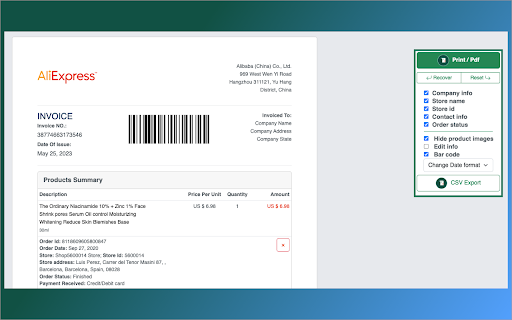
One click to Generate AliExpress invoice from order details. Generate one invoice for multiple orders. # How it works? Group Invoice: 1. Go to AliExpress order list 2. Click "Generate one invoice for multiple orders" Single invoice: 1. Go to AliExpress Order List 2. On right side of every order you have button "Invoice" 3. Click and generate AliExpress Invoice What type you can export? -pdf -csv #IS IT FREE? It includes a FREE TRIAL for limited use and once you're sure you like it you can purchase PRO membership to use the full version. #Data privacy All the data is processed only on your local computer, it never passes through our web servers, no one knows what others export. #SUPPORT We sincerely want to solve any problem you may have.Please feel free to contact us via savemyday666@gmail.com

Ali Invoice
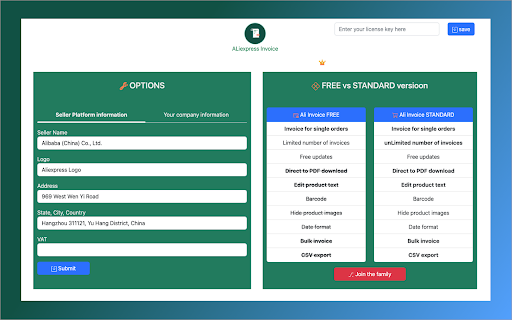
Are you a drop shipper? Do you need invoices from AliExpress for your administration and book-keeping or any other purposes? As you already know, most of the suppliers from AliExpress, for whatever reason, won’t send you an invoice when you need it. Of course, you can change the supplier, but sometimes there aren’t any other good ones with items you need. You can view and print details about each order from your account on AliExpress. But if you have shipped the order to your customer’s address directly, as often is the case with a dropshipping business model, there will be their name and address on order details page, and yours or your company’s name isn’t mentioned anywhere. Yes, you could print screen and edit the page in some image editing software, but this can be time-consuming. You could be spending hours doing just that. You could hire a virtual assistant too. Or, you could be using the simplest solution, Ali Invoice. Using Ali Invoice, you can generate an invoice in a single click, for every order you have ever placed on AliExpress! One more click and you can print it or save it as PDF. After installing the extension, you need to enter your details. 1. Click on the AliInvoice icon 2. Select Options 3. Enter required details 4. Click on the Save button Using AliInvoice, on AliExpress website 1. Open My Orders page 2. Click on Ali Invoice button 3. Done

AliExpress Invoice Downloader
Downloads all AliExpress invoices for the current year across all AliExpress domains. Tired of navigating through your AliExpress order history to find and download your invoices? AliExpress Invoice Downloader simplifies the process by allowing you to quickly download invoices for any of your past purchases. One-click download of invoices directly from your AliExpress account. Saves time by automatically fetching and organizing your invoices. Perfect for keeping track of your business expenses or personal purchases. Works seamlessly with your AliExpress order history. How it works: Install the extension. Log into your AliExpress account. Access your orders, choose the period and click "Start Download". Stay organized and save time with AliExpress Invoice Downloader!

AliInvoice - Generate AliExpress Order Invoice
Invoices for your AliExpress and Alibaba orders! Perfect for resellers, dropshippers who needs organized order documentation. 🧾 AliInvoice – Generate AliExpress Order Invoice AliInvoice is the must-have Chrome extension for AliExpress shoppers, dropshippers, and small businesses. Easily create clean, professional invoices from your AliExpress order history — no third-party tools, no data collection, and no extra tabs. Whether you're managing business expenses, preparing for taxes, or organizing purchases, AliInvoice helps you generate PDF invoices with just one click — safely and instantly, right from your browser. ✅ One-Click Invoice Generator Quickly generate invoices from your AliExpress Orders page — no setup required. 📝 Editable Invoice Fields Customize buyer/seller names, shipping address, invoice number, and more before downloading. 📄 PDF Download & Print Download high-quality invoices as PDF files or print them directly for bookkeeping or business use. 🌍 Multi-Currency Support Invoices automatically reflect the original order currency from AliExpress. 🖥️ Seamless Interface AliInvoice integrates directly into the AliExpress interface for a smooth and intuitive experience. 🔒 Privacy-First Design Your data stays private — all invoice generation and order processing happen locally in your browser. This extension does not collect, transmit, or store any personal or order data. 📌 How It Works ✔ Install the AliInvoice Chrome extension. ✔ Visit your AliExpress Orders page. ✔ Click the "Generate Invoice" button beside an order. ✔ Edit any fields you'd like to customize. ✔ Click Download or Print to get your PDF invoice instantly. ✅ Policy Compliance ✔ AliInvoice complies fully with Chrome Web Store policies: ✔ No personal data collection or transmission ✔ No background tracking, analytics, or third-party data sharing ✔ No misleading behavior or UI modifications outside AliExpress invoice generation ✔ All functionality is transparent and user-initiated 📦 Perfect for: ✔ Dropshippers ✔ Small business owners ✔ Bookkeepers ✔ Reimbursement needs ✔Personal order management AliInvoice is a simple, privacy-first Chrome extension built for AliExpress and Alibaba users. Instantly generate professional PDF invoices from your order history—perfect for dropshippers, resellers, small businesses, or personal expense tracking. ⚠️ Disclaimer AliInvoice is a third-party tool. Invoices generated are for personal or business reference only and are not official tax documents. They may not meet the requirements of your local tax authority. Please consult a licensed tax advisor or accountant for official compliance and financial reporting. 💼 Why Choose AliInvoice? ✅ Built for dropshippers, resellers, and business buyers ✅ Saves time by generating invoices instantly ✅ Helps with expense tracking and customer communication ✅ Lightweight, fast, and requires no login 🔐 Permissions Disclosure AliInvoice only uses permissions necessary for its core functionality, in full compliance with Chrome Web Store’s minimum permission policy: 1. Website Access (http/https://*/*) To retrieve order data on the following domains: aliexpress.com, aliexpress.us, aliexpress.ru, alibaba.com & aliinvoice.app (for optional features and backend services) This allows invoice generation directly from your Orders page. 2. Storage To save your invoice preferences locally (e.g., business name, address, currency settings). No personal data is sent externally without your explicit action. ❌ No background tracking ❌ No login or user account required ❌ No personal data or browsing history collected ✅ All invoice generation occurs locally in your browser ✅ Optional features (like translation) are user-triggered and transparent ✅ Affiliate links may be used for redirection, but they do not impact extension behavior or performance 🧾 Affiliate Disclosure AliInvoice participates in affiliate programs. When you use the extension to interact with AliExpress or Alibaba, we may earn a small commission on qualifying purchases. This does not affect your experience or access, and all core features remain free to use. 📈 Keywords AliExpress invoice generator, create AliExpress invoice, Alibaba invoice tool, AliBill, invoice for AliExpress orders, AliExpress billing, dropshipping invoice tool, AliExpress PDF invoice, download AliExpress invoice, AliExpress order invoice, AliExpress accounting, generate AliExpress bill.

AliExpress Invoice Creator
Creat Invoice from AliExpress. Сформировать детали вашего заказа в PDF-файл для печати.
