
aljlkhhkeonjkngcnbennagpefbjjhal
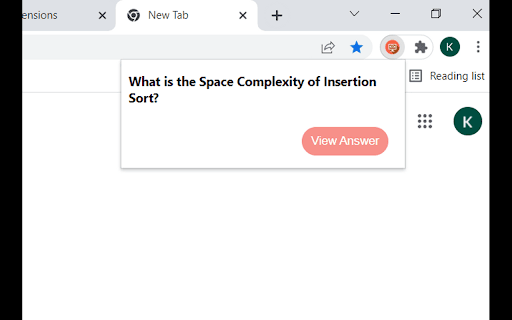


Guess Complexity allows students learning Data Structures and Algorithms to remember the Time and Space Complexity of various… Guess Complexity allows students learning Data Structures and Algorithms to remember the Time and Space Complexity of various Algorithms and their operations . This extension will pop up a question and students/users can guess the answer and check for the same with "View Answer" button.

LeetCode Forcer
An extension which force you to solve daily leetcode problem. Say no to procrastination. Occasionally, we all make a commitment to solve at least one problem daily on Leetcode. However, in today's fast-paced and distracting world, it can be challenging to stick to this commitment despite having made it multiple times. To motivate you to tackle the daily Leetcode challenge, we have developed this extension. Instead of sending reminders, it will automatically redirect you to Leetcode until you have completed the problem of the day. What is the function of this extension? 1. After installing, if you browse anything on chrome and you have not solved the problem for a day it will redirect to that. Basically, it's virtual implementation of the principles outlined in book 'Eat That Frog'. 2. In case of an urgent need to browse, the extension includes an emergency button that can be used once per day to temporarily disable the redirection to Leetcode for a period of 3 hours. 3. You have the option to choose between two modes: redirecting yourself to the daily Leetcode challenge or to any problem on Leetcode. This is beneficial for users who are beginners and those who are on their way to becoming pro and do not want to solve the daily Leetcode challenge. What's new in version 2.0.6 1. There appears to be an issue with the extension not functioning properly on the new UI of Leetcode. If you are experiencing this issue, we recommend switching back to the old UI. In order to assist with this, we have included instructions in the extension popup on how to switch back to the old UI. What's new in version 2.0.5 1. Now Leetcode Forcing For Mode Daily Leetcode Challenge will happen according to UTC 12 AM as daily leetcode problem changes accordingly. 2. Minor bugs are fixed.

LeetCode Complexity Insight
Analyzes time and space complexity of LeetCode problems directly on the problem page. LeetCode Complexity Insight helps developers understand where their approach stands in terms of time and space complexity while solving LeetCode problems. If you often feel unsure whether your current solution is optimal or where it can be improved, this extension provides clear, on-demand complexity insights directly on the problem page. • Time and space complexity analysis for LeetCode solutions • Clear explanations aligned with problem constraints and logic • Identification of potential performance bottlenecks (approximate) • Inline insights without leaving the LeetCode interface • Educational feedback to improve algorithmic thinking Before using the extension for the first time, a simple one-time setup is required: 1) Open Chrome Extensions → LeetCode Complexity Insight → Options 2) Enter your API key and preferred model 3) Click Save Once this is done, the extension is ready to use on any LeetCode problem. 1) Open any LeetCode problem 2) Click the extension icon 3) Click Analyze Complexity 4) View time and space complexity insights directly on the page The extension activates only when the user explicitly clicks the Analyze button and does not run automatically in the background. • Time and space complexity insights are approximate and code-dependent • Bottleneck regions may appear when identifiable and may vary based on implementation • Re-running the analysis after code changes can help confirm insights The tool is designed to provide educational guidance, not strict compiler-level guarantees. Users may choose their own AI provider and model. Any API key provided is stored locally on the user’s device using Chrome local storage and is never uploaded, tracked, or shared by the extension. LeetCode Complexity Insight is designed as a learning companion for students, competitive programmers, and interview candidates who want to write more efficient and well-reasoned solutions.

Big-O
Time & space complexities of different-different alogrithms and data structure operations. Big-O helps aspiring software developers remember the time and space complexities of different programming algorithms and various other data structure operations. Now, you must be wondering how ? Well, it randomly shows a name of the algorithm or name of the data structure operation along with it's worst case time and space complexity. You can also check that how good or bad a complexity is in the options section, just right click on the Big-O icon and then click on options. By this, it becomes a fun and easy way to remember complexities of different programming paradigm. And we all know how important it becomes to have a good grip on various algorithmic complexities specially when you have a coding interview scheduled nearby. Well, what are you waiting for..? Add Big-O to your chrome browser NOW...!!!!!!

CrackTech - Tech Interview Preparation
A tool that can help candidate to prepare for a tech interview preparation. [v2.2.0] - Name modified to CrackTech - Tech Interview Preparation - Daily system design, low-level design, test engineering, behavioral content recommendation. - Relevant database preparation. - List of system design, low-level design, test engineering, behavioral contents. - Removed the contest and notification features [v2.1.0] - Company-based problems filtering. - Tabbed layout to add Company-based filtering. - `About Me` branding page. - Bring problems asked in companies into a tabbed layout. - Separate the database. - Create a company name database to parse company names. - Create a script to auto-parse company names. - Modify relevant pages. - Chrome-only update. - Notices updated. - README updated. [v2.0.0] - Prepare with Popular SDE Sheet. - Progress tracking window for each sheet. - Summarized progress tracking status. - Reset progress for the currently selected sheet and all available sheets. - Notices on top of the page. - Change the appearance of the DSA preparation section and the Contest viewing section. [v1.0.8] - (✯) Notation for recently asked questions reflected in the following page - Extension pop up window - All Company page - A public All Company information page has been published at https://ssavi-ict.github.io/LeetCode-Which-Company/ - A workaround All Company web link is added to the extension PopUP for those who are not able to see the company information for some reason. [v1.0.7] - Next To Solve suggestions for [Easy], [Medium], [Hard] category unsolved problems. - User Solving Summary categorized in difficulty level. - Solving percentage of [Easy], [Medium], [Hard] category problems shown in a PIE CHART. - Quick access panel added on Company Information and User Stats Analysis page. Are you preparing for your technical interviews? Are you looking for the question asked by companies like Microsoft, Google, Meta, Apple etc.? Then this extension gives you what you are looking for. This extension is my effort to make your preparation one step better. If you are solving problems on leetcode and you do not have premium account to see company information then I am definite that this extension will give you the same experience to some extent. You can prepare for you dream companies and sharpen your DSA skill accordingly. However, since I am continuously updating company information solely, you might not get company information for every single company like you can find in leetcode premium. I collect company information from different source of the internet and update in my database. So in some cases, you might get some more company information than Leetcode provides. Now what are you waiting for? Install this add-on and boost your prep up.
