
algdeaeafmpcijckjefedebmdmfbhakl

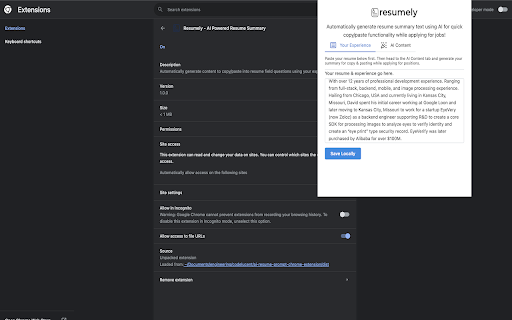
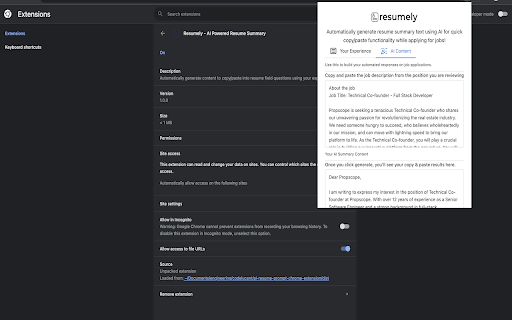
Automatically generate content to copy/paste into resume field questions using your experience. Resumely is the AI resume summary builder for those applying to jobs. Resumely enables you to upload your own resume and experience and get on-demand resume summaries based on job descriptions you are applying for. It's as simple as uploading your resume information and uploading content on the job description. You will receive back a unique and personalized cover letter or summary text for you to copy into each application. Save time and stand out through comparisons and personalized resume summaries.

CVmatchlyAI – AI Resume Optimizer & Job Matcher
AI-powered CV optimizer that matches your resume to job descriptions. Optimize CV for interviews, match job requirements. Stand out in every job application with CVmatchlyAI – the smart assistant that matches your CV to any job description in seconds. Whether you’re applying for your dream role or just updating your resume, CVmatchlyAI helps you optimize your CV for the best possible fit.

ContentEaseAI - Boost Browsing
Boost productivity & creativity using AI to understand the webpage's context into precise content in your personalized language. In the world of digitalization, content matters the most. Linguistic barriers cannot dust your potential anymore. Here's the solution for you, ContentEaseAI, your way to uninterrupted engagement with web content. Our AI-powered translation and interpretation will help you to go into depth of articles, blogs, and many more, all in your choice of language. It will help you to leave a remarkable impact through your professionalism in crafting content and messages. It tailors all websites and online platforms just like they are customized for you. Try it out to rise above linguistic barriers and dive into online content in your own way. You are just a click away.

ResumeMapper: AI Resume Tailored to Jobs
Extract job descriptions and generate AI-tailored resumes for each role. | 抓取职位描述,用AI生成针对岗位的定制简历。 ResumeMapper(简历Mapper) is a Chrome extension that streamlines the job application process. Key Features: • Intelligent Job Description Extraction: Automatically capture job requirements from popular job boards • AI-Powered Resume Generation: Leverage Qwen LLM to generate tailored resumes that highlight your most relevant skills and experiences for each specific job posting • Multiple Export Formats: Download your customized resume as DOCX (editable) or PDF (for printing) • Local Storage: All resume data is stored locally in your browser—no data is sent to our servers • Bilingual Support: Seamless switching between English and Simplified Chinese interfaces • All functions are free; no charging is involved How to Use: 1. Navigate to any job listing page 2. Click the ResumeMapper extension icon 3. Extract the job description (or paste manually if needed) 4. Upload or input your base resume 5. Click "Generate AI Resume" 6. Export as DOCX or PDF Data Privacy: Your resume content is processed by our AI service for generation purposes only and is never stored on our servers. All processing is done securely, and your data remains under your control. Supported Job Boards: • LinkedIn • Boss Zhipin (BOSS直聘) • Indeed • Zhaopin (智联) • 51Job (前程无忧51job) • Generic English or Chinese public/company job sites (some other webpage with structured job content)

AI Sidebar - Lensel: Ask Any Page Without Leaving It
AI on your sidebar. Highlight text to ask questions instantly with full context, or autofill inputs with smart suggestions. Lensel is an AI sidebar designed for people who spend their time reading, researching, coding, and working across the web. This AI sidebar lives directly in your browser, allowing you to interact with any page without switching tabs or copying content into another tool. Unlike traditional tools, this AI sidebar works in context. You can highlight any piece of text and instantly use the AI sidebar to ask questions, get explanations, or break down complex ideas without interrupting your workflow. With this AI sidebar, you are not limited to just simple prompts. You can highlight paragraphs, technical documentation, code snippets, research papers, forum discussions, or even text inside screenshots. The AI sidebar understands what you are looking at and gives you answers that are relevant to the page. This AI sidebar is built to understand full-page context. Instead of relying only on selected text, the AI sidebar can read entire articles, documentation pages, or long threads to provide grounded and accurate responses. This means the AI sidebar can give better explanations, summaries, and insights without requiring you to manually provide extra context. The AI sidebar stays accessible at all times with a simple click. You do not need to leave your current tab or disrupt your workflow. Whether you are studying, debugging code, reading documentation, or writing content, the AI sidebar adapts to what you are doing. What you can do with this AI sidebar • Use the AI sidebar to ask questions about any content you find online. The AI sidebar can explain concepts, define unfamiliar terms, and walk you through complex ideas step by step. • Summarize long content using the AI sidebar. Whether it is an article, research paper, documentation page, transcript, or PDF, the AI sidebar can turn it into clear and readable notes. • Write directly with the AI sidebar. You can draft emails, replies, comments, reports, or messages without leaving the page you are on. • Rewrite and improve text using the AI sidebar. Adjust tone, simplify writing, or make content more professional, concise, or clear. • Upload files into the AI sidebar. Add screenshots, images, or PDFs and ask the AI sidebar questions about them while staying on the same webpage. • Use full-page understanding. The AI sidebar uses the page you are on as context so responses stay aligned with what you are actually reading. • Continue conversations with memory. The AI sidebar saves session history so you can return to previous questions or build on longer workflows. • Choose how the AI sidebar responds. Select between different models depending on your needs for speed, reasoning, or cost. Why an AI sidebar changes how you work Most tools require you to leave your page, open another tab, and manually copy content. This breaks your focus and slows you down. An AI sidebar removes that friction by keeping everything in one place. This AI sidebar acts like a layer on top of the web. Instead of moving between tools, the AI sidebar comes to you. You stay on the page, and the AI sidebar helps you understand, write, and think through problems in real time. Because the AI sidebar is always present, it becomes part of your workflow rather than a separate step. Over time, this makes reading faster, research more efficient, and writing easier. Who this AI sidebar is for This AI sidebar is useful for: • Students who need help understanding difficult material • Developers working through documentation or debugging code • Researchers reading long papers and extracting insights • Writers drafting and refining content • Designers and product managers reviewing information and making decisions • Anyone who spends time learning or working online If you regularly deal with information, an AI sidebar like Lensel becomes a natural extension of how you work. This AI sidebar is built around context. Instead of treating every question as isolated, the AI sidebar understands the page, the content, and your workflow. It is not just a chatbot. It is an AI sidebar that stays with you, adapts to your task, and works directly on top of the web. By installing this AI sidebar, every page becomes easier to understand and work with. You can break down complex topics, summarize dense content, and write better responses without ever leaving the tab. This AI sidebar helps you stay focused, reduce friction, and get more done without constantly switching tools. Lensel is an AI sidebar that works alongside you as you browse, helping you read, learn, write, and research with clarity and efficiency.
