
algadbfmljcppohmcckpdemkjklapibd
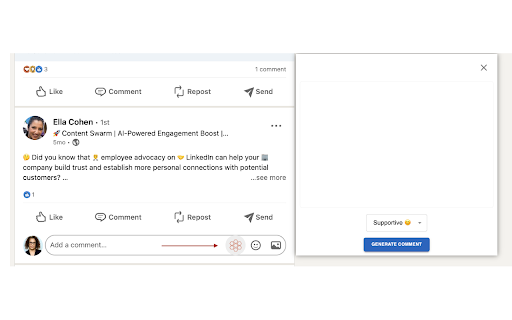
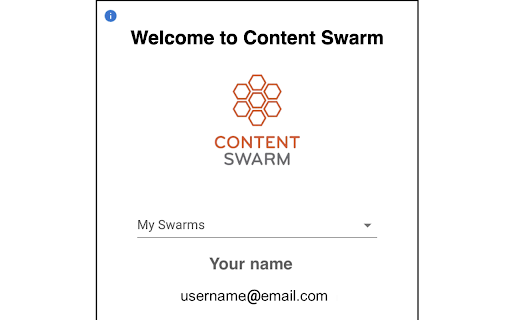
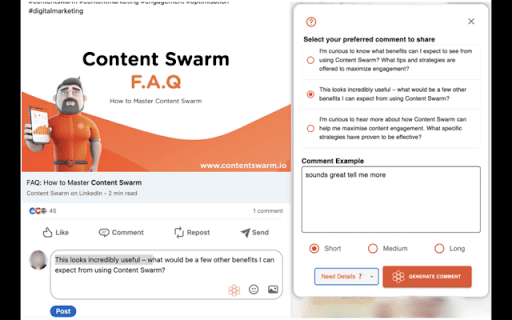
Generate AI-powered comments and manage your content swarm on LinkedIn Exclusively for Content Swarm users: Elevate your LinkedIn™ game with generative AI. write comments that skyrocket visibility and drive more engagement, leading directly to increased sales.

AuthoredUp – No. 1 LinkedIn ™ Content Tool
Boost your LinkedIn ™ growth with the secure platform designed for creators. Create and analyze your content in clicks, not hours. Write, schedule, and analyze your LinkedIn content in one secure workspace. It keeps everything in one place so you can focus on creating posts that develop your personal brand or drive business growth. 𝗖𝗿𝗲𝗮𝘁𝗲 𝗰𝗼𝗻𝘁𝗲𝗻𝘁 • Format text with bold, italics, bullets, and check readability before posting • Preview posts on desktop and mobile to ensure they look right everywhere • Use 200+ hooks and endings templates (available in English, German, Dutch) 𝗣𝗹𝗮𝗻 𝗮𝗻𝗱 𝗼𝗿𝗴𝗮𝗻𝗶𝘇𝗲 • Plan with a calendar view, best-time-to-post insights, and reminders • Collaborate with clients or teammates by sharing drafts for fast feedback. • Manage multiple company pages and groups under one profile license 𝗠𝗲𝗮𝘀𝘂𝗿𝗲 𝗮𝗻𝗱 𝗶𝗺𝗽𝗿𝗼𝘃𝗲 • Track results with full post history and profile growth • Use analytics to see what works and adjust your content strategy • Export data or connect the API for reporting and deep analysis. Just install this extension, and you are ready to go. 𝗢𝗽𝗲𝗿𝗮𝘁𝗶𝗼𝗻𝘀 𝗮𝗻𝗱 𝗰𝗼𝗺𝗽𝗹𝗶𝗮𝗻𝗰𝗲 • AuthoredUp is not affiliated, associated, authorized, endorsed by, or in any way officially connected with LinkedIn Corporation, registered in the U.S. and other countries. LinkedIn is a trademark of the LinkedIn Corporation. • We do NOT use cookies or automate your activity on LinkedIn, so your account stays safe while you work. • AuthoredUp cannot access your or anyone else's private data (passwords, emails, web browsing history), etc. • AuthoredUp is fully compliant with GDPR. • All data is hosted in Germany.

ViralSort - Sort Instagram Reels & Manage in One Dashboard.
Sort Instagram Reels & manage your content creation flow from idea to publish. ViralSort is a Chrome extension that helps you Sort Instagram Reels, find top viral content from any Instagram profile, and manage your entire creation process from idea to upload. 🔍 Sort Instagram Reels from Any Profile Instantly Sort Instagram profiles by Reel performance. Our Instagram Sort feature shows you what is going viral without endless scrolling or guesswork. 📂 Explore and Save Content Inspiration Use Instagram Reels Sort to view the best performing Reels from one or multiple accounts. Manage them directly to your ViralSort dashboard for future creation. 🎥 Manage Your Reel Creation Flow Organise scripts, shoot links, and edit files in one place. Track your content stages such as Scripted, Shot, Editing, or Ready so nothing gets lost. 🚀 Publish and Track Performance After publishing, link your Reel in ViralSort to track engagement and reach. 💡 Perfect For: Content creators Social media managers Marketing agencies Anyone aiming for strategic Instagram growth 🔄 From Research to Reel Made Effortless ViralSort is your all-in-one command centre for finding, creating, and tracking Instagram Reels.

PinSight - Pinterest AI Control
Spot AI-generated content on Pinterest and control how AI pins are displayed in your feed. If you are tired of constantly seeing AI content when browsing Pinterest, this extension is for you. The tool finds AI pins without you having to access their individual page. You can chose to hide them completely, blur them out, or simply add a clear label on the images so you know what’s human-made and what’s not. No account is needed and no personal data is accessed. 1. Install the extension and open Pinterest as usual. By default, AI pins will just be labelled. 2. To change the behavior, click the PinSight icon in your toolbar to open the settings. 3. Choose how you want AI-generated pins to be handled : - Hidden = remove AI pins from your feed. - Blurred = keep them in the feed but blur the image (you can unblur them by clicking on the "Show AI pin" button). - Labelled = show them normally but with a clear AI badge in the top right corner. 4. Refresh the page with the dedicated button to make the changes take effect. The extension will automatically update your feed as you scroll ! The process has been optimized for good speed and performance by keeping track of the pins that have already been processed in the page.

ContentIn - LinkedIn™️ Analytics & AI Content and Insights
The ContentIn Chrome extension for LinkedIn post analytics, AI comments and deep profile insights. ContentIn: Your AI-Powered LinkedIn Intelligence & Content Creation Tool Transform your LinkedIn presence with ContentIn, the smart extension that gives you deeper insights and supercharges your content strategy. 👉 Unlock LinkedIn Intelligence (Free for Everyone) Get powerful insights into any LinkedIn profile you visit: ✅ Discover viral posts from the best creators ✅ Discover optimal posting times based on engagement patterns ✅ Analyze content strategies and themes that drive engagement ✅ Track commenting patterns and interactions ✅ Identify key relationships and networking opportunities ✅ Understand what content performs best in your network ✅ Download LinkedIn Videos 👉 Elevate Your Content Game (With ContentIn Account) Take your LinkedIn presence to the next level: ✅ Import your analytics to understand what truly works for your audience ✅ Train a personalized AI Ghostwriter that captures your unique voice and style ✅ Generate content that sounds authentically you, not robotically AI ✅ Create engaging posts that resonate with your network ✅ Create AI comments ✨ Instant Insights: Get valuable profile analytics with a single click ✨ Data-Driven Success: Make informed decisions about your content strategy ✨ Personal Touch: AI that learns and adapts to your unique writing style ✨ Time-Saving: Generate quality content while maintaining your authentic voice Ready to transform your LinkedIn game? Install ContentIn now and join thousands of professionals who are already leveraging AI-powered insights for LinkedIn success. Questions? Contact us at support@contentin.io for personal assistance from our team.
