
aldmgmgmjomckcjljebhedkkgbjodbih
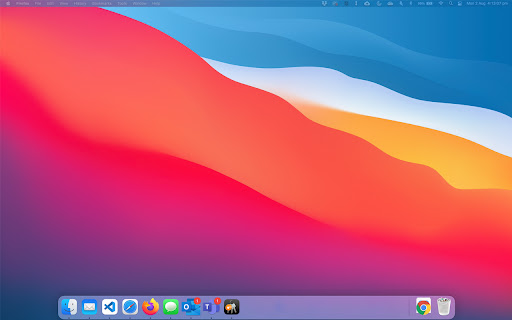
Display email count on the Outlook web app icon and adds some handy shortcuts Displays the unread email notification count on the outlook web app icon when you have your inbox displayed and the folder view open You must install Outlook as a chrome web app

Email Notifier
A lite notifier that works with Gmail™, Yahoo, Live, iCloud, and more. Email Notifier is an extension that gives you easy access to a few famous email providers (such as Gmail, iCloud, Live Mail, etc.), plus you get badge notifications. Before using the extension, please log in to each email service once to enable the badge notifications. To add or remove an email service, please open the options page and choose desired services (at the top). Moreover, you can re-arrange email tiles within the toolbar popup. Badge color is also adjustable via the settings page. To report bugs, please visit the addon's homepage and fill out the bug report form (https://mybrowseraddon.com/email-notifier.html).

Inbox Spotlight - for Outlook 365
Achieve Inbox Zero with your Outlook 365 email account using keyboard shortcuts. How to launch the extension: 1. After installing it, press ctrl+enter to launch the extension. 2. It's recommended to enable keyboard shortcuts in Web Outlook before using the extension. For more info: https://support.microsoft.com/en-us/office/keyboard-shortcuts-for-outlook-3cdeb221-7ae5-4c1d-8c1d-9e63 3. The extension should be supported on any domain as long as you're using Web Outlook. 4. That's it! Try filtering unread messages by typing 'unread' after launching the extension. Please share your feedback here: https://forms.gle/9o6bYuLkk1EtqrhA6

Badge Notifications for MS Teams PWA
Show badge notifications in the dock/shelf when using MS Teams as an app (PWA). PWA badge notifications are supported on Windows, macOS and ChromeOS:

Email Taskbar/Dock Unread Badge
Note: I have added a new extension that merges the first 2 together, the Gmail and Outlook unread counts all in one extension. Please view my other extensions or you can find it at https://chrome.google.com/webstore/detail/multi-emailapp-taskbardoc/ipeimmibpbandhbpndfdbjpdodcjdbdo Disclaimer: The developer of this extension in no way claims to be associated with Google/Microsoft/Outlook. I acknowlegde that I do not own their respective trademarks. This extension was developed for personal use and shared for others to use, if they wish to. This extension adds an unread count badge to the taskbar/dock icon of a PWA* Outlook** app. The extension is still in its infancy, so please consider it when rating it. (Windows) How to install a PWA in Google** Chrome: 1. Navigate to the Outlook** URL, i.e. go to your Outlook** Inbox. 2. Click on the Google Chrome browser settings button, ⋮ . 3. Click on menu option, "More tools". 4. Click on sub-menu option, "Create shortcut..." 5. Name the shortcut, e.g. Outlook**. 6. (NB!) Ensure that you check/tick the checkbox labelled, "Open as window". 7. Once the new Outlook** window opens, remember to pin the PWA to your taskbar to ensure that the extension adds the unread count to the pinned icon on the taskbar. 8. Windows 10 and 11, ensure that the Taskbar setting, "Show badges on taskbar buttons", is toggled on (i.e., enabled) to allow the unread count badge to be shown on the Windows Taskbar. Once you have successfully made use of the extension, could you please rate it, and if you have any feedback, it will be appreciated too. As mentioned, this is still in the alpha stage of the extension and may have issues with reflecting an accurate count. If you find any bugs with the count reflected, please do share the scenario that may have triggered the incorrect count. I hope that this small extension helps you in some way, enjoy. * PWA, Progressive Web Application. ** The developer acknowledges that the trademarks are owned by their respective owners and in no way is associated with the developer of this extension. Updates: 2022-11-26 (0.1.6) - The previously named extension was taken down by the Chrome Web Store, due to a complaint received, “The app uses the trademarks of Microsoft Corporation without authorization. In this instance, the app uses the trademarks in the app's Title.” 2022-07-11 (0.1.6) - Removed the previous Calendar feature from being default enabled. If this feature is wanted, there is a checkbox in the extensions options that will enable it again, "No Badge on Calendar PWA: (Experimental)". It is experimental, as it causes the count badge to flash on and off. 2022-07-10 (0.1.5) - When viewing the "Calendar" in the PWA, the count is cleared for that window icon, i.e. no count badge is shown on the icon. To see the click on "Mail" to view your emails and the badge will display the updated count on the icon again. 2022-06-24 (0.1.4) - Added support for Outlook**.office.com 2022-06-14 (0.1.3) - Fixed the Options page not displaying the options correctly due to the page's collapsed height. - Improved overall script performance. 2022-05-05 (0.1.2) - Added the option menu ("Inbox count only") -- [Default] If unchecked/not ticked, will show the count of the Inbox unless it is not found or zero, in which case the extension looks for the next available folder count to be displayed on the PWA icon badge. -- If checked/ticked, only the Inbox count will be shown on the PWA Icon Badge 2022-04-26 (0.1.1) - Added support for Outlook** live mail and Outlook** office365 mail
