
alacjcbjjhnnafkkbfhgbdemhhkhfkml


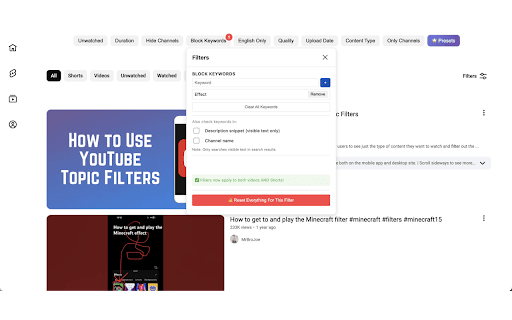

Filter YouTube search results by channel, keyword, duration, upload date, language, and video quality. YT Filters is a powerful YouTube filters Chrome extension that helps you clean up YouTube search results and find better videos faster. Instead of scrolling through irrelevant or low-quality content, you can control exactly what appears when you search on YouTube. • Block keywords you don’t want to see • Filter YouTube videos by duration and upload date • Filter videos by language and video quality Whether you want to avoid clickbait, hide certain creators, or narrow results to exactly what you’re looking for, YT Filters gives you simple, precise control over YouTube search. • YouTube access: Required only to hide videos, channels, and keywords directly on YouTube pages. • Tabs: Used to detect when a YouTube page is active so filters can be applied • correctly. We do not collect personal data, browsing history, or analytics. All filtering happens locally in the browser.

YouTube Filter (Stop Addicting Videos)
Version 1.2.2: - Duration filter added - Hide shorts feature added - Hiding videos optimized and added live sync. Version 1.2.2: - Duration filter added - Hide shorts feature added - Hiding videos optimized and added live sync. YouTube Filter (Stop Addicting Videos) is a straightforward yet powerful tool that lets you block YouTube videos containing specific keywords. Whether you're avoiding spoilers, filtering content themes, or customizing your feed, this extension enhances your viewing experience by hiding unwanted videos from search results and suggestions. - Reduce distractions on YouTube with flexible, instant filters. Hide Shorts, set duration limits, block channels, and filter by keywords — all applied in real time across Home, Search, and Subscriptions. - Features: - Hide Shorts globally for a cleaner feed. - Duration limits: set minimum/maximum video length; live/upcoming streams are excluded. - Channel controls: block or allow channels; allowed channels override keyword matches. - Keyword filtering: add, reset, and export your keyword list. - Instant updates: changes apply without page reloads. - Lightweight and private: settings are stored locally; no tracking, no external requests. - How to use: - Click the extension icon to open the popup. - Toggle “Hide Shorts”, set min/max duration, and add keywords or channels. - Your feed updates automatically — no manual refresh needed. - Privacy: - No data collection, no analytics, no third-party services. - All configuration stays on your device. We Value Your Feedback: Your feedback helps us improve! Please share your thoughts, experiences, and suggestions in the reviews section. What’s working? What could be better? Your input drives future updates. Contribute to the Project: This is an open-source project! Feel free to explore or contribute: https://github.com/myaxyo/youtube-filter-extension

FilterTube
Restore peace of mind to your digital video experience. Take back control of your YouTube or YouTube Kids recommendations and search results. FilterTube helps you restore peace of mind to your digital video experience by blocking unwanted content, channels, and distractions. FilterTube now supports: -**Mobile Apps MVP** are now available first for Andorid users. - **Whitelist Mode** for allow-only feeds and safer kid-focused setups - **Profiles and PIN protection** for Default, independent Account, and Child profiles - **Nanah P2P device sync** so you can move settings across your own devices without manual copy-pasting Whether you want to avoid spoilers, hide toxic channels, remove Shorts, or build a much more controlled experience for a child, FilterTube runs primarily on your device and applies changes directly where the content appears. 1. **Local-first and private** FilterTube runs locally in the browser for the filtering work. For device sync, Nanah uses a small signaling relay only as a meeting place, then your devices are meant to talk directly device-to-device after the secure handshake. 2. **Works across YouTube surfaces** Home, Search, Watch, Playlists, Shorts, and YouTube Kids are all part of the filtering model. 3. **Profiles with real control** Default, Account, and Child profiles let you separate rules and apply PIN protection where it matters. 4. **No more manual copy-pasting across devices** Nanah lets you pair devices, verify the safety phrase, and send the scope you want. Managed links make repeat parent-to-child updates much easier. **A. Content and channel filtering** 1. Block videos that mention specific keywords. 2. Block channels by handle, canonical `UC...` ID, or older channel paths. 3. Enable **Filter All Content** to hide any video that references a blocked channel. 4. Use **Whitelist Mode** to hide everything except approved channels and content. 5. Block channels directly from YouTube’s `⋯` menu. **B. Focus and cleanup controls** 1. Hide Shorts across shelves, watch pages, and sidebars. 2. Hide comments entirely or filter toxic comments by keyword. 3. Reduce autoplay chains, live-chat clutter, recommendation noise, and similar distractions. **C. Profiles, locks, and PIN protection** 1. Default profile acts as the main admin layer. 2. Independent Account profiles can keep their own separate rules. 3. Child profiles can stay parent-managed and lock-sensitive. 4. Master PIN and profile PINs protect profile management, exports, and other sensitive actions. **D. Import, export, and secure device sync** 1. Export and import JSON backups, including whitelist state and profile-aware scopes. 2. Use plain or encrypted backups depending on the profile and security level. 3. Use Nanah to sync across your own devices securely without setting up a central account. 4. Save managed parent-to-child trust links so repeat updates are easier than manual backup transfer. **E. Dashboard and transparency** 1. New Tab dashboard with filtering controls, profiles, Accounts & Sync, and Help. 2. Built-in release notes so changes are visible instead of hidden. 3. Stats and hidden-item counters to show how much clutter was removed. #### Good fit for FilterTube started after repeated parent frustration around YouTube Kids filtering limits and the inability to block content precisely enough by keyword or topic. FilterTube is ideal for parents creating a safer environment with whitelist mode, students who need focus, and anyone tired of the algorithm dictating their feed. **Note:** This extension is not affiliated with YouTube™ or Google Inc.

Upload Date Sort
YouTubeの検索結果に「アップロード日」順のソートボタンを追加します 以前はYouTubeの検索結果にあった「アップロード日」順の並べ替えオプションが、いつの間にか表示 されなくなりました。最新の動画を探したいのに、関連度順の結果しか表示されず不便に感じていま せんか? この拡張機能は、検索結果ページとチャンネルの動画一覧ページに「アップロード日順」ボタンを追 加し、以前のようにワンクリックで最新順に並べ替えできるようにします。 【機能】 ・検索結果ページに「アップロード日順」ソートボタンを追加 ・チャンネルの動画一覧ページにも同様のボタンを追加 ・現在ソートが適用中かどうかがボタンの見た目でわかる ・YouTubeのデザインに馴染むシンプルなUI 【プライバシー】 ・ユーザーデータの収集は一切行いません ・外部サーバーへの通信は行いません

Great Filter
AI-powered content filtering for Youtube, Reddit, X, HackerNews, and Substack Great Filter uses artificial intelligence to automatically filter content on social media platforms based on your preferences. Features: - Smart content filtering on YouTube, Reddit, X, and HackerNews - Preferences are set in natural language - Free tier with daily limits or connect your own OpenRouter API key for unlimited filtering Limitations: - Content filtering is not 100% accurate. The AI may occasionally miss relevant content or filter out posts you'd want to see.
