
akbibappaegkabjcckciljeflcemnggd
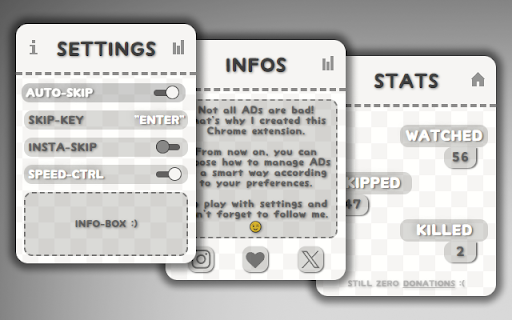


The Best YouTube ADs Manager. Manage the YouTube ADs in a smart way according to your preferences. With this extension, you can manage YouTube ADs in a smart way according to your preferences: - You can let the AUTO-SKIP take care of automatically skipping the AD that interrupted your viewing. But, remember: if an advertisement starts to look interesting to you, you can temporarily stop the autoskip and enjoy your advertisement just by pressing a convinient key on your keyboard... until you realize you are no longer interested and proceed to skip it, ALWAYS WITH THE SAME KEY ON YOUR KEYBOARD. INCREDIBLE! - Do you often change your video playback speed? My extension gives you a very convenient shortcut to control your video playback speed: CTRL+UP/DOWN. This is not only useful for the videos you watch, but also for advertisements, allowing you to set a very boring non-skippable AD up to 16x speed. - If you are a true ADs hater you can ignore all of the above, this extension is for you. In this new 2.0.0 version you can set the extension to not allow any advertisement to bother you. Since you activate this setting, if an AD tries to approach you this will be instantly and brutally skipped. I also collect the number of the watched, skipped and insta-skipped advertisements. Just for fun.

Adblock for YouTube™ — best adblocker
Privacy aware, secure Adblock for YouTube™. Blocks any ads on YouTube.com. You can understand what this extension does by looking at the name. If you don't understand then let's say, this extension helps to keep you away from various advertisements on YouTube. You can turn this extension on and off whenever you want to turn off and on your YouTube ads or advertisements. This extension has a disable button with which you can stop the extension. The best feature of this extension is that it will also show you how much time this extension has saved you from advertisements. So don't delay and download this extension soon it will keep you away from YouTube app for free and you don't have to pay any money for it. 1. Blocks video ads or advertisements during videos on YouTube. 2. Blocks suggested videos on YouTube. 3. YouTube blocks sponsored advertisements. 4. Avoid various sponsorship ads or banner ads and suggest advertisements on YouTube. 5. This extension will keep you away from YouTube advertisements. 6. Very lite and easy to use Extension. You will find thousands of extensions of this name in the market but the original extension of this name is this. If you don't believe it, you can try it. I am sure once you use the tension you will understand that it is the original extension that will help you to stay away from various advertisements on YouTube. Everyone uses this name of Ads Block for YouTube but the original extension is this. This extension keeps you away from various YouTube banner ads. Not only that, YouTube also keeps away from various sponsorships. You can turn this extension on and off whenever you want.It means you can turn YouTube ads off whenever you want and you can turn YouTube ads on.This extension keeps you away from the YouTube app. You can turn off this extension to support your favorite YouTubers. because every YouTuber gets their income from YouTube advertisement. So I request everyone to support their favorite YouTubers and also support me. While using it you will have a pop up open on YouTube. through that you can provide your review and you can close that pop up if you want. Clicking the "Don't Ask Again" button on the pop up will not opening the pop up a second time.

AD Skipper for Youtube
Enhance your YouTube experience by auto-skipping video ads. You won’t feel any difference between blocking and skipping ads. ⏩ Enhance Your YouTube Experience with Auto-Skipping Video Ads for YouTube Are you tired of sitting through video ads on YouTube? Imagine a seamless viewing experience where ads are automatically skipped, allowing you to enjoy your favorite content uninterrupted. With our innovative solution, you won’t even notice the difference between blocking and skipping ads. 🆕🔥 With addition to auto-skip, our extension automatically fast forwards through video ads, allowing you to enjoy uninterrupted content. You can destroy all the AD with a double strike! What is gonna be first, auto-skip or fast forward or maybe both? ✅ Smart Detection: Our system intelligently identifies video ads as they appear. Whether it’s a pre-roll ad or an annoying mid-roll interruption, we’ve got you covered. Instant Skip: As soon as an ad begins, our technology kicks in, ensuring that you don’t waste precious seconds watching promotional content. Seamless Transition: The transition from ad to video content is so smooth that you’ll forget ads ever existed. Say goodbye to those frustrating countdowns! ✅ Time-Saving: No more waiting for ads to finish. Get straight to the content you love. Ad-Free Feel: Experience YouTube without interruptions, just like premium subscribers. Privacy: We respect your privacy by not tracking your ad preferences or personal data. ✅ Install the Extension: Download our browser extension. Enable Auto-Skip: Once installed, activate the auto-skip feature in your settings. Enjoy Ad-Free YouTube: Sit back, relax, and let our technology do the work. Remember, with auto-skipping, you’ll never miss a beat. Say hello to an ad-free YouTube experience! 🎉📺🚫

YouTube Parental Controls
Use YouTube Parental Controls. Secure your kids with a parental lock on youtube and advanced parental filters for youtube easily 🛡️ Ensure a safe digital environment for your family by using our advanced solution for kids safety. This extension is designed for those who need reliable youtube parental controls and want to take full control over available content. You no longer have to worry about your children stumbling upon inappropriate videos. Our tool is the definitive answer to how to put parental controls on youtube effectively and simply. 🔒 Many parents wonder exactly how to block youtube shorts so that children cannot bypass the settings. Our extension includes a robust password-protected interface to secure every session. This is a true parental lock on youtube that prevents access to settings and unauthorized content. The block yt channel feature works instantly and accurately to keep your children safe. 📉 A highly requested feature is the ability to completely disable youtube shorts. Short-form videos often contain unpredictable content and can be addictive for children. Our solution shows you how to block youtube shorts with a single click, allowing your child to focus on long-form educational videos. This is a vital step in how to set parental controls on youtube for healthy habits. 📍 If you are unsure how do you put a parental lock on youtube on a standard browser, our plugin does the heavy lifting for you. It integrates directly into the site, creating powerful parental restrictions on youtube. Now, your child’s learning sessions are under your quiet supervision. This is much more effective than the built-in mode, as our parental controls youtube are far more strict. 🖥️ We have brought the best mobile parental control experiences to your desktop browser. Our extension serves as a comprehensive parental control youtube app for your PC, providing an unprecedented level of filtering. You take the wheel and decide which content is worthy of your family’s time. It is the most direct way to block youtube channels that do not fit your goals. 🛠️ Installation and Setup 1️⃣ Install the extension in your Chrome browser. 2️⃣ Import your favorite educational channels to whitelist. 3️⃣ Toggle the switch to permanently disable youtube shorts. 4️⃣ Set a strong parent password in the settings. 5️⃣ Save changes and launch the secure Child mode. 🧐 If you are still contemplating how to block youtube shorts or unauthorized creators, simply try our tool in action. The filtering system works at the code level, making it impossible to bypass restrictions without the master password. These are the ultimate parental filters for youtube that save your time. You no longer need to sit next to your child to monitor every single click. ✨ Why Parents Choose Our Filter ▸ Guaranteed blocking of unwanted creators and specific videos to ensure only high quality content. ▸ Removal of distracting shorts and clickbait thumbnails that lead children toward non-educational videos. ▸ Easy import and export of your approved lists allowing you to share settings across computers. ▸ Regular updates to stay ahead of platform changes ensuring your parental restrictions on youtube remain active. 🤖 We created a product that makes the process of digital safety automatic and stress-free. By utilizing a powerful parental lock on youtube, you can be confident in the safety of the digital space. This is more than just a plugin; it is your peace of mind in a complex online world. Every parent eventually looks for how to set parental controls on youtube to protect their children. ❓ Frequently Asked Questions ❓ Question: How to put parental controls on youtube using this extension? 💡 Answer: Simply install the plugin, add your child’s favorite channels to the list and set a password. ❓ Question: Can my child block yt channel or change the settings? 💡 Answer: No, all settings are protected by a master password that only the parent knows. ❓ Question: How to block videos on youtube that are not in the whitelist? 💡 Answer: The extension automatically blocks any video that does not belong to an approved channel. ❓ Question: Does this extension help to disable youtube shorts? 💡 Answer: Yes, it completely removes the Shorts tab and all short-form videos from the interface. 🎈 Now you finally know how to put parental controls on youtube and can tailor the system to your child's needs. Our extension allows you to quickly add new videos to the approved list. Try the best parental controls youtube today and feel the difference. High-quality youtube parental controls must be flexible to grow with your family.

Speed Master for YouTube Video
Auto HD and control video speed on YouTube for each individual channel. SpeedMaster for YouTube - a helpful tool that allows you to easily change the playback speed of YouTube videos. With this extension, you can adjust the speed for each YouTube channel individually, and your preferred speed settings will be saved for future videos from the same channel. Along with controlling the playback speed, you can also specify your preferred video quality. This new feature allows you to enjoy videos at the quality level that suits your preferences and internet connection. Your preferred quality settings will be saved and applied automatically whenever you watch videos. You have two options to control the speed: 1. Clicking the buttons: ・To make the video faster, simply click the '+' button located at the top right corner of the YouTube player. ・If you want to slow it down, click the '-' button instead. 2. Using keyboard shortcuts: ・Press the '[' key to decrease the playback speed and enjoy a slower pace. ・Press the ']' key to increase the playback speed, making the video faster. In the option page of SpeedMaster for YouTube, you will discover even more ways to manage the playback speed for different channels. This extension provides you with additional options to fine-tune your speed preferences. You can customize the playback speed individually for each YouTube channel, ensuring that each channel plays videos at your preferred speed. Moreover, you can easily modify or update these settings at any time, granting you full control over the playback speed of specific channels. With these advanced options, you can tailor your YouTube experience to match your unique preferences for each channel you follow.
