
ajjelinkcmnghbblfilfgpohdpimemoj
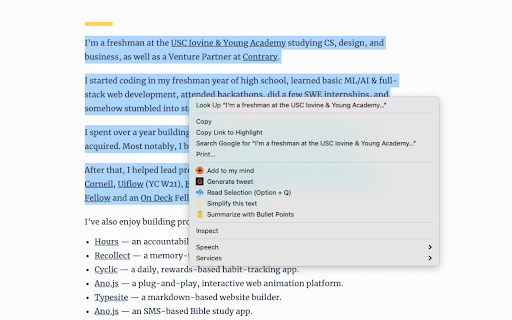
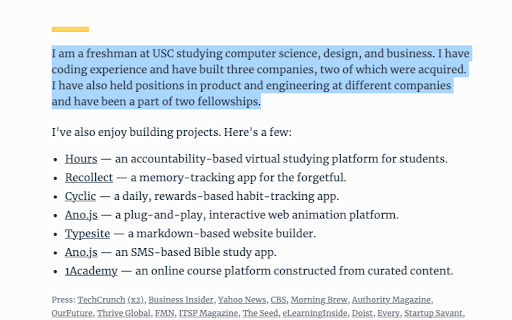
Simplify text with a single click. Have you ever been reading something but it's just too complicated, and you can't understand it? With Simplify AI, you can *simply* highlight, right-click, and simplify the text. We simplify the text you highlighted and inject it right back into the web page.

EveryTube
Populates your YouTube Subscriptions page with content from other video platforms. Currently supports Bitchute and Odysee.com. This extension allows you to keep up to date with creators who don't have a YouTube account right from your YouTube subscriptions page. Everything in one place 👍 1. Visit the other video sites (Bitchute or Odysee) and login to them using your web browser as normal. 2. Visit your YouTube Subscriptions page (https://www.youtube.com/feed/subscriptions) 3. You should now see content from all video sites listed on that page. 1. If for some reason you don't see the content on the YouTube page, but you are logged in to the other video sites, wait 5 minutes and try again (EveryTube takes that long to update sometimes).

Dumb It Down
Use AI to dumb text down. AI provided by OpenAI takes any piece of text and simplifies it so that anybody can understand it. You can also generate a sharing link for your simplified text. This extension makes Dumbing It Down even quicker and easier – simply highlight the confusing text and with a couple of clicks: voila! Simple.

EasyRead.AI - Reading Assistant
Your ultimate reading assistant powered by GPT. Compose AI summary, mind map, or just translate and explain everything you selected. Say goodbye to lengthy articles and videos, with the power of GPT! EasyRead.AI is your ultimate AI reading assistant. It generates high-quality summaries, mind maps, and let AI share perspectives in fresh perspectives from different angles of thought. Also, enjoy super-fast content translation and transcript browsing. Everything at your fingertips! 🫰🏻 🚀 EasyRead.AI, your all-in-one reading efficiency tool, is now open for public beta. Register now to receive free usage quotas! 🚀 🔥 Key Features: - One-click article summary, mind map generation, quickly grasp the essence of lengthy texts, and significantly save reading time. - No more prompt spells, zero learning curve, step into the era of AI with ultimate efficiency. - YouTube supported, also with transcript browsing and translate. - Article translation, block translation, selection defination, all in one place. 🔧 How to Install: Simply log in on the pop-up page after installing the extension, currently supporting Google account logins. 📪 Contact Us: If you encounter any issues or have feature suggestions while using the app, feel free to contact us via email at hello@easyread.ai.

Ping Blocker
Prevents sites from tracking you by blocking the PING request! Ping Blocker helps you prevent websites from tracking you by blocking ping requests. Ping requests can be generated via a few methods on websites. The most famous one is the navigator.sendBeacon() API. Another method is to use the "ping" attribute for anchor elements. The last method is via a tag with a "report-to" URL. This addon, when enabled, can successfully block all ping requests. Toolbar icon changes color when you click on it. The red color is when the addon is active and the grey color is for the inactive state. Within the add-on options page, there are several settings to adjust. You can choose which type of ping request to block via the first three options. Next, there is a console log error checkbox (to log blocked URLs to the browser's console). The last setting is for adding domains to be whitelisted. All entries should be comma-separated. If you have a feature request or found a bug to report, please fill the bug report form on the addon's homepage (https://mybrowseraddon.com/ping-blocker.html).
