
ajgehecfkfhindkhdcjmifbngkfdflla

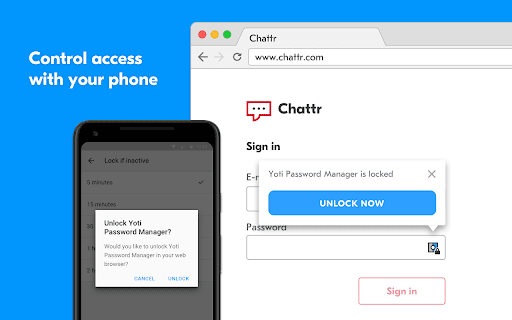
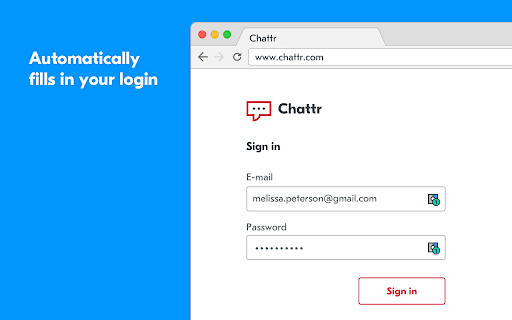
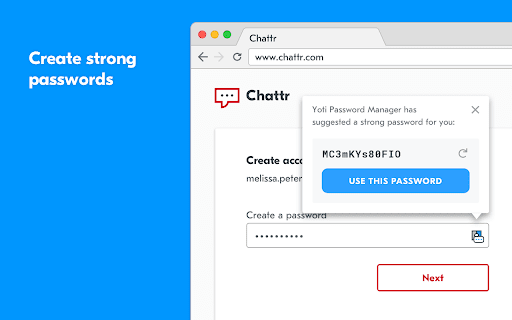

A secure, simple to use password manager. No master password means you never need to remember a password again. Yoti Password Manager helps you: - Access and use your login details without having to remember any passwords. - Easily access and use your login details using password manager across multiple platforms and devices. - Automatically fill in your login details for you when you visit your favourite websites. - Generate strong, unique passwords for each of your online accounts using password manager. - Automatically lock your login details to keep them safe when you’re away from your computer. You need the free Yoti app to use Yoti Password Manager. It’s how we ensure that you, and only you, can access and use your passwords. The Yoti app is the new way to prove who you are, giving you a trusted digital identity to use online and in person. You can use the Yoti app to securely connect to, unlock and lock Yoti Password Manager as and when you want to. Over 2 million people have already downloaded the Yoti app, with thousands more downloading every day. Just search 'Yoti' in the iOS or Android app stores. Keeping your data safe is our highest priority. To protect every piece of information you give us when you register your Yoti account – whether it be your photo, date of birth, address or passwords – we scramble it with AES 256-bit encryption. The private keys that unlock your data are stored on your device. Nobody else, not even Yoti, can access these keys.

RoboForm Password Manager
RoboForm Password Manager makes your life easier by remembering passwords and logging you into websites automatically Generate strong passwords for new accounts, manage your passkeys, and enjoy seamless autofill for all your credentials—all in one lightweight extension. 🌎 Works on every device RoboForm works in all major browsers and on all devices, including Windows, Mac, iOS, and Android. ⬆️ Easy import Bring your passwords from your browser or any other password manager in seconds. 🧩 All-in-one management Manage passwords, passkeys, and authenticator codes directly from the extension. ⚡ One-click logins Open a Login, and RoboForm takes you to the site, fills your credentials, then signs you in automatically. 🛡️ Monitor weak, reused, or compromised passwords RoboForm scans your vault for weak, reused, or compromised passwords and alerts you so you can fix them quickly. 🔍 Know immediately if your data is exposed Get alerts for breaches affecting up to 5 email addresses, along with recommended steps to mitigate the threat. 🔒 Zero-knowledge security Your data is encrypted locally with your Master Password—never transmitted to our servers. Uses AES-256 encryption, PBKDF2-SHA256, and full end-to-end encryption. 🔓 Passwordless unlock Skip typing your Master Password. Unlock RoboForm using Windows Hello, Touch ID, passkeys, hardware security keys (e.g., YubiKey), or a trusted device like your smartphone. 🔐 Built-in authenticator & advanced 2FA Use RoboForm as your TOTP authenticator for any website. Secure your account with passkeys, security keys, authenticator apps, or a trusted device. 🔗 Secure sharing Share individual items or entire folders with end-to-end encryption, and assign permissions to each recipient for complete control. 🆘 Emergency Access to trusted contacts Grant trusted contacts secure, controlled access to your RoboForm data in case of an emergency. ⏱️ Real human support Chat, phone, and 24/7 email support whenever you need help.

ESET Password Manager
Never forget a password again! ESET Password Manager will make your life easier and passwords safer. To install ESET Password Manager, you either need to receive the invitation to use it or have an ESET HOME Security Premium or ESET HOME Security Ultimate subscription. ESET Password Manager allows you to manage your passwords, credit card numbers and other sensitive information, and access them from anywhere. All content in the application is encrypted, protected by a master password, and ONLY YOU have access to it. The ESET Password Manager app allows you to: ✔ Take advantage of Password Generator to create random and secure passwords ✔ Increase the security of stored passwords with Two-Factor Authentication ✔ Manage access to your passwords with the Secure Me feature that: - provides a complete overview and detailed information about active sessions on all of your devices and browsers - allows you to log out of all your sessions remotely - provides actions to improve your security (delete cookies, download history and bookmarks, close tabs, log out from all Password Manager’s sessions), either on a device or remotely, depending on platform or browser. ✔ Use ESET Password Manager for Two-Factor Authentication to your accounts for even stronger security ✔Check a Security report to see if your passwords are among breached passwords and data leaks ✔ Add multiple identities for easier completion of online forms ✔ Prioritize favorite accounts to move their passwords to the top of the list ✔Access your passwords on the go from your Windows PC and Android, iOS and macOS devices Find out more about the ESET Password Manager Chrome extension for ESET HOME Security Premium or ESET HOME Security Ultimate: https://www.eset.com/int/home/protection-plans/ For more info about the privacy policy, visit: https://help.eset.com/password_manager/3/en-US/privacy_policy.html For EULA visit: https://help.eset.com/password_manager/3/en-US/terms-of-use.html

KeyGuard - Password Manager
Experience seamless password management with KeyGuard – save, autofill, and secure your credentials effortlessly. Meet KeyGuard, the ultimate password manager that keeps your online world safe, simple, and secure – and it's completely free. Never worry about forgetting or reusing passwords again. KeyGuard combines top-notch security with unbeatable ease of use and lightning-fast performance. Effortless Password Management: Manage your passwords with our clean, simple-to-use interface, designed to make securing your online accounts easier than ever. Instant Autofill for Seamless Browsing: Instantly save & autofill your passwords with our smart and responsive autofill feature. Unmatched Security: Your data is protected with industry-leading AES256 encryption – the gold standard in online security. Quick & Strong Password Generation: Create secure and unique passwords for every site with our easy-to-use password generator. Seamless Cross-Browser Syncing: Access your passwords on any device with smooth synchronization across Chrome, Firefox, and Edge. Get Started Today – It’s Free! Join the many users who trust KeyGuard to protect their digital experience. Take control of your passwords and enjoy a faster, safer, and smoother online experience. Install KeyGuard now and experience password management like never before. KeyGuard – The Secure, Simple, and Effortless Password Manager.

LastPass: Free Password Manager
LastPass is an award-winning password manager for secure credential management on any device. LastPass is the easiest way to manage passwords—wherever you browse. Tired of forgetting passwords or resetting them constantly? Meet LastPass, the trusted password manager—used by millions of people and thousands of businesses—to keep passwords and other account info safe, secure, and always within reach. With LastPass, you only need to remember one master password. We’ll handle the rest—autofilling logins, generating secure passwords, and syncing across all your devices. Whether you're browsing on Chrome or logging into your favorite website, LastPass makes it effortless. WHY MILLIONS TRUST LASTPASS 🔐 Secure Password Vault: Store all your passwords, passphrases, passkeys, usernames, and payment methods in one encrypted place. ⚡ Autofill Made Easy: Instantly fill in login credentials on websites and in apps—no typing required. 🧠 One Master Password: Just remember one password—LastPass remembers the rest. 📝 More Than Passwords: Securely store credit cards, insurance info, social security numbers, and private notes. 🤝 Share Securely: Share passwords safely with family, friends, or coworkers. 🔒 Built-In Password Generator: Create strong, unique passwords and passphrases in a single tap. 🛡️ Multi-Factor Authentication (MFA): Add an extra layer of protection to your password app. GO PREMIUM FOR MORE POWER Try LastPass Premium free for 30 days and unlock: 📱 Unlimited device access across all platforms 🌐 Access on Edge, Firefox, and other browser extensions 🔗 Unlimited sharing of passwords and notes ☁️ 1GB of encrypted file storage 🛡️ Advanced MFA options like YubiKey 🚨 Emergency access for trusted contacts 💬 Priority customer support BUILT FOR SECURITY Your data is encrypted with bank-grade AES-256 encryption—only you can unlock your vault. Even we can’t access it. RECOGNIZED. RESPECTED. RECOMMENDED. There’s a reason LastPass is trusted by millions and featured in top publications like Forbes, PCMag, TechRadar, and ZDNet. We consistently lead the way in ease of use and customer support, earning top ratings on platforms like G2. When it comes to password managers, users and experts agree—LastPass delivers. DOWNLOAD LASTPASS TODAY Start using the smarter, safer way to manage your passwords and passkeys.
