
ajfokipknlmjhcioemgnofkpmdnbaldi
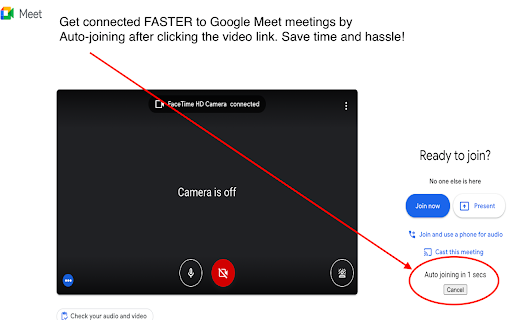
Get connected to video meetings faster by automatically clicking the Join or Ask to Join button! Get connected to Google Meet meetings faster by *automatically* clicking the "Join" or "Ask to Join" button! No more waiting to enter a meeting only to find you have to find a tab and click a button when you already clicked the link! It's how Google Meet should work in the first place. Click "Add to Chrome" button in the upper right corner to get doing meetings faster. Anytime to you connect to a video meeting a countdown timer will appear and when it hits 0 you will be automatically joined to the meeting. If for some reason you, don't want to auto-connect you can click the Cancel button. Easy, fast, safe, and light! Finally, you won't be sitting there wondering why you are not in the meeting! This extension is provided by Zoomcorder.com - the video bot service to record ANY Zoom meeting WITHOUT attending and without being the host. Click "Add to Chrome" in the upper right corner to immediately experience the goodness of this free and useful software!

Google Meet Attendance List
Easiest way to save the attendance list for your meetings or lectures The simplest way to save the attendance list for your meetings or lectures. From teachers to business professionals, this extension is intended to create a simple way to have all the meeting attendees on a list. What does it offers: ★ automatically generated attendance list ★ possibility to manually save the attendance ★ saved data contains First Seen At and Time In Call for each participant ★ date included in the name of the file, for easy reference ★ dashboard to see meetings history ★ Google Meet elegant UI integration (controls are integrated inside the Google meeting UI for easy access) ★ CSV export for easy integration with Google Classroom or Drive (just drag & drop) Everything is stored locally, the data belongs to you and it never leaves your device.

Meet Auto Admit
Only Google Meet Auto Admit extension that also works on admit all button. Automatically admit users who are joining your meeting. Eases the work of admitting everyone one by one when there are many users.

MeetApps: Google Calendar Video Call Links
Chrome extension for Google Calendar to easily join video calls without searching for the links in meeting invites. Supports 9 meeting platforms and improves work from home experience. CLUTTER FREE MEETINGS Normally you would have to identify meetings at your Google calendar, find its joining link, copy-paste it in the browser and then join them. MeetApps helps you join meetings hassle free. START AN INSTANT MEETING All you need to do is click on the Google Meet logo. A newly generated meeting will be opened and the link will be automatically copied. It will also make an entry in your Google Calendar. HOW DOES THIS WORK? After you install the extension and authorize from Google, MeetApps will present you your upcoming meeting as a popup upon clicking the chrome extension icon and the popup entries will take you right to the meeting URL. A reminder will also budge you 2 to 3 mins before the start of a meeting. As an early adapter, you'll get a free license key mailed to you on your email address which will be valid for MeetApps integration with Google Calendar. Your email address will be stored for the purpose of licensing SUPPORTED PLATFORMS It doesn't matter if your client has scheduled the meeting on Skype or Amazon Chime. This extension will search for meeting links and present you with the joining links. 8 platforms are supported by this including Zoom, MS Teams and Blue Jeans. SIMPLE DESIGN, EASY TO USE Our Chrome extension is free to download and easy to use with user friendly minimal interface and concise design. All your meetings are automatically scheduled and you’re given a reminder every time a meeting is about to start. The fast inbuilt redirecting action allows you to directly reach the meeting joining link and cut the irritating inconvenience of searching the links. NEVER COST YOUR BUSINESS ANOTHER LATE MEETING ANYMORE! Install MeetApps free of cost today and you’d never miss a meeting or get late for one anymore. This extension uses icons from flaticons.

Auto Admit for Google Meet
This extension allows you to automatically approve join requests from external guests for Google Meet and hangouts meet. By installing this extension in Google Chrome, when you are inside the Google meet rooms, it will automatically allow external guests to join the Google Meet call by clicking the admit button on the popup. This software extension is very useful when you need to have a call with users on google hangouts meet who are not part of your company. It helps save you from having to accept every external guest manually as this is done automatically by the software extension. To begin using our software extension for google meet app, here are the steps you need to follow. 1) Install our software Auto Admit for Google Meet 2) Go to the Google Meet website and click on the software extension icon 3) Our software will begin working and will automatically accept external guests once you click on our extension icon If you have any questions about our software which works for google video conference, please contact us with your query. Updated so there is a button on the bottom right corner of your Google Meet call, so you can activate/switch off the auto admission feature. Fixed a bug where the extension was not working if your default language was not english. Feature was not working due to an upgrade inside Google Meet, updated the extension so the auto admit feature works once more. Disclaimer: Please note this extension is NOT made by Google and is made by an independent development team. All copyrights belong to their respective owners. Google doesn’t endorse or sponsor this Chrome extension. Auto Admit for Google Meet is not owned by,it is not licensed by and is not a subsidiary of Google Inc.
