
ajffdfegnkejimlfnijmdlbpllhghdpk



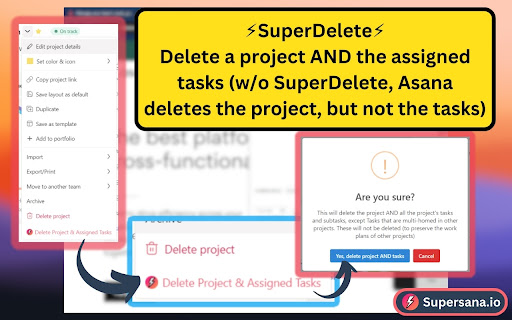
Supersana.io for Asana, built by TeamKickstart.com Supersana.io for Asana, built by TeamKickstart.com --- Asana Superpowers!🎉 With Supersana.io for Asana, built by TeamKickstart.com, you have instant access to powerful automations, bulk action, and powerful efficiency features to help you w/ "Asana Superpowers".🎉 Grab Supersana now for free and it'll auto-update as these new features are released! Great things ahead! --- LATEST UPDATES: 📢v1.98.56-63 Updates - 04.30.26 NEW FEATURES🎉 🎉Improved design BUG FIXES🪲 🪲Fixed buttons in multi-select menu 📢v1.98.55 Updates - 12.04.25 NEW FEATURES🎉 🎉"All Starred" sidemenu BUG FIXES🪲 🪲Features working with new URL structure more reliably. 📢v1.98.51 Updates - 09/21/2025 IMPROVEMENTS➕ ➕Settings now accessible in Asana header and Asana settings 📢v1.98.49 Updates - 09/07/2025 NEW FEATURES🎉 🎉"Add Screenshot" button for all links in descriptions 📢v1.97.6 Updates NEW FEATURES🎉 🎉Embed links and iframes 🎉Customize Asana keyboard shortcuts 📢v1.96 Updates📢 NEW FEATURES🎉 🎉API Explorer - developers, you can now see field ID's when you click "Edit Field" 📢v1.88 Updates📢 NEW FEATURES🎉 🎉New layout -- interim layout while we prepare our fully overhauled interface for our big launch in March 📢v1.70 Updates📢 NEW FEATURES🎉 🎉SuperArchive Projects: Choose custom actions for closing out the remaining incomplete tasks in projects while archiving. 📢v1.66 Updates📢 NEW FEATURES🎉 🎉TimeSheet: This is BIG, but very early. Still fixing bugs and making it work more smoothly. See a daily and weekly log of your time entries. Many more developments to come. 🎉SuperInbox: Bulk process your Inbox. Try it. It's smokin'! 🎉Inbox Search: Yeah, what we've all been asking for from Asana forever. Well, we went ahead and did it first. ;) 🎉Date Protection: Prevent non-project admins from changing task due dates. 📢v1.59 Updates📢 NEW FEATURES🎉 🎉SHARE Feature Groups with your team! 📢v1.51 Updates📢 NEW FEATURES🎉 🎉Search This Project: Convenient, easily located button for "Search This Project" so can instantly search for any task or subtask in a project (b/c many users forget where to find this feature in Asana natively) IMPROVEMENTS➕ ➕Search box for finding your target project when sending a duplicate section to another project 📢v1.50 Updates📢 NEW FEATURES🎉 🎉"Bulk Modify Task Names" now allows you to REPLACE text in bulk in task titles IMPROVEMENTS➕ ➕"Convert to Subtask WITHOUT Removing from Current Project" now works in inbox! 📢v1.49 Updates📢 NEW FEATURES🎉 🎉Team Admins can now create multiple user groups for their team and enable/disable features for specific user groups. The user now sees a feature has been disabled by their team admin. 📢v1.46 Updates📢 NEW FEATURES🎉 🎉Feature Groups: This. is. HUGE. The #1 issue for most of our users has been that we have... TOO MANY features :) Feature Groups allows you to compile customized feature groups so you don't have to wander through the long list of features every time you want to use Supersana differently. PRO TIP: Use "Feature Finder" search to find and enable your preferred features, then click the 3-line button at the top right and save current features as a feature group! Then switch between feature groups as needed -- e.g. "Project Build Mode" feature group and "Daily Work Mode" feature group! 📢v1.44 Updates📢 NEW FEATURES🎉 🎉Feature Finder: Search for features and toggle right from the search bar so you don't have to know where a feature is found -- just search by keyword and enable/disable the feature 📢v1.43 Updates📢 NEW FEATURES🎉 🎉Notify others of date changes: now, when you change a date, you have the option to automatically post an update to all subtasks notifying all collaborators of the date change in the parent task. 🎉Shift dates of all subtasks while keeping subtask date duration IMPROVEMENTS➕ ➕Error tracking rolled out on Super Actions, Super Reporting, and Super Nav so that we can find and fix errors/bugs more quickly. 📢v1.42 Updates📢 NEW FEATURES🎉 🎉Super Delete: Delete a parent task and optionally delete all nested layers of subtasks at the same time, even if they are assigned or multi-homed 📢v1.40 Updates📢 IMPROVEMENTS➕ ➕"Bulk Modify Description" now supports inserting images and pasting screenshots. 📢v1.39 Updates📢 NEW FEATURES🎉 🎉"Bulk Modify Description" - Now you can modify task descriptions in bulk. Bulk add new text BEFORE the current description, or AFTER, or fully replace... across dozens of tasks at a time! 📢v1.38 Updates📢 NEW FEATURES🎉 🎉"SuperUncollab": Remove yourself or others as collaborators on a task and all the subtasks all at the same time. 📢v1.37 Updates📢 NEW FEATURES🎉 🎉"Add all projects from team" in Portfolio Bulk actions - Make it simple and instantaneous to add all team projects to a specific portfolio. 📢v1.36 Updates📢 NEW FEATURES🎉 🎉Bulk edit MORE THAN 50 TASKS (Asana's bulk edit limits you to 50 tasks) 📢v1.35 Updates📢 NEW FEATURES🎉 🎉Convert to Subtask WITHOUT removing from project (Asana's version of the feature removes the task from the project) 📢v1.32 Updates📢 NEW FEATURES🎉 🎉Bulk Modify Task Names: Now you can bulk add a prefix or suffix to many tasks at once. 📢v1.31 Updates📢 NEW FEATURES🎉 🎄Supersana Surprise! Complete your tasks and milestones and get a Supersana Surprise visitor 🦌! 🎉Super Bulk Edit! Now you can make bulk edits to subtasks inside the task pane -- solving the issue of needing the subtasks to show up on the left side. This means you can bulk edit subtasks, sub sub tasks, sub sub sub tasks, etc.! 📢v1.29 Updates📢 IMPROVEMENTS➕ ➕Show/Hide buttons in Settings changed to "Shown/Hidden" to make it match current status so it's easier for users to understand and use. ➕Supersana feature description pop-ups inside Asana, to help users adopt more easily. Disable with 1 click. 📢v1.28 Updates📢 IMPROVEMENTS➕ ➕Custom fields in Supersana subtask dropdowns can now be repositioned and resized, just like in regular subtask dropdowns. 📢v1.26 Updates📢 NEW FEATURES🎉 🎉Added SuperCelebrations option: the Supersana Surprise! This image will change every few weeks -- to celebrate holidays, to do giveaways, and to celebrate YOU! Go ahead. Go to the SuperCelebrations section of your feature settings and turn it on. You'll be surprised as you complete your work, in different ways periodically, and who knows... you may just have another reason to smile a few extra times per day! :) 🦌🎄❄️🕎🥳🎉 📢v1.25 Updates📢 NEW FEATURES🎉 🎉Feature Descriptions INSIDE Asana: Now each Supersana feature will show a description inside the Asana interface and can be enabled/disabled by users. 📢v1.24 Updates📢 NEW FEATURES🎉 🎉Feature Description Pop-ups: Now hovering over any feature will show a brief description of what it does. Next, we will move away from having most features begin with the word "Super" and create more functional feature names. IMPROVEMENTS➕ ➕Page refresh prompt after changing settings now covers the whole extension, so that users don't miss it. ➕Features that have sub-feature settings now show a drop-down so users know to click to open and customize ➕Toggle names have been changed to describe what they do (e.g. "Toggle all features on/off" or "Toggle all features in this group on/off") 📢v1.23 Updates📢 IMPROVEMENTS➕ ➕Subtask dropdowns now allow for subtask re-ordering! ➕Page Refresh Prompt: when users change their settings, Supersana will prompt them to refresh the page so that the settings activate properly. 📢v1.21 Updates📢 NEW FEATURES🎉 🎉U.S. Holiday Awareness: Users will now see a red circle and a text prompt showing U.S. Holidays on the due date picker to help avoid accidental holiday scheduling. FUN HINT: Many other Holiday awareness features coming soon! 📢v1.20 Updates📢 NEW FEATURES🎉 🎉Project Date Range Auto-set: Users can now select an option in the project actions dropdown menu to automatically update the start/end dates of the project based on the task dates. 📢v1.19 Updates📢 IMPROVEMENTS➕ ➕Extension Feature Settings now has master toggles for all features and for each feature group (to make setup and customization much easier and faster) 📢v1.18 Updates📢 IMPROVEMENTS➕ ➕Extension Feature Settings: Completely Refreshed the layout of the Supersana extension feature settings to make it easier for users to find features to enable or disable. 📢v1.17 Updates📢 IMPROVEMENTS➕ ➕SuperUncollab now allows you to review other user(s) as collabs across an entire project ➕SuperSub now shows a loader so users know the search is working properly and that results will show shortly 📢v1.16 Updates📢 NEW FEATURES🎉 🎉SuperChainLink: Highlight multiple tasks and add sequential dependencies with a single click 📢v1.15 Updates📢 IMPROVEMENTS:➕ ➕DeleteANDConnect WITH ShiftDate: Now the Delete AND Connect button also provides users the option to shift dependent tasks sooner to fill the gap from the deleted task. This means your timeline will (optionally) compress when you delete a task in the middle of your work plan, so you don't have the make the adjustments manually! 📢v1.14 Updates📢 NEW FEATURES🎉 🎉➕SuperPortfolio: Duplicate portfolios, including optionally duplicating/sharing custom fields, projects, and portfolio members 📢v1.13 Updates📢 NEW FEATURES🎉 🎉ShiftDueDate: This allows you to move a task X number of business or calendar days or weeks. This will soon go beyond what Asana's native date shifting features allow in that you'll be able to CHOOSE to maintain the buffer between tasks or consume it (which, in Asana, you can only choose if you are in Timeline view at the time of the change). This also allows you to shift the date earlier. Lastly, this is the first step in a series of nuanced changes to how we handle due dates to eventually, in 2-3 months, will give you a very powerful button to organize your entire project automatically! 📢v1.12 Updates📢 NEW FEATURES🎉 🎉Project Quick Actions: Users can make bulk changes to a project right from My Tasks or from the Project header, starting with auto-adding all subtasks to a special project section that will force them to show up for workload and for "Sort by Project" 🎉Delete AND Connect: Users can now delete a task in a sequence of dependency linked tasks and Supersana will connect the gap created from the task deletion. 🎉Hide Empty Custom Fields: Some projects have a large number of custom fields and with only a few in use on any specific task. Users can now hide empty custom fields in the task view. 🎉ShowDate: Users can force Asana to show the dates for near-term due dates instead of "Tomorrow", "Friday", or "Yesterday". 📢v1.11 Updates📢 NEW FEATURES🎉 🎉Subtask Project Reveal: In My Tasks view and Search view, FINALLY you can see what project a subtask is part of. 🎉Hide/Show Dependencies: Now you can hide a long list of dependencies and click to show only when you need to reference it 🎉Hide/Show Custom Fields: Now you can hide a long list of custom fields when a simpler task view is needed, and only show for reference. 🎉Auto-show All Subtasks: No need to ever click repeatedly "Show more subtasks". Auto-show all subtasks every time 🎉Auto-show "Inherited Custom Fields": Choose to automatically show all custom fields instead of needing to click Show every time 🎉SuperUncollab: Auto-remove yourself from every task and subtask in a project (perfect for if you created a project but no longer need to be part of it. IMPROVEMENTS➕ ➕Duplicate Section: Now you can duplicate a section and send it to another project ➕Task Count: Now shows on board view also ➕SuperDuper: Now allows you to add a task name pre-fix before duplicating a group of tasks --- TOP FEATURES: 🎉SuperChainLink: Highlight multiple tasks and add sequential dependencies with a single click 📅ShiftDueDate: This allows you to move a task X number of business or calendar days or weeks. ➕SuperPortfolio: Duplicate portfolios, including optionally duplicating/sharing custom fields, projects, and portfolio members ⚡Project Quick Actions: Users can make bulk changes to a project right from My Tasks or from the Project header, starting with auto-adding all subtasks to a special project section that will force them to show up for workload and for "Sort by Project" 🔗Delete AND Connect: Users can now delete a task in a sequence of dependency linked tasks and Supersana will connect the gap created from the task deletion. Also, optionally, shift dependent tasks sooner to fill the gap from the deleted task. 🙈Hide Empty Custom Fields: Some projects have a large number of custom fields and with only a few in use on any specific task. Users can now hide empty custom fields in the task view. 📅ShowDate: Users can force Asana to show the dates for near-term due dates instead of "Tomorrow", "Friday", or "Yesterday". ➕SuperDuper: Bulk duplicate tasks (vs w/o Supersana... Asana only lets you duplicate one at a time) ➕SuperSection: One-click section duplicator to with options to choose what task elements you want to copy (assignee, collaborators, descriptions, etc.) 🔢SuperCount: Show task count on sections and show number of subtasks completed on tasks w/ subtasks 💬SuperShow: Automatically show all comments (instead of having to click "Show More Comments") ⤵️SuperOpen for SECTIONS and SUBTASKS: 1-click button: expand or collapse all visible sections or subtasks ⤵️SuperSub: Convert multiple tasks to subtasks in bulk. ⛓️SuperBlock: One-click auto-dependencies to make a parent task either (1) Blocked by ALL its subtasks, or (2) Blocked by its LAST subtask 📅SuperDate: Instant, 1-click auto-date range for parent tasks based on the subtask date ranges. 💬SuperReply: Two buttons below every comment -- "REPLY" and "REPLY W/ QUOTE" to allow you to auto-@mention and quote the user you are replying to. ✅SuperComplete: Special new "Mark Complete" task button that allows you to also complete some or all subtasks ❌SuperDelete: Delete a project AND the assigned tasks (which Asana does NOT allow you to do natively without Supersana) +❤️Special link in the extension for free access to our Asana Kickstart help hub! --- ✨Supersana is available on Chrome, Edge, Brave, and Wavebox (and all Chromium browsers) currently,... and will soon be available on Firefox and Safari.

Tanuki Utilities
Provide useful utilities for GitLab users. * Change the GitLab favicon to a project icon; you can easily distinguish many GitLab tabs. * Move "Copy reference" button on top bar; the button is always shown for your easy access. This extension tries to change favicons in the **all** sites by default. You can specify which GitLab site (e.g. gitlab.com or your self-hosted site) you would like to change favicons. #### Change the GitLab favicon to a project icon

Circle of Trust
LinkedIn business networking extension for entrepreneurs that makes prospecting and generating referrals easy. Circle of Trust allows entrepreneurs and community members to connect, have conversations, and make warm introductions. And it is available free of charge to them. Essentially, Circle of Trust is a business networking extension and mobile. The extension makes it incredibly easy for users to keep track of their trusted ‘inner circle’ connections on or off LinkedIn. Prospecting becomes a breeze while the referrals you generate are warm introductions that actually result in sales or deals. This powerful application is a game changer because it facilitates conversations and referrals in such a way that is easily managed and maintained and wildly productive. If you’re struggling to find enough connections, referral and introductions to fill your sales pipeline, this extension and mobile app is for you. Install it today to end your frustrations!

Thymeline
Add events to your timeline the easy way Keep track of everything important about your projects all in one place. Meet Thymeline, the free Chrome extension that will magically transform your project chaos into an organized masterpiece. Created for Project Managers. Here is how Thymeline saves you time. No APIs. No integrations. As simple as copy & paste. Easily copy relevant information from any of your existing tools or apps without any hassle. Once you download the chrome extension... Step 1: Visit any website. Step 2: Highlight any text. Step 3: Click on the Thymeline Chrome extension Step 4: Add to existing Thymelines. That’s it! Thymeline can handle as many projects as you’re juggling. Create as many Thymelines as you need! Multiple projects, multiple Thymelines, we can handle it. Keep track of it all in a simple interface. Share with others Share your Thymelines with others on your team with view or edit privileges, keeping everyone on the same page. Want to keep it private? You can do that too.

Social Attache
Automate your social media prospecting and messaging with the only tool that covers all the bases. Social Attaché is the world's only social CRM... with automation! Work your business directly within your social media accounts instead of having to copy/paste between social and CRM. - prospecting made easy through one-click import of a social profile as a contact - one-click import the email sender from your Web based email - automatically import profiles of people who've messaged you on social - watch posts and automatically import profiles of those who comment - auto-respond to post comments with a social message - automatically accept new group members and import their answers to the group questions - set up automated follow ups via email, SMS text and social messaging - curate content with one-click post download - schedule your content for auto-posting on all your social platforms - schedule your content once for repeating parties or challenges that take place within Facebook groups or Messenger group chats
