
aiokmbjldfkeabmobdimmdgakpaklhbc

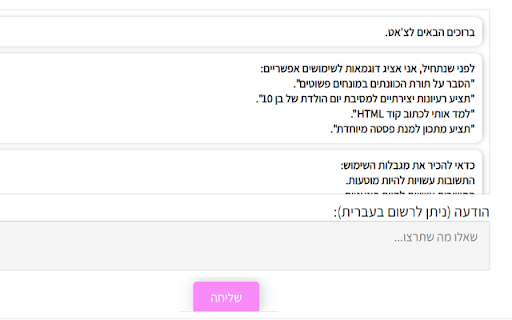
תוסף ייחודי שמאפשר לנהל שיחות בצ'אט בחינם, במהירות וללא פרסומות, באתר הקהילה הישראלית של ChatGPT. היעזרו בקיצורי דרך לאתרים המובילים מחפשים דרך חכמה ומהירה יותר להשתמש בצ'אט GPT? התקינו את התוסף הייחודי שיאפשר לכם להשתמש בצ'אט בחינם, במהירות וללא פרסומות. בזכות השימוש בצ'אט תוכלו לקבל מענה מהיר על כל שאלה או בקשה. התוסף מאפשר לנו לשפר את חווית החיפוש שלכם ולהביא לכם את התוצאות שאתם מחפשים במהירות. היתרון הבולט הוא היכולת שלכם להשתמש בקישורים מהירים לצ'אט באתר של הקהילה הישראלית, ולאתרים נפוצים נוספים בישראל. חסכו זמן יקר, קבלו מענה מהיר ועברו לחיפוש המתקדם בעזרת בינה מלאכותית. הצטרפו לחוויית חיפוש מתקדמת ומהירה בחינם.

AI Sider: ChatGPT + DeepSeek + Gemini
Seamlessly access ChatGPT, DeepSeek, and Gemini side-by-side in your browser sidebar. 🚀 AI Sider — Your All-in-One AI Sidebar for Chrome 📸 Smart Screenshot & Paste to AI • Full Page Screenshot — Capture the entire visible viewport and send it directly to any AI chatbot. • Region Screenshot — Select a specific area to capture and paste into your AI chat. 📋 Copy & Send Page Context Extract text content from any webpage and send it to your preferred AI for summarization, translation, analysis, or Q&A — all without copy-pasting manually. 📄 DOM File for Deep Analysis Generate a simplified, clean HTML representation of any webpage and upload it as a file to AI chatbots. Perfect for asking AI to analyze page structure, extract data, or debug web issues. 🎬 YouTube Video Summarization Automatically extract YouTube subtitles (with timestamps) and send them to AI for instant video summarization. Never watch a long video just to find the key takeaways. ⚡ Smart Page Actions Context-aware action buttons that adapt to the website you're visiting. Get relevant AI-powered shortcuts based on the page content — configured remotely and always up to date. 🌐 Works on Any Website AI Sider lives in your browser's native side panel. Browse any website while chatting with AI — no popups, no tab-switching, no distractions. 🔒 Privacy & Security • No data collection — your conversations stay between you and the AI providers. • No account required — just install and start using. • Open communication via official AI provider websites only. • 📝 Summarize articles, PDFs, and web pages • 🌍 Translate content on-the-fly • 💻 Debug code with screenshot context • 🎓 Research and study with AI assistance • 🎬 Get YouTube video summaries in seconds • 📊 Analyze webpage data and structure • ✍️ Draft emails and content while browsing Have questions or feature requests? Leave a review or reach out — we're constantly improving AI Sider based on your feedback!

ChatSearch: ChatGPT for Search Engine (GPT4)
ChatSearch is a free ChatGPT tool that enhances the efficiency of search engines. We have GPT4, Claude2, and Web access now! ChatSearch: ChatGPT for Search Engine - a free browser extension that aims to unleash the full potential of search engines like Bing, Google, Baidu, DuckDuckGo, and more. With AI tools powered by Microsoft Bing’s GPT-3.5, GPT-4, and Claude2, you can now easily access the powerful capabilities of artificial intelligence right from the search results page, taking your search experience to a whole new level. Install with just one click and start using it. With ChatGPT for microsoft Bing, you can now take your Bing search experience to the next level by effortlessly accessing the power of ChatGPT's language generation technology right within your search results page. Advantages of ChatGPT for Search Engine: 🚀 Enhance your search results in any search engine by integrating ChatGPT’s answers for users. 🥳 It is available for free use without any restrictions or the need to register an account. 💬 Start chatting with ChatGPT instantly by clicking the plugin button. 🤖️ Model support is expanded. In addition to GPT-3.5, you can also use GPT-4 and Claude2 to improve the accuracy of information. 🔍 Search functionality is enhanced, allowing you to utilize the powerful summarization capabilities of ChatGPT or Claude2 for web content. 🌍 Internet connectivity is improved, eliminating gaps and providing you with the most accurate content based on real-time web information. 🛫 Learn in one minute: 1️⃣ Choose an API type, we recommend the Developer API (stable, free to use). 2️⃣ Search your questions on various search engines and view the ChatGPT answers generated on the right side by Search+. 3️⃣ Click the extension button to start chatting directly with ChatGPT. ❓ Frequently Asked Questions: 📌 Is ChatGPT for Search Engine free? Yes, ChatGPT for Search Engine is free to use. Whether you are a domestic or international user, you can install it and use it immediately. 📌 What is the relationship between ChatGPT for Search Engine and ChatGPT? ChatGPT for Search Engine is an AI tool developed based on the capabilities of the ChatGPT model, which has powerful ChatGPT abilities. 📌 What model does ChatGPT for Search Engine use? ChatGPT for Search Engine supports GPT-3.5, GPT-4, and Claude-2 models. We will also support more large language models as soon as possible. ChatSearch is your most reliable search engine enhancement tool. With the powerful AI models GPT-3.5, GPT-4, and Claude-2, it provides you with the highest quality search content. You can rely on ChatSearch to analyze and summarize web content intelligently, greatly enhancing the real-time and accuracy of your search results. Elevate your content game with ChatGPT - the ultimate browser extension for unleashing the power of ChatGPT on the new Bing!

Wide GPT
Expand ChatGPT's screen instantly with 'Wide GPT' Chrome extension! No clicks needed, free and easy to install. Get more space now! You'll have more room to see and interact with your content with "Wide GPT," whether you're reading a story, writing code for your next big idea, or talking to AI. This extension is great for people who want to make the most of their workspace and avoid eye strain by not having to constantly scroll horizontally or resize their browser window. Simple to set up: just add "Wide GPT" to your Chrome browser, and you're good to go! You don't have to click any buttons or do anything else. The extension works in the background without being noticed and instantly makes ChatGPT's screen as big as it can be. As soon as you start, you'll be able to browse in a bigger and more immersive way. The best part? You can use "Wide GPT" for free. Why wait then? Get "Wide GPT" right now and start easily making the most of your screen space! Release log: 1.0.8 - Update the component selectors to follow the changes made by ChatGPT web interface. 1.0.7 - Fix the project page that was shrinking in the middle of the screen, now that page is ignored, no wide-screen will be applied to it. 1.0.5 - Fixed an issue with the enable/disable switch. - New version to try clearing the cache for Windows users who reported that the extension stopped working. 1.0.4 - Fixed the selectors to capture messages and make it wide again. 1.0.3 - Fixed the manifest.json to apply the extension on top of new ChatGPT URL. - Fixed the selectors to capture the prompt element textarea. 1.0.2 - Fixed manifest.json file to limit content access to https://chat.openai.com/ and cease requesting permission to access content on all websites. 1.0.1 - Enhanced element selector stability to prevent the extension from breaking when CSS classes are modified 1.0.0 - Added popup with preferences to: - Toggle the primary feature of the extension either inactive or active - Choose the width of the messages and prompt text input. - Buy me a coffee button.

ChatGPT to Help
Get Instant Help Anywhere and Anytime with ChatGPT AI Assistant on Chrome With the ChatGPT2Help extension, you can integrate artificial intelligence into your writing process. Whether you're drafting an email, social media post, or article, ChatGPT2Help can provide suggestions and corrections in real-time, helping you to write more effectively. 🤖 Customize Your Own Prompts - Add unlimited personalize prompts - Set default prompts - Add, Edit, Update, Reorder freely 🌎 Easy Translation: - Translate text between 100+ languages with ease. - Get accurate translations. - Save time and resources with this feature. 👨💻 Shared AI Responses: - Sync AI-generated responses across multiple browser tabs. - Never miss a response or message with this feature. - Continue having conversation with AI with content from different browser tabs. 📧 Smart Reply to Emails: - Respond to emails faster with the help of smart reply technology. - Save time by using pre-written responses generated by AI. - Customizable options for frequently asked questions and common inquiries. 📝 Instant Online Explanations: - Get instant answers to anything you want to know online. - The extension uses ChatGPT to provide quick and accurate explanations. - Easily search for explanations within the software interface. ✨ Fast Content Marketing: - Scale up your content marketing efforts quickly and efficiently. - Improve your writing skills. - Tools to optimize and analyze your content to increase engagement. 📈 Boost Ad Conversions: - Improve your ad copy. - Increase your conversion rates with targeted messaging. - Get suggestions for better headlines, descriptions, and calls-to-action. ✍️ Finish Essays Faster: - Write faster and more efficiently. - Get suggestions for better sentence structure, grammar, and spelling. - Save time and meet deadlines with ease. 🧠 Brainstorming Tool: - Generate new ideas and concepts. - Enhance your creativity with this feature. - Use this feature to overcome writer's block or brainstorm for new marketing campaigns. 📱 Social Content Creation: - Create social media content quickly and easily. - Use selected text as a starting point for your content. - Use different tone and style to increase user engagement. More and More ...
