
aiojhbmmflaiogelncfofmahkcmlpmlo
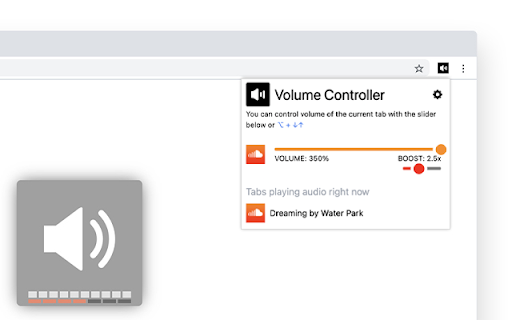
Boost your volume x6. Control the volume of tabs separately. Transform your browsing experience with Chrome™ Volume Controller, your all-in-one solution for mastering volume control for each tab seamlessly while also boosting volume when needed. ❗️❗️❗️ Curious why Volume Controller surpasses other options like volume master, volume controller, and audio enhancer? ⭐️ Effortlessly adjust volume with Alt+↓↑ Shortcut Keys. Find us now on the Chrome Web Store: - Chrome tab volume control extension - Control volume by tab Chrome - Chrome audio per tab extension - Chrome extension for individual tab volume control - Chrome volume booster extension - Boost volume by tab Chrome"

Volume Booster Pro
Volume Booster Pro is an application to increase the sound volume in the Google Chrome browser. It gives you the ability to amplify the audio on any site or web app you use in Chrome. With Volume Booster Pro, you can adjust the sound volume level on your computer, amplifying the sound to the maximum level. This is especially useful when you are listening to music, watching movies or online videos and the sound is too quiet or unintelligible. The main features of the application include: - Adjusting the volume level of the sound in the Chrome browser - Increase the sound to the maximum level - Friendly user interface for quick and easy sound volume control - Support for various types of audio files, including music, videos, audiobooks and more. Volume Booster Pro is a free chrome store app available to download and install from the Chrome Web Store. It also ensures that your privacy is protected and does not collect personal user data.

Volume Manager
Do note that once you started modifying volume: - You cannot toggle fullscreen of this tab. This is due to the Chrome API limitation. - Your system may not go into sleep/suspend/monitor off because Chrome will mark the current tab is "capturing" and inhibit doing so.

Sound Booster – Max Volume & Deep Bass
Boost your browser’s audio – perfect for YouTube, Twitch, and streaming! Enjoy max volume & rich bass instantly! Experience the ultimate audio upgrade with BrowserBoost, the extension engineered for maximum sound control. Amplify your audio up to 500% and enjoy crystal-clear sound with deep bass on YouTube, Twitch, Netflix, and more. Our cutting-edge technology meets the needs of streaming, gaming, and online conferencing. 🔊 Instant Volume Boost: Elevate your sound with one click for a superior listening experience. 🎵 Deep Bass Enhancement: Enjoy rich, immersive bass that transforms your audio. 🎚️ User-Friendly Interface: Easily adjust volume levels with an intuitive slider in a sleek control panel. 🌐 Optimized for Major Platforms: Specially designed for YouTube, Twitch, and other popular sites. ⚡ Quick & Easy Setup: Install, pin to your toolbar, and start enjoying enhanced sound quality immediately. Transform your online audio experience with BrowserBoost – where every sound counts.

Simple Volume Booster
Simple volume booster in your browser - increase your volume with sound control and bass booster Volume Booster is a simple, easy-to-use browser extension that helps you increase your volume and fine-tune sound on web pages. Using a lightweight sound control interface and optional bass enhancement, the extension boosts HTML5 audio and video playback in the active tab so you get louder, more satisfying playback where supported. 🎶Increase your volume for HTML5 audio/video with a convenient slider control. 🎶Sound control UI that is quick to access from the extension popup. 🎶Optional bass booster to add low-end emphasis when applicable. 🎶Includes a basic limiter to help reduce clipping at higher gain levels. ✅Works on pages that use standard HTML5 audio/video players (for example YouTube, SoundCloud). ✅Does not change your system (OS) volume or other apps’ audio. ✅May not work with DRM-protected or heavily customized players that block injected scripts. ⭐️Open a page with an HTML5 player (e.g., a YouTube video). ⭐️Click the extension icon, enable Boost, and move the slider. ⭐️You should hear increased playback volume in that tab.
