
aikochbgjfmeiccocianinmffgjghffp
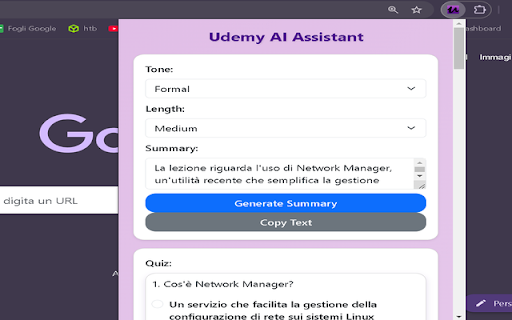
Your AI-powered learning companion for Udemy: summaries, quizzes, and flashcards. Udemy AI Companion is your AI-powered assistant designed to enhance your learning experience on Udemy. With this extension, you can: Smart Summaries: Quickly generate concise summaries of your lessons, helping you save time and understand key points effortlessly. Personalized Quizzes: Test your knowledge with interactive quizzes tailored to your lesson content. Interactive Flashcards: Create and use flashcards to memorize essential concepts. Chill Pomodoro Timer: Stay focused during study sessions with a visually appealing timer. AI Chat Support: Ask questions and get personalized explanations based on your lessons. Simplify your learning process and get the most out of your Udemy courses with Udemy AI Companion.

YouTube To Transcript: AI Summarizer & Chat
Get instant YouTube transcripts with AI summaries, insights, and chat features. Ideal for faster learning and note-taking. YouTube to Transcript instantly turns any YouTube video into text you can use. Get accurate transcripts, AI-generated summaries, key insights, timestamps, and even chat with the video’s content. Perfect for learners, researchers, and creators who want to save time and understand videos faster. ⚡ Instant transcripts for any YouTube video 🧠 AI summaries, key points & takeaways 💬 Chat with the video to ask questions or clarify content ⭐ Works directly on YouTube or via popup 📘 Great for studying, note-taking, and research

SolvelyAI - AI Homework Tutor & Study Helper
SolvelyAI is your AI Homework Helper—instant screenshot solving, step-by-step AI Answers, AI Summary, and Study Helper tools. Capture, Solve, Summarize, and Learn Anytime, Anywhere 🚀 Solvely.ai is the AI learning assistant for solving problems and understanding content faster. Our revolutionary One-Click Solve now gets you answers to an entire page of questions at once. 💬 👉 Your AI Homework Solver Stuck on a tough assignment? Whether it's one question or a whole page, get instant clarity. 🆕 One-Click Solve All : Solve all problems on your screen at once with one click. Press the magic button for instant answers, no screenshots required. ✔️ Take a Screenshot to Get Instant Answers: Quickly capture your homework questions and receive immediate solutions from AI. ✔️ Step-by-Step Solutions: Understand complex problems with detailed, step-by-step explanations that guide you to mastery. ✔️ Save Problems for Later Review: Keep a record of your questions and solutions for future reference and revision. ✔️ Solutions in Various Formats and Languages: Access solutions in different formats and languages to suit your learning preferences. 👉Your AI Content Summarizer Overwhelmed by long videos and articles? Get the key ideas in seconds. ✔️ Real-Time YouTube Summaries: Get AI-generated summaries, key points, and time-stamped chapters while you watch. Instantly grasp the core concepts of any video and jump directly to the most important parts. ✔️ Summarize Any Webpage in Seconds: Instantly distill any article, academic paper, or online report into a concise summary and key talking points. Absorb complex information at a glance and accelerate your research. 📌Pro tip: Use our quick capture shortcuts for faster question solving: 👉Learn Smarter, Not Harder Get the Solvely.ai extension now and embark on an extraordinary journey of knowledge and success. Unlock the power of AI and make every study session count! 💪📚🌟

Quizard AI - Homework Tutor
Study smarter with Quizard! Instant AI answers and explanations for your all your questions to help you learn and succeed! ✨ Homework & AI Answers Solver Are you struggling to understand your homework and study materials? Don’t worry, Quizard is here to help! Take screenshots 📸 and get instant answers, explanations, and related resources for any question. 💁♀️ 🪄 【 Instant and Accurate Solutions 】 ✅ Instant answers: in just seconds receive answers, explanations, and related resources to your question ✅ The #1 AI in accuracy: we are 20% more accurate than ChatGPT and deliver the highest quality, most accurate answers with speed ✅ 24/7 support: use Quizard anytime, anywhere, we’re always there to help you ✅ Math: Quizard can accurately recognize and solve even the most complex math problems that have symbols which can’t be copy and pasted 🔥 【 Take A Screenshot, Get An Answer 】 ✅ Screenshot feature: allows effortless question-asking by capturing a screenshot ✅ Highlight text: simply highlight and solve any question found online ✅ Type In Your Question: you can directly type your question into the text box to receive an instant answer ✅ Universal compatibility: use it on websites like Canvas, Blackboard, Moodle, Google Classroom, and more 🎓 【 Any Subject, Any Level 】 ✅ Any type of question: we can solve multiple choice, short and long answer questions, and provide step by step solutions to your word problems ✅ Help on any subject: from math, history, chemistry, biology you name it we got you covered ✅ Every grade level: whether you’re a college student, high school student, or even an adult looking to brush up on your knowledge, Quizard is the perfect tool to help you succeed. 🗣 【 Clarify Your Understanding 】 ✅ Ask follow-up questions: interact with Quizard to explore complex topics effortlessly ✅ Related resources: we generate you related resources from the web based on the question to confirm the solution we’ve provided and see how others have solved it 💻【 How To Use 】 🟪 Click the “Add to Chrome” button and pin it to the toolbar. 🟪 Log in to your account. 🟪 Press Cmd/Ctrl+Shift+K to wake up Quizard 🟪 Start working with AI! 🗣️【FAQ】 📌 Is it free to use? -Yes, we offer limited use for free. For unlimited access, you can choose the Quizard Pro Subscription. 📌 Is my Quizard Pro Subscription active on both the mobile and Quizard Chrome Extension version? -Yes! If you are a Quizard Pro subscriber link your device in-app or through the Chrome Extension 📌 How can I link my Quizard profile to the extension or from the extension to the app? -From the extension, go to your settings and click “Link Device.” You will then receive further instructions for linking with your mobile device! 📌 ChatGPT is banned in my country. Does it work in my country? -Yes. Our chrome extension works in all countries. 📌 Can I use your service on my phone? -Yes. Quizard is available on all devices (Chrome Extension, iOS, Android). Search up “Quizard AI” in the App Store/Google Play Store

AnswerAI - Homework AI Tutor & Study Helper
Your AI assistant ChatGPT Plugin.Answer questions and get AI answers quickly,write emails,articles,chatbot,learning assistant. Ask anything and learn everything with one of the leading AI educational apps for student success. Answer.AI is the only app that is there for students both in and out of the classroom, and revolutionizing the way you learn. With Answer.AI's web extension, your screen will become a powerhouse of personalized education and learning. You can screenshot or highlight any question on your browser and get step-by-step solutions, generate brainstorming drafts for any type of writing, chat with AskAI about tough concepts, master complex math questions with Geometry mode, and more. With over 6 million users, our mission is to help our evergrowing community achieve their milestones and crush their goals both in and out of the classroom. 🥳Here are some features you can look out for: 📍Upload a screenshot for instant answers Easily upload a screenshot of your question, and Answer.AI will analyze it to provide accurate answers—perfect for complex math problems and more. 📍Ask and Answer Click the Answer.AI icon to initiate a real-time conversation, or select any text on a webpage to receive detailed answers instantly. No matter the complexity, Answer.AI offers clear explanations. 📍Writing Assistant Answer.AI also serves as an AI-powered writing assistant, helping you create high-quality content in seconds, making it perfect for essays, articles, and more. 📍Smart Homework Solutions Submit your questions and get step-by-step solutions, ensuring you not only get the correct answer but understand the underlying concepts. 📍Highlight and Solve Answer.AI works on any website you visit and integrates smoothly into your Chrome browser. Simply highlight text or use the extension to get answers quickly and efficiently. 🌟 Getting Started: 1️⃣ Click the Answer.AI icon on your screen to start a conversation. 2️⃣ Highlight text on any webpage, click the Answer.AI icon, and receive an answer immediately. 🧑💻 How to use the Chrome Extension: 1️⃣ Click the "Add to Chrome" button. 2️⃣ Log in to your Answer.AI account. 3️⃣ Start using Answer.AI! You can open the Answer.AI sidebar anytime you need help. Answer.AI offers both free and premium versions. Free users receive limited access, while premium users enjoy enhanced features and unlimited usage. 📍What platforms does Answer.AI support? Answer.AI is available on iOS and Android (download via the Apple Store or Google Play), as well as a Chrome extension for Windows and Mac users. 💯Ready to upgrade your learning experience? Install Answer.AI today and leave your feedback—your suggestions help us continue to innovate. You can contact us at support@answerai.pro or go to our website, https://answerai.pro for more info. We love hearing from you!
