
aibgcngnlebelbhbfgoinonfbngkdmbj


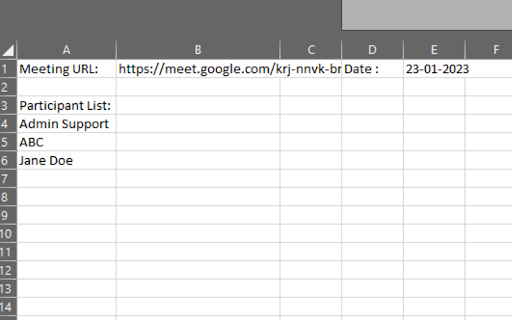
1. Install and pin 📌 the extension, log in to your google account and sync your Chrome browser. 2. Select the participants' view in Google Meet, accept the permissions, close and reopen the people to capture attendance. 3. Click the Attendance icon of the extension to open the attendance spreadsheet. 4. Attendance along with the attended duration will be exported in a spreadsheet. Auto features of the extension include: 1. Add a sheet in the spreadsheet. 2. Create a new spreadsheet. 3. Turn Attendance collection off. 4. Auto scroll through participants. 5. Snapshot attendance. With this extension, you will be able to auto-record the attendance of the participants in a google spreadsheet. This extension will let you re-size the browser's window 💻 in order to emulate various resolutions.

Auto Admit for Google Meet
This extension allows you to automatically approve join requests from external guests for Google Meet and hangouts meet. By installing this extension in Google Chrome, when you are inside the Google meet rooms, it will automatically allow external guests to join the Google Meet call by clicking the admit button on the popup. This software extension is very useful when you need to have a call with users on google hangouts meet who are not part of your company. It helps save you from having to accept every external guest manually as this is done automatically by the software extension. To begin using our software extension for google meet app, here are the steps you need to follow. 1) Install our software Auto Admit for Google Meet 2) Go to the Google Meet website and click on the software extension icon 3) Our software will begin working and will automatically accept external guests once you click on our extension icon If you have any questions about our software which works for google video conference, please contact us with your query. Updated so there is a button on the bottom right corner of your Google Meet call, so you can activate/switch off the auto admission feature. Fixed a bug where the extension was not working if your default language was not english. Feature was not working due to an upgrade inside Google Meet, updated the extension so the auto admit feature works once more. Disclaimer: Please note this extension is NOT made by Google and is made by an independent development team. All copyrights belong to their respective owners. Google doesn’t endorse or sponsor this Chrome extension. Auto Admit for Google Meet is not owned by,it is not licensed by and is not a subsidiary of Google Inc.

Mr Meet - Take Attendance in Google Meet
Adds new class-oriented functionality to Google Meet. Take attendance and select a random student. The most complete and easy to use attendance extension for Google Meet! Its integration with Google Drive allows you to keep everything organized in automatically created folders and spreadsheets. More info and screenshots here: https://github.com/martinmorenoc/mr-meet.git

Meet Attendance Tracker - Your Smart Meeting Attendance Assistant
Automatically save and manage your Google Meet attendance. Easily view history, analyze data, and export to CSV/JSON with one click. Are you still struggling with manually tracking participants in your Google Meet sessions? The Meet Attendance Tracker extension will completely revolutionize your meeting experience! With a single click to install, it automatically and securely records the attendance for every meeting, allowing you to focus on the content, not the tedious task of roll-calling. Explore the Key Features: 🔹 Comprehensive Dashboard: Once installed, you'll have a clean and intuitive dashboard that centralizes all key data: Total Meetings: Easily track all the meetings you've recorded. Total Participants: Understand the total number of unique individuals who have joined your meetings. Average Participants: Quickly get the average size of your meetings. Average Meeting Duration: Analyze the average length of your sessions to optimize efficiency. 🔹 Detailed Meeting History: Automatically saves a detailed record of every meeting. You can review at any time: Meeting ID, precise start & end times, and total duration. A complete participant list, clearly showing who attended. Record creation time, ensuring data accuracy and traceability. 🔹 Powerful Search: Need to find a specific meeting or check someone's attendance? Simply enter the meeting ID or participant's name in the search box to quickly filter through all relevant records in seconds. 🔹 Easy Data Export: Effortlessly export your attendance data into universal formats to meet various reporting and analysis needs: Export to CSV: Convenient for data processing and chart creation in Excel or Google Sheets. Export to JSON: Ideal for developers or users who need to integrate the data into other systems. Exported data is comprehensive, including meeting ID, timestamps, and detailed participant information. 🔹 Top Participants Leaderboard: Want to know who your most active and engaged members are? The "Top Participants" feature provides: A ranked list of participants by the number of meetings attended and total duration of participation. An excellent tool for teachers to assess student engagement or for team managers to understand member commitment. 🔹 Secure & Private: We know how valuable your data is. All meeting and attendance records are 100% securely stored on your local computer and are never uploaded to any external servers. Your privacy is fully protected, and you have complete control over your data. Perfect For: Teachers & Educators: Easily record student attendance for online classes, saying goodbye to manual roll calls. Project Managers & Team Leads: Accurately track participants in team meetings, providing data support for project management. Event Organizers: Keep an accurate list of attendees for your online webinars, lectures, or networking events. Any User who needs a reliable, automated attendance tracking tool for Google Meet. Install Meet Attendance Tracker today and make your meeting management simpler, more efficient, and more secure than ever before.

Meet Attendance Tracker – for Google Meet
The most accurate and reliable chrome extension to track attendance in Google Meet with just a single click ! The most reliable and accurate chrome extension to track attendance in meet.google.com with just a single click ! once you have successfully installed this extension whenever you join a meeting in meet.google.com a new button named Track Attendance will be appearing in the bottom left of the google meet UI on clicking that button the attendance tracking script will start automatically and show how long the attendance is being monitored and clicking on that button again would generate the attendance report The attendance report will contain the following details : 1. Attendance tracking start time, 2. Attendance tracking stop time, 3. Total number of persons attended the meeting, 4. Total class duration , 5. Count of people who attended more than 65% duration of the class, 6. Count of people who attended less than 65% duration of the class, 7. List of all the people names with their total attended duration and their attendance percentage 8. The data of people who attended less than 65% duration of the class will be highlighted in red color This extension was made specially for teachers to track the attendance of their students in online class during this pandemic, It can also be used to have a general overview after the end of the meeting since it can give you details like how many attended and how many attended more than 65% duration of the meeting etc... Let us know if you want to add any new features to this extension contact : shaileshrkumar@hotmail.com
