
ahhjfofclhjllmiglebianajpmkabcbc
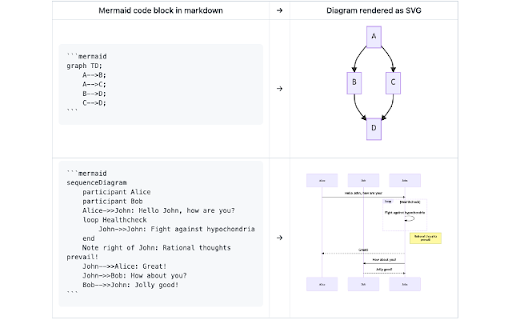
Render mermaid diagrams in markdown files in GitHub and GitHub Gist (mermaid@8.14.0). NOTE: As announced at 2022-02-14, now GitHub officially supports Mermaid code blocks in Markdown files. You no longer need to install this Chrome extension in most cases. https://github.blog/2022-02-14-include-diagrams-markdown-files-mermaid/ An extension for Google Chrome and Chromium to render mermaid diagrams in markdown files in GitHub (https://github.com/*) and GitHub Gist (https://gist.github.com/*). * The extension renders mermaid code blocks without sending the mermaid code to non-GitHub services, which is suitable for private repositories. * The embedded mermaid version: (mermaid@8.14.0)

Markdown Primer
A fast Markdown viewer with Extensions support, Themes, and Extra modules: YAML, LaTeX, Diagrams, Web Fonts A clean and powerful Markdown reader with enhanced syntax support, smart extensions, and user-friendly features. Markdown Primer takes the .md files to the next level with support for basic and extended syntax, custom modules (e.g. Callouts, Code Syntax Highlighting), themes (Light, Dark, GitHub, etc), LaTeX (MathJax), and diagrams (Mermaid), right in the browser. Whether need to read documentation, notes, or technical content, this extension ensures the Markdown is clear, sharp and looks professional. Bonus: Includes Font Awesome free web-fonts. MathJax and Mermaid are disabled by default, so they do not occupy memory. They can be enabled via toggles in the Options. 📁 Also supports local Markdown files — just enable "Allow access to file URLs" for this extension in Chrome’s extension settings. ☑️ More information and the Syntax Manual can be found on the support page. https://netbuddy.net/mdprimer/ ✅ Advanced Modules • Tables with Alignment • IDs & Classes for headings, links, and images • Definition lists • Callouts (Blockquotes with Roles) • Code syntax highlighting (HTML, CSS, JS, PHP) • Task Lists • Comments • Footnotes ✅ Power Features • Marked.js as the core Markdown parser • YAML frontmatter rendering (show - hide) • LaTex & MathML notation • Mermaid diagrams for flows and charts • Multiple built-in themes including GitHub-style, dark mode, and more • Font Awesome free web fonts • Support for text files (.txt), with the option for styling 📌 Built for users who want a solid Markdown experience with powerful extras—without clutter.

Mermaid Diagram Renderer
Automatically detects and renders Mermaid diagrams on any web page. Supports fullscreen view with drag/zoom and copy to clipboard.

Mermaid Preview
Preview Markdown and Mermaid files, support LaTeX math equations rendering. Mermaid Preview is a powerful extension that instantly renders Markdown and Mermaid diagram files in a beautiful, user-friendly interface. Simply drag and drop your .md or .mermaid files, or paste a URL to preview documentation with formatted text, tables, code blocks, and stunning flowcharts, sequence diagrams, Gantt charts, and more. Features include dark/light theme toggle for comfortable viewing, export functionality to save Mermaid diagrams as high-quality PNG, JPEG, or SVG images, and support for both local files and remote URLs. Perfect for developers, technical writers, and anyone working with technical documentation or creating visual diagrams. The extension uses the latest versions of Mermaid.js and Marked.js libraries to ensure full compatibility with modern syntax and features. Support print markdown or mermaid file.

Mermaid extension
Azure devops support for mermaidjs
