
ahdhipiinailgchfffngafjlcfickmam
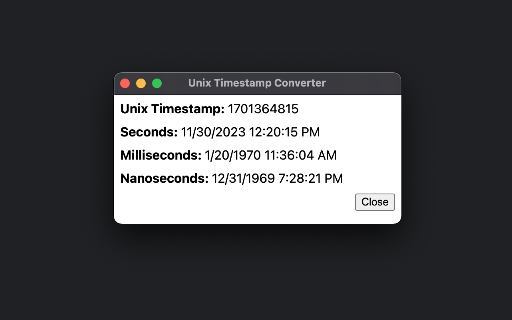
Displays a Unix timestamp (e.g. 1701364815) as a human-readable date and time. Interprets seconds, milliseconds, and nanoseconds. Adds a context menu item to convert a unix timestamp (in seconds, milliseconds, or nanoseconds) to a human-readable date and time. Useful for debugging software.

ClickUp Git Task Title Formatter
This extension will format ClickUp task name without losing any character Are you having trouble about task name including unicode when creating git branch in Clickup? This extension will format it to make the task name friendly, readable. Just open Create Branch modal in ClickUp and click Format it on this extension. => Task name will be format to friendly, readable form. => You will never to confuse about your task. * Currently support for Vietnamese characters only.

Life DeFi
There are state of the art features that include username purchase, import accounts, names on transactions, and many more exciting features. The future of LIFE looks amazing with a marketplace in the works, swap functionality, on/off ramp, and

Timezone Converter
My Chrome Extension This extension allows easy conversion of natural language timestamps to a user-configured timezone Usage: set your timezone in the extension popup, use your mouse to select text containing a timestamp, e.g. Sat Aug 17 2013 18:40:39 GMT+0900 (JST) or 9am PST, a popup containing the timestamp converted to your timezone will appear specifying the timestamp in your configured timezone.

PromptGPT - Speak/Listen/GPTify
Turn any text field into a ChatGPT prompt and get the response right there, + Speaking and Listening abilities with ChatGPT web Introducing the PromptGPT Chrome Extension: Streamlined Communication with ChatGPT! The PromptGPT Chrome Extension is a powerful tool designed to enhance your online communication experience. With its seamless integration, it transforms any text field, whether it's an input box, a textarea, or any editable content, into an interactive ChatGPT prompt. Gone are the days of switching between tabs or applications to get the answers you need. One of the standout features of this extension is its ability to quickly retrieve responses from ChatGPT. By simply appending the command '!#GPT' (case insensitive and without quotes) to the end of your text prompt, you can instantly generate a comprehensive response. The response is then automatically copied to your clipboard, allowing you to effortlessly paste it back into the same text field. This eliminates the hassle of manually switching between different interfaces, saving you valuable time and effort. Moreover, the PromptGPT goes beyond text-based interactions. It offers Speaking and Listening abilities, giving you an immersive conversational experience. Each response from ChatGPT is accompanied by a convenient Speak icon, allowing you to hear the generated response in a natural and engaging manner. Additionally, the extension provides a microphone icon for speech recognition, enabling you to dictate your prompts instead of typing them out. This feature further streamlines the communication process, making it even more effortless and efficient. With the PromptGPT Chrome Extension, you can now access the power of ChatGPT seamlessly within your browsing experience. No longer will you have to navigate away from your current context or deal with tedious copy-pasting tasks. Install the extension today and enjoy the benefits of instant, accurate, and context-aware responses right at your fingertips. Experience the future of conversational AI with the PromptGPT Chrome Extension. Upgrade your communication capabilities and unlock a world of efficiency and convenience. Install it now and revolutionize the way you interact with text fields online!
