
agfgfblilojgcocejiganaempijdmkeg

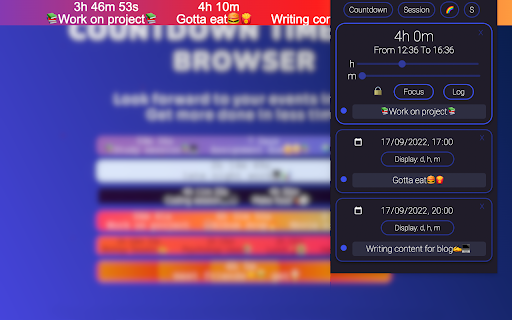
Countdown and Session Timer for browser Benefits of countdown for your events • Better mood and more excitement. • Clarity and perspective • Helps with anticipation of event Benefits of session timer • Attention and concentration are improved. • Better time-management abilities. • Increased productivity and motivation. Countdown and session banner sits at the top of your page. Customize your banner to fit your events and sessions with different colors and fonts. Session timer is a great tool to increase your focus and productivity. You can use it for study, work or any type of session⌚⏳

Bandcamp Tempo Adjust
A browser extension to detect and adjust track tempo on Bandcamp Detect and Adjust the tempo of tracks on Bandcamp 👉 Pick from ±6, ±10, ±16, or WIDE mode. 👉 Click on the percentage to reset the tempo 👉 Detect the BPM of tracks on album pages 👉 Adjust tempo on wishlist / collection page 👉 You're now a DJ! Bandcamp Tempo Adjust also includes a purchase export feature. Go to your purchases page to see how much you've spent on Bandcamp this year or export a CSV of all of your purchases.

Prayer Times: In-Browser Prayer Notifications
In-Browser Prayer Times and Notifications Prayer Times: In-Browser Prayer Notifications for Google Chrome Support this extension: https://www.buymeacoffee.com/jalalmostafa 3.0 Chrome Manifest v3 New options page Bug fixes Hanafi Adjustments 2.2.0 * Hijri dates and its adjustments * UI improvements 2.0.0 * Specify your location manually (useful for VPN users) * new options page * reduced extension size * bug fixes * re-written using react/typescript/webpack 1.0.0: * Support all calculation methods for muslims around the world * Notifications per prayer time! * Better Performance (less overhead on memory) * More prayer times! 0.0.3: * Option to change between 12Hours and 24Hours Formats. * Notification on updates * Bug fixes

Time Card Calculator
Online Time Card Calculator to track work hours and pay. Time card calculator with lunch break, biweekly schedules and decimal time Whether you're tracking yourself or managing a team, my time card calculator is here to help. This robust tool offers a range of features that cater to various tracking requirements, making it an essential addition to your workflow. Manage work with free time card calculator. It's designed for simplicity and efficiency, ensuring you spend less minutes calculating and more focusing on what matters. From freelancers to large teams, our extension is perfect for anyone looking to calculate time card accurately and easily. 💎 Key Benefits: 1️⃣ Simplifies tracking 2️⃣ Ensures precision 3️⃣ Easy and accurate. 📑 How to use the time card clock calculator: 🧐 Step 1: Install the Extension 🛠️Open Chrome: Make sure you're using the Google Chrome browser. 🛠️Visit the Chrome Web Store: Search for our time card calculator. 🛠️Add to Chrome: Click the "Add to Chrome" button to install. 🚀 Step 2: Open the Extension 🔸 Click the Extension Icon: After installation employee time card calculator, you’ll see the extension icon in the top-right corner of your browser. Click on it to open the time card calculator. 🔸 Sign In (Optional): If you want to save your data and access it from multiple devices, sign in with your account. 💸Step 3: Calculate what you need 🔹Click Calculate: Press the "Calculate" button and get your total worked. The time card hours calculator will show you everything, including or excluding breaks as needed. 🔹View in different Format: The results can be displayed in decimal using the time card calculator decimal option or in a traditional variant. ❓ Frequently Asked Questions (FAQs) About the Time Card Calculator free Chrome Extension: 📌 Q1: Can I use time card decimal calculator format? 💡 A1: Our extension allows you to convert into decimal. Simply select this option to view it in decimals. 📌 Q2: Is it possible to use military format? 💡 A2: Yes, the military time card calculator feature supports this. 📌 Q3: Can I track breaks separately? 💡 A3: Absolutely! Use it to add multiple breaks throughout your workday. Just input the start and end times for each break. 📌 Q4: Can I use the extension offline? 💡 A4: Yes! You can input and save data offline 📖 Tips for Best Use: Enhance your experience with our time cards calculator extension by following these additional tips. 📝 Set Regular Reminders: Schedule reminders to update your entries with time card punch calculator throughout the day to ensure accuracy 📝 Batch Entries: If you work in blocks, enter your start and end in batches. Also you can insert biweekly time card calculator with lunch 📝 Template Setup: Create templates for regular schedules to streamline the data entry process. 🔍 Double-Check Entries: Regularly review your entries to correct any mistakes. 🔍 Consistentsy: Use the same format (regular or military) consistently for all entries to time card calculator with breaks works properly 🔍 Account for All Breaks: Ensure all breaks are accurately recorded, using the time card hour calculator with breaks feature. 👨💼 Time card calculator hours blocking: Implement blocking techniques to structure your day and increase productivity. 👨💼 Prioritize Tasks: Use the time card calculator in decimals to prioritize tasks based on the time required for each. 👨💼 Review & Adjust: Regularly review your minute usage and adjust your schedule to improve efficiency. ❓ Ensure you are using the latest version of calculator for time cards ❓ Keep the extension updated for the latest features and fixes. ❓ If you encounter any issues with calculate time cards, contact our support team. Using our time card calculator online, you'll simplify your tracking process and enhance accuracy. If you have any more questions or need further assistance, feel free to reach out to our support team.

Browser Screen Time
Keep track of the amount of time you spend on the internet Keep track of the amount of time spent on the internet with this simple extension. The information is displayed in a simple chart to make viewing time spent easy. You can see time spent in a single day or a specific interval of time. This add-on is meant to fix the problems with the "Mind the time" add-on. For example, watching videos will not stop the timer from running. Help develop browser screen time: https://github.com/aaaeka/browser-screen-time
