
agchhomhkimcgheikdcijjpohgjlflll
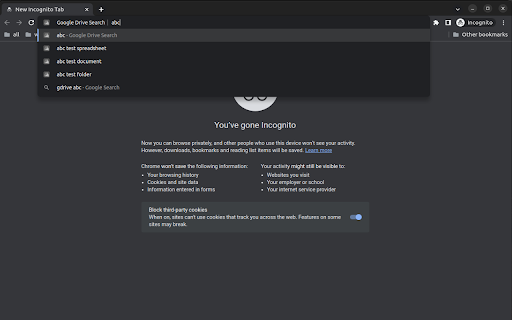
Google Drive Quick Search is a powerful yet simple Google Chrome extension that allows you to search your Google Drive with live… Google Drive Quick Search is a powerful yet simple Google Chrome extension that allows you to search your Google Drive with live results without leaving the address bar. Save time and enhance your productivity by finding your documents and folders quickly and easily. Instant Drive Search: Type 'drive' followed by the Tab button in the address bar to initiate a search in your Google Drive. Get live search results as you type, displaying matching documents and folders instantly. Seamless Integration: Google Drive Quick Search integrates seamlessly with your browser, making it a natural part of your browsing experience. No need to switch between tabs or windows; find what you're looking for directly from the address bar. Easy Setup: With minimal setup required, simply grant the read-only Google Drive API access for your current account, and you're ready to go. Your privacy and security are our top priorities, so rest assured that your data remains protected. Efficient Workflow: Boost your productivity by reducing the time spent navigating through your Google Drive. Quickly locate and access the files and folders you need with just a few keystrokes. Lightweight and Fast: Google Drive Quick Search is designed to be lightweight and fast, ensuring it doesn't slow down your browsing experience or interfere with other extensions. Experience a new level of convenience and efficiency with Google Drive Quick Search – your ultimate Google Drive search companion. Try it today and revolutionize the way you search and access your files on Google Drive.

Upload to Google Drive™
Boost productivity with Upload to Google Drive™ – save your photos, videos, files and other documents directly to Google Drive™ 🌟 Upload to Google Drive™ is your all-in-one solution for seamless file uploads. Easily transfer documents, photos, videos, and large PDFs to your Google Drive™ account with just a few clicks. Whether you need to save important files or access them across multiple devices, this extension keeps your digital life organized and accessible. 🚀 Quick Start Tips 1️⃣ Install and pin the extension for quick access. 2️⃣ Sign in to your Google Drive™ account. 3️⃣ Click the extension icon to open the upload window and set your preferred folder. 4️⃣ Drag and drop files, documents, photos, or videos, or right-click on a link to upload it directly to Google Drive™. 🔑 Key Features: - Fast Uploads: Save files effortlessly without opening multiple tabs. - Wide Format Support: Upload documents, spreadsheets, presentations, PDFs, and more. - Media Uploads: Store photos, videos, and images with ease. - Secure Environment: Ensure your files remain safe in Google Drive™. 🖼️ Save Photos and Videos with Ease Not just for documents! Upload to Google Drive™ makes it easy to save photos, images, and videos, making it an excellent tool for photographers, artists, and content creators. 🎥 Archive Videos Instantly Whether you're a videographer or capturing everyday moments, this extension ensures that your videos are safely stored and accessible whenever needed. ⏱️ Save Time and Boost Efficiency Upload files to Google Drive™ instantly without downloading them first. This feature is especially helpful for users managing large numbers of documents, images, and media files. 👨💻 Simplified File Sharing Share important files, photos, and videos with colleagues, family, or friends directly from Google Drive™. 💻 Browser Compatibility Currently compatible with Google Chrome. We plan to extend support to Mozilla Firefox, Microsoft Edge, and Safari soon, ensuring broader accessibility. ⚙️ Planned Future Features: - Link Sharing: Instantly generate a sharing link after uploading. - File Conversion: Convert Microsoft Office files to Google Docs format. - Multi-Account Support: Choose different accounts for immediate uploads. 🔒 Enhanced Security Protect sensitive files with Google Drive’s secure environment. Only you and authorized users can access your uploaded files. 📤 Upload Multiple Files Simultaneously Save time by uploading multiple files at once, ideal for managing bulk content effectively. 🖥️ Screenshot Capture Feature Quickly capture and save screenshots directly to your Google Drive™ folder. Perfect for visual records, project documentation, and saving important information. 📱 Access Files Anywhere Manage and access your files easily, whether you're at home, work, or on the go. 📚 Ideal for Students and Educators Streamline the process of saving and sharing lecture notes, research papers, and multimedia presentations. 🎓 Boost Productivity for Professionals Save and share work-related files, reports, and documents with ease. Collaborate effortlessly with your team. 👥 Valuable for Organizations and Businesses Seamlessly integrate with cloud storage infrastructures, keeping records, confidential documents, and critical files secure and accessible. ✅ Get Started Today! Transform your file management experience with Upload to Google Drive™. Download the extension and enjoy effortless organization, quick uploads, and enhanced productivity. ⚠️ This extension is developed by third-party developers and is not affiliated with Google LLC or its subsidiaries.

Quick Drive
One click access to your recent drive files Did you recently visit a file and have a hard time getting back to it? Are you in a meeting with someone and you want to share a document quickly with them? Look no further! This is the product for you!! *Mission Statement* Access the Google Drive file you are thinking about in less than 30 seconds. **Quick filters** Select between doc, slide or sheet. Use the input text box to filter your files by name. (regex is not yet supported) Additionally, you can use the provided tags to quickly search through predefined names. (This will be configurable soon!) Keyboard Shortcut: Alt+Shift+D (you can change this in chrome://extensions/shortcuts) Caveats: I've purposely limited it to docs, sheets and slides. This solves 99% of the use cases. Versions: 1.0.0 - Add task integration, tag extraction and filtering. FAQ: 1) Why can't I go to drive.google.com and search it myself? Of course you can. You can also start a fire using sticks and stones, but do you want to do that? You would end up spending ~ 5 minutes to search using Google Drive. Now imagine spending 5 min every time you want to get to your document! Install this extension and get that edge over your colleagues and make a difference in your career!! ;-)

Google Sheet Search
This extension adding search for google docs sheets Usage 1. Install 2. Reload google sheet page 3. Click search button 4. Enjoy

Copy Notes, Text, Screenshots to Google Drive
One click to copy text, images, and screenshots to Google Docs and manage your Drive directly in Chrome Toolbar - web research tool. One-click to copy web text and images to your Google Docs and streamline your research: 1. Copy-paste Text, Images & Screenshots to your Google Docs via right-click and hot-key 2. Manage Google Drive vie Chrome Toolbar (select, create & open Folders and Docs) Data Privacy The extension: 1. only accesses data it strictly needs to perform its main function - It accesses information from users' Google Drive in order for users to select and create new folders and documents to save text and images to - It accesses information found on the webpages the user browses to store that information to the Google Drive documents selected by the user 2. does not store, share or transmit in any way any Google user data 3. does not use or transfer the data for serving ads, retargeting, personalized, or interest-based advertising 4. does not allow any other humans to read the data Home page and Privacy Policy: https://www.web-research-assistant.com/
