
afoejdbdbdfpdhhemjoojjagmcpjjpla
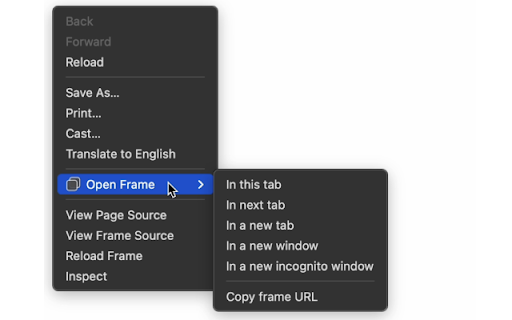
Adds context menu items to open a frame (or iframe) in the current tab, a new tab, new window, or incognito window. Adds context menu items to open a frame (or iframe) in the current tab, a new tab, new window, or incognito window. This extension will copy and use the frame URL to open the new tab or window. Version 1.1 Adds "In next tab" menu item which opens a new tab after the current tab.

Print this frame
You can print only the selected frame in frameset HTML page. You will see the [Print this frame...] on the context menu by right-clickking in the frame of the page that uses . By selecting the menu item, you can print only the contents of the frame. This command does not reload the contents of the frame. You can also use this function for the contents received HTTP-POST.

Iframe QuickLink - Open Iframe URLs in a New Tab
Simplify development: Open iframe URLs in a new tab instantly with Iframe QuickLink. 🛠️ Developer's Toolbox: A valuable tool for developers to enhance workflow. ⏰ Time-Saving: Eliminates manual steps, making iframe inspection and interaction more efficient. 🌐 Streamlined Workflow: Simplifies the process of navigating and working with iframe elements in Chrome.

PikPak Browser Extension
Save your favorite content to your PikPak cloud drive with the most convenient assistant. [ Description ] This extension intelligently identifies resource links in web pages, making it easy for users to add them to PikPak in one click for saving and viewing. [ Kind reminder ] 1. After installing this extension, the "PikPak icon" button will be displayed next to the resource link in the webpage by default. Click it to add it to PikPak. 2. If you think that this mode affects the web browsing experience, you can enter the "Basic Settings" interface of this extension and change the display time of the PikPak icon button to "hover the mouse" or "select the link"; 3. If you have any problems during the use of PikPak, please join the official communication group feedback https://t.me/pikpak_userservice_en

Video Downloader Web
Download videos from popular websites in different resolutions and watch it later with video downloader. One click to save video. Video Downloader Web is a Chrome extension for downloading video from websites you want (with possible restrictions by the website’s privacy and copyright policies.) Download videos from websites and watch them offline! The extension works on sites - Twitter, Facebook. These platforms offer an endless stream of engaging videos, from news clips to viral memes and music videos. However, most of these platforms do not have a built-in download feature, which makes it challenging to save videos offline for future reference. Video Downloader is an easy-to-use tool for downloading videos from various websites and saving them for offline use. Using extension is easy: 1. Install the Video Downloader extension and open a web page with a video. 2. Click the extension icon. 3. In the Video Downloader pop-up window, select the video you want to download – and it will be saved to your device in the best quality available. Thanks to Video Downloader Web, you can save your favorite videos and watch them later: When your device goes offline during a commute, long-haul flight, or internet outage, you’ll still have access to your downloaded videos! Use video downloader for free without any registration.
