
afhmplbnocjhbpmdfiefplmaliagpfch
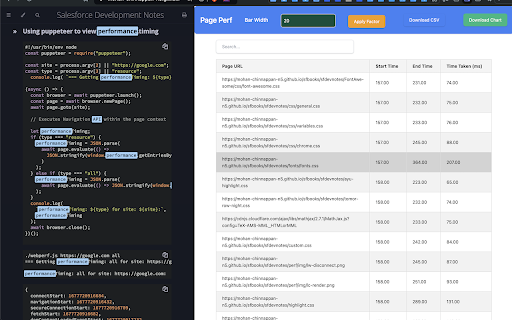

Track performance metrics of visited URLs and display waterfall chart. The Performance Metrics Tracker is a powerful Chrome extension designed to help developers and analysts monitor and visualize the performance metrics of web pages. This extension captures key performance indicators (KPIs) of visited URLs, including start and end times, and presents them in a comprehensive waterfall chart. • Detailed Metrics Collection: Automatically collects performance metrics such as start and end times of web page navigation and resource loading. • Interactive Waterfall Chart: Visualize performance data with an interactive waterfall chart, which displays the duration of each web request in a clear and engaging manner. Customize the chart with adjustable bar widths . • Dynamic Table View: View and manage performance metrics in an easy-to-read HTML table. The table supports sorting and searching, and includes options to wrap long URLs for better readability. • Export Options: Download the performance metrics table as a CSV file and the waterfall chart as an SVG file for further analysis or reporting. • User-Friendly Interface: Featuring a side panel for seamless integration into your browsing experience, allowing quick access to performance data without disrupting your workflow.

Candi-Tab
A chrome extension for tab page - Custom Drag-and-Drop Layout. Build muscle memory for your most-used tools. Click faster, think less. - Setup once, use everywhere. Keep your workspace consistent across all your devices instantly. - Use themes like GitHub, Dracula, or Tokyo Night to match your editor and reduce eye strain. - Hands-free navigation. Filter bookmarks or search the web without leaving your keyboard. - Lightweight and ad-free. Opens instantly so you can focus on your code, not the dashboard.

SanitizHAR
A simple chrome extension to sanitize HAR file contents SanitizHAR is a simple Chrome devtool extension that allows you to handpick and hide any sensitive headers, cookies, or query params from your HAR file. Simply go to the dev tools tab, choose all the fields you want to sanitize, and get your squeaky clean HAR file. Piece of cake!

ScrapboxQuickLink
An extension that makes it easy to copy links in Scrapbox format. Third party extension for Scrapbox users. This is a Chrome extension to easily generate links for Scrapbox. Clicking on the extension menu that appears when right-clicking within a page will copy the link to the clipboard in the following format. * Right-click within a page: [page-title URL]. * Right-click on a selected text: [URL selection-text]. Please feel free to contact us for any improvements or bugs on GitHub. Please feel free to contact us. https://github.com/okaryo/ScrapboxQuickLink

Clipboard Manager
This chrome-extension is a tool to keep more than one "clip board" at once. While active, pressing "ctrl + c" will save the… This chrome-extension is a tool to keep more than one "clip board" at once. While active, pressing "ctrl + c" will save the selected text to the extension. A button can be pressed to clear the whole thing. Wanna write directly into the extension? No problem! Just click the icon, write what you want to save and press the save button.
