
afgbckekjlfkfhklldgdndiagddhbohm
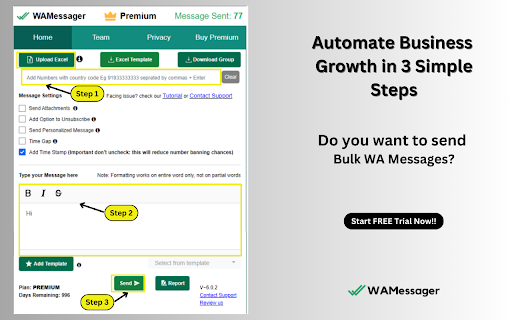


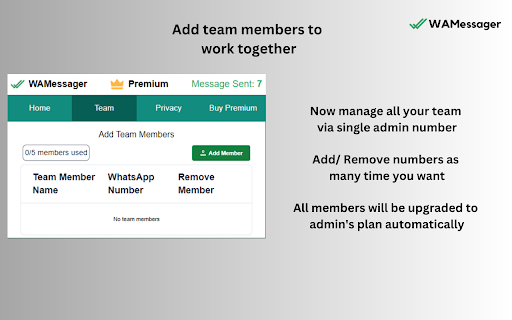
Connect with your customers via WhatsApp™. Send WhatsApp™ Bulk Messages without saving numbers using WAMessager- the Best WA Sender FREE Marketing Software & Automation Tool. Comes with Priority Support via WhatsApp™/ Email Core features - 1. Connect with customers without saving numbers by sending them messages easily. 2. Add custom delay time after each message, batching. 3. No software installation needed, just a simple chrome extension. 4. Extremely simple to use. 5. Use formatting (*BOLD* _italic_ ~strikethrough~ & EMOJI) to communicate better with your customers. 6. Name customization in message. 7. Privacy Blur/ Quick Reply. 8. Send image, audio, video file 7 attachments with captions. 9. Filter contact numbers. 10. Give contacts an option to unsubscribe. 11. Download unsaved contacts/numbers from groups, broadcast lists and more… 12. Download/export/save all contacts. 13. Send links redirecting people to your website/ shop. Give your customers an option to purchase directly from your shop. 14. Upload an excel sheet of your customers and send messages to any country. 15. Send Unsubscribe option with every message so that people who don’t want to receive messages from you can safely opt out. 16. Download delivery reports and detailed analytics of all the messages that you’ve sent to your customers. What makes us different? 1. 50 msg/per day FREE FOREVER! 2. Fairly intuitive and easy to use 3. Affordable premium features 4. Much more utility features at a better price than competition 5. Priority Customer Support via WhatsApp™ Disclaimer: This Chrome plugin is not endorsed or certified WhatsApp™ Inc. This is an unofficial enhancement tool for it. This software is not to be used against policies of WhatsApp™ Inc in any manner. We are not related in any way to the bulk WhatsApp message extensions or automation tools like WA Sender Free Plugin, WA Messages, Premium Sender, WAPI, Prime Sender WAMessager is the highest rated bulk Sender software latest 2023. If you are looking for Marketing Software to grow your online business by sending personalized messages to your customers, you have come to the right place. WhatsApp™ is a trademark of WhatsApp Inc., registered in the U.S. and other countries. This extension has no relationship to WhatsApp™ or WhatsApp Inc.

WA Web Plus – WhatsApp Web Tools for Privacy & Deleted Messages
Blur chats & media for privacy, view deleted messages, download status, track online activity on WhatsApp Web. WA Web Plus — Privacy & Productivity for WhatsApp Web Protect your WhatsApp Web privacy in public spaces. Blur chats, hide sensitive content, and customize your workspace — all running locally in your browser. ✓ Updated for the latest WhatsApp Web (May 2026) ✓ Working blur — verified on the current WhatsApp Web release ✓ Active development with fast bug fixes ✓ Lightweight and privacy-focused ✓ Available in 8 languages • Blur messages, media, profile pictures, and contact names — reveal on hover • Instant privacy mode for public or shared spaces • Auto-blur when idle so your screen stays protected when you step away • Customize blur intensity for different content types • Lock screen with custom PIN • Hide text input while typing Open WhatsApp Web and your chats are instantly protected. • Quick Chat — message any number without saving as contact • Status Download — save images and videos from Status updates • Translation — translate messages instantly in 12+ languages • Pin unlimited chats • Mark all chats as read in one click • Export contacts and group members to CSV • Click-to-Chat link & QR code generator • Customize your chat background with wallpapers, gradients, and colors • 16 built-in wallpapers included • Access recalled (deleted) messages locally in your browser • See online presence directly from your chat list • Hide read receipts — read messages without sending blue ticks • Hide typing & recording status • View statuses without sending a "seen" notification • Invisible Mode — control your online visibility • View profile information such as country, local time, and currency from phone numbers • Alt + X — instantly blur the entire page • Cmd + Shift + L / Ctrl + Shift + L — quick lock screen • Your messages stay 100% on your device • No account required, no data uploaded 1. Click "Add to Chrome" 2. Open WhatsApp Web 3. Privacy features activate automatically 4. Customize settings anytime from the extension toolbar icon Not affiliated with WhatsApp Inc. or Meta. WhatsApp is a trademark of Meta Platforms, Inc.

WA Chat Backup
WA Chat Backup is the fastest and easiest way to back up WhatsApp messages securely to your laptop or desktop. Whether you want to save your WhatsApp chat history, export WhatsApp messages, or store important conversations in PDF or Excel format, WA Chat Backup has you covered. 🔐 Protect Your Data & Keep a Permanent Record of All Important Conversations. 💡 Core Features of WA Chat Backup: ✅ Backup Chats by Message Count & Date Range • Choose how many messages you want to back up- 5, 20, 50, or more. • Export chats based on specific date ranges directly from WhatsApp Web. • Get flexibility and control with custom chat export options. ✅ Export as PDF, TXT, CSV (Multiple Format Support) • Choose your preferred format to download chats • Great for reporting, documentation, or legal use ✅ Back Up Individual or Group Chats • Export one-on-one conversations or entire WhatsApp groups • Perfect for professionals, teams, or customer communication tracking ✅ Download Media with Chat (Optional) • Optionally include images, videos, and documents with the chat backup • Organize everything neatly in folders ✅ Works Smoothly on WhatsApp Web • No need for mobile access to export chats. • Fully functional via WhatsApp Web in your browser. • Ideal for professionals, researchers, legal teams, and more. ✅ In-Built Support & Tutorial • Stuck somewhere? Access step-by-step video tutorials directly inside the extension. • Chat with the support team from the extension interface. ✅ User-Friendly Interface • Simple and intuitive design- no technical skills required. • Export WhatsApp chats in just 3 clicks. ✅ Secure & Private • Your chat data is processed on your device- nothing is stored on external servers. • 100% privacy guaranteed. 🚀 Why Choose WA Chat Backup? ✔️ Best tool to download WhatsApp chat history ✔️ Multiple format options (PDF, CSV, TXT) ✔️ Easy-to-use Chrome extension – no software required ✔️ Ideal for professionals, freelancers, and legal advisors ✔️ Secure – data saved only on your device ✔️ Perfect for users who need permanent WhatsApp chat records ✔️ Lightweight – doesn’t slow down your browser ✔️ No sign-up required 🎯 Use Cases ✅ Lawyers & Legal Teams – Export chats for evidence or case filing ✅ Freelancers & Coaches – Save client communications for invoicing or future reference ✅ HR & Recruiters – Back up candidate conversations ✅ Customer Support Teams – Archive WhatsApp interactions with customers ✅ Event Planners – Document group discussions and RSVPs 🔧 How to Install the Extension Step 1: Visit https://wa-chat-backup.com Step 2: Click "Add to Chrome" and pin the extension Step 3: Open web.whatsapp.com and log in Step 4: Open any individual or group chat Step 5: Click the WA Chat Backup extension → Select format → Export & download ⚠️ Disclaimer This extension is not endorsed by WhatsApp™ or Meta™. It is an independent tool developed to help users export their chat history from WhatsApp Web. Users must comply with WhatsApp’s terms of service. LEGAL WhatsApp™ is a trademark of WhatsApp Inc., registered in the U.S. and other countries. WA Chat Backup is not affiliated with WhatsApp™ or Meta™.

Volt - WhatsApp Superpowers
Supercharge WhatsApp with audio transcriptions, summaries, scheduled messages, tasks, chat management, and AI assistance. Volt is the productivity layer for WhatsApp — built for professionals and teams who live in WhatsApp. Automatic voice notes transcripts and summaries, scheduled messages, tasks, keyboard shortcuts, and AI-powered features. All on top of WhatsApp Web, without ever leaving your browser. ────────────────────────────── ⚡ WHY VOLT ────────────────────────────── If you manage dozens of WhatsApp conversations a day, your inbox is probably a source of stress — not productivity. Volt fixes that. Users with Volt save an average of 4 hours a week. Not by doing less, but by moving faster. ────────────────────────────── 🔑 FEATURES ────────────────────────────── 🎙️ Audio Transcription & Summaries Voice messages are automatically transcribed in any language — the text is ready before you even open the chat. Long audios get an instant AI summary so you catch the key points in seconds. 🔔 Message Tasks and Reminders Turn any message into a task so you never forget to follow up. Stop keeping mental tabs on "I'll reply later" messages. 📅 Scheduled Messages Write a message now, send it at the right time. Perfect for following up with clients, sending across time zones, or separating work and personal hours. ⌨️ Full Keyboard Navigation Move between chats, reply, react, forward, pin, and star messages — all without touching the mouse. Every action is one key away. 📋 Smart Lists & Group Management Organize contacts and groups into custom lists (with emoji icons). Manage hundreds of groups with ease — mute entire lists with one click, and the muted state syncs to WhatsApp on your phone too. 👥 Workspace Collaborate with your team directly inside WhatsApp Web. Share context, coordinate responses, and keep everyone aligned — without leaving the chat. 🕶️ Privacy Mode Blur your chats instantly when you need to share your screen or step away from your desk. Keep your conversations private with one click. 🤖 Catchup Came back to a full inbox? Catchup scans all your unread conversations and generates a summary of what happened while you were away. Select any individual chat to get a full digest — key decisions, action items, and context — without scrolling through hundreds of messages. 🔍 Unread Filter One click to see only your pending conversations. Get to inbox zero faster. ⚡ Fast Contact Creation Save a new contact in under 5 seconds with a keyboard shortcut — without ever leaving the chat. 📎 File Preview Open PDFs, spreadsheets, and documents inline — no downloads, no app switching. ────────────────────────────── 🔒 PRIVACY-FIRST ────────────────────────────── Volt never reads your messages. All processing happens locally on your device. No Volt server ever sees your chats. Our AI providers operate under zero data retention policies. Revenue comes from subscriptions — not your data. ────────────────────────────── 💼 BUILT FOR PROFESSIONALS ────────────────────────────── Volt is used by founders, sales teams, customer support leads, and anyone who manages high-volume WhatsApp conversations. If WhatsApp is part of your workflow, Volt is for you. ────────────────────────────── 💰 PRICING ────────────────────────────── Free version with usage limits. Upgrade to Pro to have full access to all features without limits. No credit card required to start. ────────────────────────────── 🔗 LINKS ────────────────────────────── Website: https://voltchat.com Privacy Policy: https://voltchat.com/legal/privacy Terms of Service: https://voltchat.com/legal/terms

WA Download — WhatsApp Chat Backup & Contacts Export
Back up WhatsApp chats and export contacts quickly, securely, and locally with WA Download. Easy, private, and reliable. Back up chats and export contacts on WhatsApp Web with a simple, privacy‑minded workflow. Keep your data portable for CRM, migration, and record‑keeping—without clutter or extra steps. Key features - Export contacts from Groups or your Chats list - Back up chats by conversation, group, or date range - Granular selection with a quick preview before exporting - Processing runs locally in your browser; you control your data - Clear onboarding and multi‑language support Export formats - vCard (.vcf): Import to iOS and Android devices - CSV: Import to Google Contacts and many CRMs - Excel (.xlsx): Organize, filter, and analyze in spreadsheets Backup formats - HTML: View chat history directly in the browser - CSV: Transfer or share selected chat content - Excel (.xlsx): Structure conversations for reporting - JSON: Build custom workflows or integrations How it works 1) Open WhatsApp Web and sign in 2) Click the extension icon 3) Choose “Contacts Export” or “Chat Backup” 4) Set the scope, preview, and start export Privacy & security - All processing happens locally in your browser—no external servers - You choose exactly what to export and can delete generated files anytime - Minimal permissions; used only to enable the described features Compatibility - Works with Chrome and Chromium‑based browsers - Requires WhatsApp Web to be open and logged in Support - Contact us via the Chrome Web Store “Support” tab Legal - WhatsApp is a trademark of WhatsApp Inc., registered in the U.S. and other countries. This extension is an independent project and is not affiliated with WhatsApp or WhatsApp Inc.
