
afcodckncacgaggagndhcnmbmeofppok
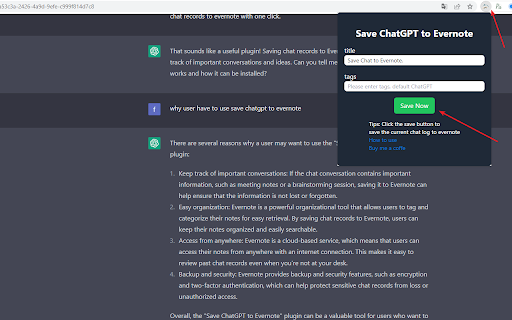


ChatGPT Chat History Saver to Evernote is the ultimate tool to backup ChatGPT conversations, export ChatGPT history, download ChatGPT chats, and sync ChatGPT to Evernote — all in just a few clicks. Whether you want to save a single ChatGPT conversation or bulk export all ChatGPT chats for a full backup, this extension keeps your AI-generated content safe, searchable, and accessible anytime. 🚀 Key Features (Export • Sync • Backup) • One‑click export — Instantly save any ChatGPT conversation to your Evernote notebook • Batch sync & backup — Build a durable archive by syncing multiple chats at once • Pages sync options — "Latest 28" or "All Conversations" for quick full/partial exports • Project sync (Gizmos) — Export entire ChatGPT projects; project name auto‑added as an Evernote tag • Team & personal support — Works with personal and team ChatGPT accounts • TextDocs tools integration — Append tool outputs and related TextDocs content to notes for full context • Sync history panel — Per‑batch stats, JSON/TXT export, and one‑click retry of failed items • Smart retry — Concurrent, rate‑aware retry with progress feedback • Rate‑limit handling — Detects Evernote API limits and shows a countdown before next run • Token auto‑refresh — Content script refreshes ChatGPT session token to reduce auth issues • Custom tags & notebooks — Organize your archive with your own Evernote structure • Smart titles — Auto‑generate descriptive titles for saved notes • Original link retention — Keep original ChatGPT conversation URLs for reference • Local download option — Export conversations as files for offline storage • Evernote search integration — Quickly search your saved ChatGPT backups ⚙️ How It Works 1.Install the ChatGPT Saver Extension → Sign in to Evernote via secure OAuth. 2.Save Single Conversations → From the popup page, save one ChatGPT chat instantly. 3.Save All ChatGPT Conversations in Bulk → From the batch export page, backup and sync your entire chat history. 4.Organize Your ChatGPT Backups → Add tags, choose notebooks, and edit titles for better management. 5.Search Your ChatGPT Archive in Evernote → Instantly find any conversation you’ve backed up. ChatGPT conversations often include valuable insights, research data, code snippets, and creative ideas. Without a reliable backup, these chats may be lost forever. By exporting ChatGPT history and syncing it to Evernote, you can: • Maintain a permanent ChatGPT archive • Export & download ChatGPT conversations anytime • Search and organize ChatGPT backups with Evernote’s tools • Access your ChatGPT chat history from any device 🎯 Perfect For • Researchers — Backup and search AI insights • Developers — Save code solutions and technical discussions • Writers — Export and store creative drafts • Students — Download study notes and Q&A for revision • Professionals — Maintain a searchable ChatGPT knowledge base 🔒 Privacy & Security • Secure Evernote OAuth authentication • No ChatGPT data stored on third-party servers • All ChatGPT export & backup operations happen locally in your browser 👉 Download ChatGPT Chat History Saver to Evernote now — and start backing up, exporting, downloading, and syncing all your ChatGPT conversations to Evernote today! 🔄 Changelog 2025-12 • Added support for note/comments content when exporting individually, 2025-11-04 • Added Project (Gizmos) sync to Evernote, with project name auto‑tagging • Added TextDocs tools integration: append tool outputs and TextDocs content to notes • Added Sync History panel: per‑batch stats, JSON/TXT export, and retry failed items • Added concurrent retry with basic rate‑aware pacing • Updated Pages sync UX: "Latest 28" and "All Conversations" radio options • Added auto token refresh in content script to improve reliability • Minor UI/UX polish and stability improvements

ChatGPT to Notion - Batch Export
Batch Save ChatGPT conversations to Notion with one click. Export ChatGPT conversations Save ChatGPT conversations to Notion in one click, or batch export your history into a clean, searchable knowledge base. ChatGPT to Notion helps you capture prompts, answers, research, project conversations, and selected message ranges directly into your Notion database with better formatting, faster bulk sync, and flexible export controls. • One-click save: Export the current ChatGPT conversation to Notion instantly • Batch sync: Save many conversations at once for backup, archiving, or knowledge management • Custom Export: Open a preview workflow, choose exactly which chats to export, and send them to Notion in one run • Selective turn export: Save only specific prompt-and-reply pairs instead of the full conversation • Project sync: Export ChatGPT project conversations, including project-based batch workflows • Smart formatting: Preserve headings, lists, code blocks, tables, links, images, and structured markdown more reliably • Enhanced formatting mode: Improve readability and structure for long-form AI outputs inside Notion • Split long chats into child pages: Break oversized conversations into smaller Notion pages to reduce lag and avoid large-page issues • Tags support: Add custom Notion tags to exported pages for better filtering and organization • Flexible duplicate handling: Choose to skip, overwrite, or duplicate existing saved pages • Better Notion compatibility: Auto-check required database fields and handle large content in Notion-safe batches • Team and personal support: Works with personal and team ChatGPT accounts • Sync history and result tracking: Review success, failure, skipped items, and recent sync activity • Deep Research support: Export Deep Research style content with improved formatting preservation • TextDocs support: Export TextDocs-related content as structured child pages in Notion • Build a long-term archive of ChatGPT knowledge in Notion • Keep research, brainstorming, writing, and coding conversations organized • Back up important AI conversations outside ChatGPT • Share structured AI outputs with teammates in a Notion workspace • Reduce manual copy-paste and cleanup work 1. Connect your Notion workspace 2. Choose the target Notion database 3. Pick how you want to save: • Save the current chat • Batch sync multiple chats • Export selected turns only • Launch Custom Export for preview-driven selection 4. Choose duplicate behavior, formatting, tags, and split-page options 5. Open the result in Notion and continue organizing your content there • Conversation title • Source URL • Chat time • Tags • Prompt and response content • Rich formatting where supported • Child pages for split content or TextDocs exports 2026-05-27 • Added Custom Export preview workflow for more controlled multi-chat export • Added selective turn export for saving only the parts of a conversation you want • Added optional split-to-child-pages support for long chats • Added custom Notion tags in the popup save flow • Improved popup quick-save flow and restored more v1 export behaviors 2025-12-03 • Added Deep Research support for richer exported research content • Added TextDocs export support with sub-page organization 2025-05-09 • Optimized batch save reliability for ChatGPT to Notion 2025-03-16 • Fixed save failures caused by markdown structures with too many nested sub-items 2025-01-19 • Added support for saving conversations after switching between personal and team accounts 2025-01-17 • Added sync configuration for modify, overwrite, and ignore • Added manual ChatGPT token refresh support 2024-10-25 • Resolved incompatibility with ChatGPT canvas mode 2024-08-13 • Resolved chat history retrieval issues caused by ChatGPT page changes 2024-05-04 • Fixed save issues caused by the ChatGPT domain change from chat.openai.com to chatgpt.com

GPTBLOX Content Manager-ChatGPT Download Conversation & web collector
GPTBLOX is a comprehensive Chrome extension that helps you easily save, download, and manage conversations from AI assistants like ChatGPT, Gemini (Bard), Claude, Poe, and HuggingChat, as well as save web page content and images. With this tool, you'll never worry about losing important conversations and insights from your AI interactions or web pages. • AI Conversation Saving: Save your conversations with AI assistants in various formats like HTML, TXT, PDF, and PNG, ensuring your valuable interactions are never lost. • Web Content Saving: Copy and save the content and interface of your desired web pages in HTML format, allowing you to access them offline anytime. • Web Image Downloading: Easily download images and background images from web pages, with features like image grouping, image link filtering, copying image links, opening images in new windows, and individual image downloading. • Web Grouping and Management: Collect and categorize your web page links and AI conversation links into custom groups for easy management and access. • Customizable Saving Area: Custom extension settings and select specific areas of web pages to save, giving you flexibility in saving partial web page content and images. • Import and Export Functionality: Import and export your collected web page groups for easy backup and migration. • Explore GPT Store Best GPTs: Amplify your AI exploration with access to an extraordinary database of over 8,000+ GPTs, meticulously categorized by ChatGPT into 32 distinct categories. GPTBLOX opens a window to the diverse universe of GPT Store apps and their myriad uses. • Local Saving, Safe and Secure: AI conversations are saved locally, eliminating concerns about conversation loss or leakage. • Support for Extra-Long Web Pages and AI Conversations: Save hundreds of pages of PDF and HTML web content to meet your various needs. • Web Page Image Management: Preview, group, and filter web page images for easy downloading of desired images. • Web Page Preview: Preview the web page content before saving web pages and AI conversations. • Customizable Saving Area: Flexibly select the desired area of web pages to save, precisely capturing the content and images you need.

Claude to Evernote
Save Claude conversations to Evernote with one click. Export Claude conversations 🚀 Claude to Evernote - Your Perfect AI Conversation Assistant ✨ A powerful Chrome extension that lets you save your entire conversations with Anthropic's Claude (cutting-edge AI assistant) to Evernote with just one click, complete with properly formatted markdown. 🎯 Key Features: • 📝 One-click saving of complete Claude conversations to Evernote • 🏷️ Customizable note titles for easy organization • 🔖 Add tags to saved notes • 📂 Choose notebooks for saving conversations • 🔄 Seamless integration with both Claude and Evernote • ⚡ Efficient access to historical AI dialogues 💡 Whether you use Claude for: • Research exploration • Content creation • Code programming • AI capability exploration This extension ensures you can revisit and reference these valuable conversations anytime. Never lose important information again! 🌟 Install the Claude to Evernote extension now and combine the power of AI with Evernote's robust note-taking capabilities to enhance your productivity! 🔧 Latest Update (2024-04-26): • Fixed issue with message port closure before response receipt

Auto-save ChatGPT History
A Google extension that automatically saves ChatGPT chat history locally and supports export ⚒️ Tips for use 1. Open the ChatGPT page and chat with ChatGPT https://chat.openai.com 2. Click the icon in the upper right corner of the page to open the `ChatGPT History` dialog 3. Switch or delete any chat history in the left navigation 4. The `Restore` button at the bottom supports jumping to the conversation history chat interface 5. The `Markdown` button at the bottom supports exporting the current conversation record to markdown format 6. At the bottom of the left navigation, you can clear all records with one click (use with caution!)
