
afbepfhknfficaflckmgflbmklcleidl
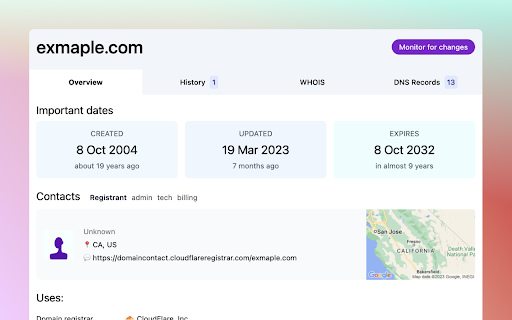


Super detailed info for any domain name: registration status & dates, WHOIS, RDAP, DNS records, Name Servers, and more This extension started as a small project: see the expiry date of a domain. More functionality was added in time, and now the extension can show you everything about a domain name: WHO registered it, important dates (created or expiry), DNS Records, mentions in the news, WHOIS, RDAP, and more. Highlights: - Shows domain availability: registered, available or for sale - Show at which registrar the domain is registered - Important domain dates: registration date, expiry date - Registrant info (if public): person/company name, location, contact details - Info about Name Servers - DNS records: lists all subdomains - Domain history: timeline of domain changes in WHOIS, DNS or public sales - Does not track or record browser history. The only info used is the domain name in current tab when extension icon is clicked Change log: - v2.6 - Updated layout for History tab, added multiple DNS resolvers - v2.5 - Fixes for links to register domains - v2.4 - Load faster & more accurate domain info, using a mix of RDAP & WHOIS info - v2.3 - Discover more DNS records (subdomains) and wildcard (*) record - v2.2 - Show friendly message when WHOIS data can't be loaded - v2.1 - Load info about IPs on mouse hover in DNS Records tab - v2 - new UI, new & faster API

PromptSync
Ask ChatGPT, Bard AI, and Bing Chat with one single prompt! Unlock the power of four dynamic chat platforms with a single prompt! Introducing PromptSync, your all-in-one solution for chatting with ChatGPT, Bard AI, and Bing Chat, through a convenient Chrome extension. Multi-Platform Chat Engage in conversations effortlessly with ChatGPT, Bard AI, and Bing Chat from a single prompt. Get diverse perspectives and responses to your queries. Customizable Experience Tailor your chat experience to your liking! Enable or disable individual chat platforms according to your preferences through the settings menu. Efficient Workflow Streamline your workflow by accessing multiple chat services without switching tabs. Save time and stay productive as you harness the combined intelligence of four powerful chat systems.

Michael's Upgrade for TrakED
Upgraded features for TrakED in the THS. (This extension is not an official product of the THS or Intersystems TrakCare software.) Upgraded features for Trak ED in the LGH. Features: - Re-enable spell check in the triage page - Use the enter key when logging in - Handover sheet for ED Main Floor and EMU - ED Main Floor filters and persistent sort - Triage Summary print out - Filter and count results of an enquiry - Count patients currently breaching length of stay targets -- This extension is not an official product of the LGH or InterSystems Trak software.

BoostPic - Google Reverse Image Search on the fly
Uncover the possibility to perform Google Reverse Image Search quickly and incredibly, with clip & paste. With this extension users can search google images simply with clip & paste. The following is how it works. 1. For win10/11: win+shift+s to clip an image even outside the browser, and for mac: shift+control+command+4; 2. Click at the input box below(select another visual search engine other than Google Images at the bottom if you prefer), and then press ctrl+v or command+v; 3. Wait a moment until it returns an URL. If timeout error happens, please delete the error message and ctrl+v or command+v again.

Breached
Find out which sites you're visiting have been pwned, using the haveibeenpwned.com database Breached is a browser extension that lets you know when you're visiting a site that has been pwned in the past. You can click the button to find out more about those breaches. Breached uses [Have I Been Pwned](https://haveibeenpwned.com/) to learn about breaches. No information about the sites you visit is sent anywhere -- all checks are local.
