
aeooplihacgjiadidooaflfehepjfjcl

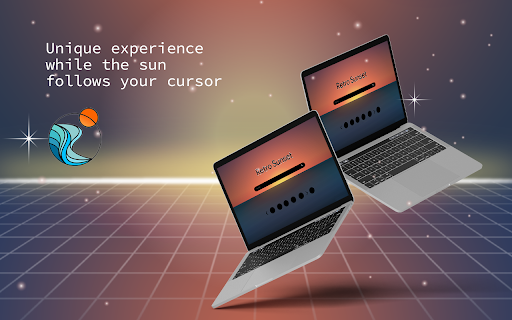

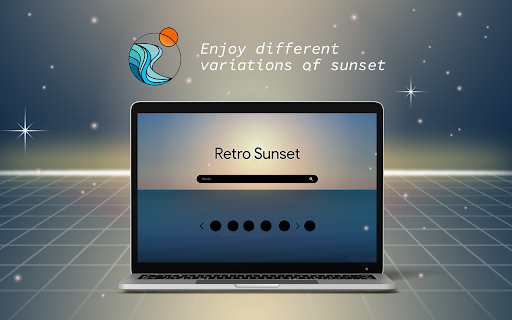
Retro Sunset extension will help you keep track of the time while enjoying a soothing new tab design. Refresh your new tab with Retro Sunset! This addon has been thoughtfully developed to make users' time spent on the web more efficient. Retro Sunset is an excellent choice for whether you want to work or when you just want to relax and have fun. Especially for those who enjoy watching the sunset! By clicking "Add to Chrome", you accept and agree to installing the Retro Sunset extension and setting Chrome™ new tab to that provided by the service and the Terms of Use and Privacy Policy. The extension will update your search settings, change your search engine, and display Microsoft Bing results. The fact that you are able to design the wallpaper in whatever way you see fit is one of our favourite aspects about it. Simply moving your cursor will cause the sun to change, and as a result, you will see a whole new background. While you are taking in your preferred rendition of the Sunset, you can effortlessly navigate the internet by using the Search Box. The bookmark function is also a useful tool. This will make it so that you can easily go to the websites that you want to visit most. After you have visited a certain page a certain number of times, we will make a tiny icon for it on your new tab so that you may access it whenever you like. Our browser extension has been designed to enhance your browsing experience in the best possible way. In order to achieve this, the we gather your data for statistical analysis. This data assists us in comprehending how you engage with online content, enabling us to fine-tune and optimise the extension’s features according to your preferences. We prioritise your privacy and security, employing strict measures to ensure that the data collected for these statistics is both anonymised and aggregated, preventing any connection to personal information. Our ultimate aim is to consistently refine and tailor your browsing encounter, ultimately providing an online experience that is not only enjoyable but also uniquely attuned to your needs. Should you have any questions or reservations, we encourage you to consult our privacy policy or reach out to us directly for clarification. Use these links if you have more questions: Homepage: https://retrosunset.net/index.html

Retro Life: Progress & New Tab
A beautiful, retro-styled new tab page to visualize your life progress,manage your daily tasks, manage shortcuts, and stay focused Retro Life transforms your new tab page into a unique, retro-styled dashboard designed to help you value your time. With a clean pixel-art aesthetic, it provides a daily reminder of your progress through life, year, month and day.Manage your daily tasks as "Quests". 🌟 Key Features ⏳ Temporal Status (Life Progress) Visualize your journey through time with experience bar and a dynamic Solar Eclipse. Switch between separate cycles to see your progress: 🌑 Solar Eclipse Visualization: The central visual element where the shadow moves across the sun, representing the percentage of time passed in your current cycle (Day, Month, Year, or Life). As time runs out, the eclipse completes. LIFE: Your overall life progress. YEAR: How much of the current year has passed. MONTH: Progress through the current month. DAY: Track the day from current time to midnight. 📜 Quest Log (Task Manager) Gamify your daily tasks. The Quest Log allows you to: Add daily "Quests" (tasks). Mark quests as completed. Clear completed quests to keep your log clean. Minimalist interface that creates a satisfying "quest completion" feel. 🎒 Inventory Dock (Shortcuts) Keep your most important links in your Inventory. Add shortcuts to your favorite websites for quick access, visualized as inventory slots. 🎨 Retro Themes Customize your dashboard with a variety of iconic retro themes: 🌌 Cosmic(Default) 🕹️ Gameboy (Classic Green) 🌆 Vaporwave (Neon Pink/Cyan) 🚨 Red Alert (Tactical Red) 🔸 Amber (Vintage Terminal) ...and more! 🧩 Other Tools Google Apps Tray: Quick access to common Google services (Gmail, Drive, Calendar, etc.). Web Search : Minimalist search bar to jump straight to the web. 🛠️ Usage Onboarding: The first time you open a new tab, you'll be asked to input your birth date. This is required to calculate your "Life Level" and experience points. Settings: Click the theme dropdown at the bottom to change the visual style. Reset: Need to change your birth date or clear data? Click the RESET button in the footer. 🔒 Privacy Retro Life respects your privacy. This extension does not collect, transmit, or sell any user data. All settings, including birthdate and shortcuts, are stored locally on your device using Chrome's local storage API.

RetroWeb
Bring back the chaotic, creative, animated GIF-filled glory of the early internet. RetroWeb instantly restyles any modern website into a nostalgic retro theme inspired by the late 90s and early 2000s. Whether you miss Geocities chaos, early hacker aesthetics, pixel art UI, Windows 95 vibes, or vaporwave visuals — RetroWeb brings that weird, fun, expressive era of the web back to life. RetroWeb adds a nostalgic layer over any website you visit. It does NOT modify the website’s content — instead, it overlays retro styles, cursors, fonts, backgrounds, GIFs, and effects to recreate classic internet vibes while keeping the site fully functional. Perfect for: -Retro lovers -Web nostalgia fans -Designers & artists -Developers looking for inspiration -Anyone who misses the chaotic charm of the early web 🌀 Geocities Chaos Mode -Maximum 90s homepage energy: -Tiled neon backgrounds -Random GIFs -Comic Sans -Visitor counter vibes -Everything wonderfully loud and unhinged 👾 Pixel Arcade -8-bit gaming aesthetic: -Pixel fonts -CRT-style shadows -Retro sprites and icons -Game-HUD inspired elements 🧩 Key Features 🎛 Per-Tab Independence Each tab has its own theme and settings — change themes freely without affecting other tabs. 🧠 Smart Styling Engine -RetroWeb intelligently detects sections like: -Headers -Buttons -Navigation areas -Cards -Sidebar regions …and restyles them with era-accurate retro flavor. 🛡 Non-Destructive Overlay Your pages remain fully interactive. RetroWeb is a visual skin placed on top of the page — no content is changed or broken. -TypeScript -React -Chrome Manifest V3 -Optimized CSS overlays -Low memory usage and instant style switching. 🎮 How to Use RetroWeb 1.Install the extension 2.Open any website 3.Click the RetroWeb icon 4.Choose a theme Enjoy the nostalgic transformation ✨ You can change themes anytime, and each tab remembers its state. The early web was weird, personal, chaotic, and incredibly fun. Before templates and minimalism took over, every site was someone’s hand-crafted digital playground — full of GIFs, rainbow borders, tiled backgrounds, and personality. A resurrection of a forgotten aesthetic. A reminder that the web doesn’t always have to be clean and corporate. A celebration of maximalist creativity. RetroWeb does not collect or store any personal data. It requires access to “all sites” because it needs to apply visual effects on the pages you visit — nothing is tracked, logged, or transmitted. Everything runs locally on your device. RetroWeb revives: -Geocities -Angelfire -Y2K design -90s personal homepages -Early browser aesthetics …and wraps them in a modern extension that works on any website you want. ❤️ Created With Nostalgia RetroWeb was built because the internet was better when it was weird — when it was expressive, personal, experimental, and full of glittery GIFs. Let’s bring the weird web back. One website at a time.

Sunset Sunrise
Sunset and Sunrise time for your location Simple tool to check the sunset & sunrise times for your location.

Stratus - New Tab page
A clean and fast new tab page Stratus is a clean and fast add-on that replaces your new tab page that will display the current Gregorian and Nepalese lunar dates. It also offers a new background image everyday, a weather forecast for two days and an inspiring quote that changes daily.
