
aendbcjpnfpggjomcbokimebjmmjhnck
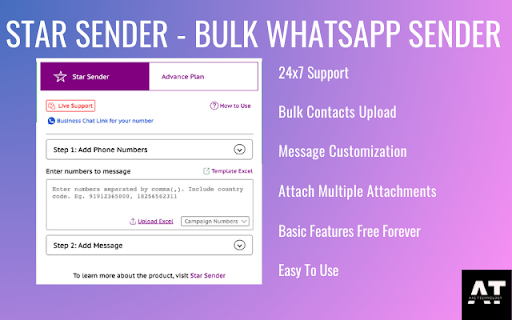
Free Whatsapp Web sender to send messages, attachments and much more... Looking for a reliable web extension to send bulk whatsapp messages, attachments, and more? Look no further than Star Sender. Take advantage of our lifetime offer of free basic features forever, and download Star Sender now! Here are just a few of the features you can enjoy with Star Sender: ✅ Customization options to personalize your messages ✅ Convenient message-sending through Excel sheets ✅ Easy attachment adding for streamlined communication ✅ Downloadable delivery reports for peace of mind ✅ Exceptionally quick and responsive customer service for any questions or issues ✅ Scheduling options for efficient communication ✅ Quick reply options to speed up your customer service ✅ Real-time notifications to keep you on top of your messages ✅ No software installation necessary – just install the extension and get started! ✅ Highly user-friendly interface for effortless communication So, what sets Star Sender apart from the rest? 👉 Basic features are free forever with no limitations on usage 👉 Simple and intuitive design for ease of use 👉 Affordable premium features to suit any budget 👉 More utility features available at a better price than the competition 👉 Live customer support available 24x7 to help you whenever you need it

WA Web Plus – WhatsApp Web Tools for Privacy & Deleted Messages
Blur chats & media for privacy, view deleted messages, download status, track online activity on WhatsApp Web. WA Web Plus — Privacy & Productivity for WhatsApp Web Protect your WhatsApp Web privacy in public spaces. Blur chats, hide sensitive content, and customize your workspace — all running locally in your browser. ✓ Updated for the latest WhatsApp Web (May 2026) ✓ Working blur — verified on the current WhatsApp Web release ✓ Active development with fast bug fixes ✓ Lightweight and privacy-focused ✓ Available in 8 languages • Blur messages, media, profile pictures, and contact names — reveal on hover • Instant privacy mode for public or shared spaces • Auto-blur when idle so your screen stays protected when you step away • Customize blur intensity for different content types • Lock screen with custom PIN • Hide text input while typing Open WhatsApp Web and your chats are instantly protected. • Quick Chat — message any number without saving as contact • Status Download — save images and videos from Status updates • Translation — translate messages instantly in 12+ languages • Pin unlimited chats • Mark all chats as read in one click • Export contacts and group members to CSV • Click-to-Chat link & QR code generator • Customize your chat background with wallpapers, gradients, and colors • 16 built-in wallpapers included • Access recalled (deleted) messages locally in your browser • See online presence directly from your chat list • Hide read receipts — read messages without sending blue ticks • Hide typing & recording status • View statuses without sending a "seen" notification • Invisible Mode — control your online visibility • View profile information such as country, local time, and currency from phone numbers • Alt + X — instantly blur the entire page • Cmd + Shift + L / Ctrl + Shift + L — quick lock screen • Your messages stay 100% on your device • No account required, no data uploaded 1. Click "Add to Chrome" 2. Open WhatsApp Web 3. Privacy features activate automatically 4. Customize settings anytime from the extension toolbar icon Not affiliated with WhatsApp Inc. or Meta. WhatsApp is a trademark of Meta Platforms, Inc.

WhatsApp Web Customizer – Themes, Fonts, Backgrounds & Quick Reply Bubbles
Personalize WhatsApp Web with themes, fonts, backgrounds, and fast-reply tools. Lightweight, clean, and fully open source. 🎨 WhatsApp Web Customizer — Themes, Backgrounds & Privacy for WhatsApp Web Customize WhatsApp Web with your own themes, wallpapers, fonts, and privacy tools. The most flexible way to personalize WhatsApp Web — no coding required. Design Your Own WhatsApp Web Themes (New) Create custom themes from scratch with a simple visual editor. Pick colors, adjust opacity, and choose gradients with one click — no CSS knowledge needed. Save, edit, and import themes, or start from a preset and customize it. Whether you want a clean dark mode, a vibrant aesthetic look, or something completely unique, the theme editor makes it possible. Custom WhatsApp Web Wallpapers and Backgrounds Set different wallpapers for your chat window, welcome screen, sidebar, and chat list. Choose from our built-in image library, upload your own photos, or pick animated backgrounds that bring WhatsApp Web to life. Animated Backgrounds Add motion to WhatsApp Web with animated wallpaper effects — subtle ambient motion or bold dynamic scenes, your choice. Fonts & Typography Change the WhatsApp Web font and adjust text size across the entire interface. Pick a typeface that's comfortable for long conversations or matches your personal style. Hide What You Don't Need Declutter the WhatsApp Web sidebar by hiding Status, Channels, Communities, Locked Chats, or Archived chats — each independently. A focused, minimal WhatsApp Web that shows only the conversations that matter. Quick Reply Bubbles Create your own preset replies for WhatsApp Web and insert them with a single click. Faster than typing, more personal than canned responses. Privacy Mode Blur messages and contact details with a quick toggle — useful in shared workspaces, on video calls, or when screen-sharing. Built with Care - Open-source — inspect the code anytime on GitHub - We collect anonymous usage statistics to improve the extension; no message content, contact data, or personally identifying information ever leaves your device - No ads, no upsells, no account required Get Started 1. Install the Chrome extension 2. Open WhatsApp Web 3. Click the extension icon to start customizing Questions? Open the in-extension FAQ for setup guides, tips, and troubleshooting.

WA Download — WhatsApp Chat Backup & Contacts Export
Back up WhatsApp chats and export contacts quickly, securely, and locally with WA Download. Easy, private, and reliable. Back up chats and export contacts on WhatsApp Web with a simple, privacy‑minded workflow. Keep your data portable for CRM, migration, and record‑keeping—without clutter or extra steps. Key features - Export contacts from Groups or your Chats list - Back up chats by conversation, group, or date range - Granular selection with a quick preview before exporting - Processing runs locally in your browser; you control your data - Clear onboarding and multi‑language support Export formats - vCard (.vcf): Import to iOS and Android devices - CSV: Import to Google Contacts and many CRMs - Excel (.xlsx): Organize, filter, and analyze in spreadsheets Backup formats - HTML: View chat history directly in the browser - CSV: Transfer or share selected chat content - Excel (.xlsx): Structure conversations for reporting - JSON: Build custom workflows or integrations How it works 1) Open WhatsApp Web and sign in 2) Click the extension icon 3) Choose “Contacts Export” or “Chat Backup” 4) Set the scope, preview, and start export Privacy & security - All processing happens locally in your browser—no external servers - You choose exactly what to export and can delete generated files anytime - Minimal permissions; used only to enable the described features Compatibility - Works with Chrome and Chromium‑based browsers - Requires WhatsApp Web to be open and logged in Support - Contact us via the Chrome Web Store “Support” tab Legal - WhatsApp is a trademark of WhatsApp Inc., registered in the U.S. and other countries. This extension is an independent project and is not affiliated with WhatsApp or WhatsApp Inc.

WA Contacts Extractor - wabulk.net
Export ,extract and backup your WhatsApp contacts by various dimensions such as Contacts, Chats, Groups, Labels, and Countries. This powerful and user-friendly tool lets you extract and export all your WhatsApp contacts, including unknown phone numbers, with just a few clicks. With this extension, you can keep your data secure and choose from popular formats like CSV, Excel, JSON, or VCard to export your contacts. Our tool is perfect for anyone who needs to backup and manage their WhatsApp contacts. Whether you need to export contacts for future use, organize your chat history, or backup your contacts in case of data loss or device transfer, our Export WhatsApp Contacts provides a simple and efficient solution. Features: ✅ Easily extract and export all your WA contacts with just a few clicks ✅ Extract contacts from groups and chats to organize your contacts ✅ Filter contacts by country for targeted outreach or analysis ✅ Save contacts from labeled chats for easy reference and management ✅ Export data to popular formats like XLS, CSV, JSON, or VCard for secure backup and use in other applications. Why use our Export WhatsApp Contacts? ✅ Save time: Quickly extract and export all your WA contacts with just a few clicks. ✅ Keep data secure: Choose from multiple export formats to ensure your data remains safe and confidential. ✅ Get organized: Categorize your contacts by groups, chats, labels, countries, and more for complete control over your data. ✅ Never lose contacts again: Easily backup and export your WA contacts for quick access when you need it. Please note that our Export WA Contacts does not collect any personal data or violate any terms of service. It only extracts and exports WA contacts that are already stored on your device. # Home Page https://export-wa-contacts.wabulk.net/ This extension is an unofficial enhacement for WhatsApp™ Web and is not related in any way to WhatsApp LLC.
