
aefiepimkogajhddmhcekceihikjcabd
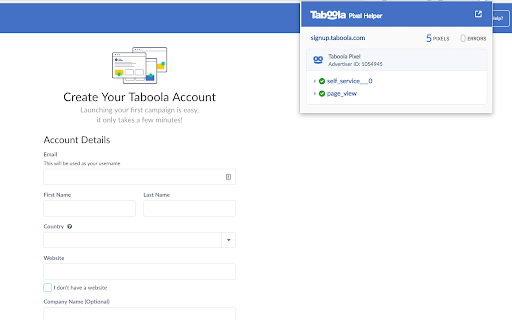
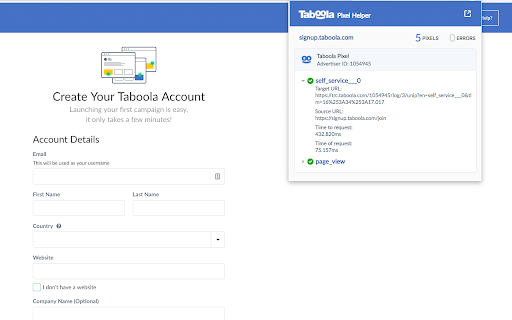
This extension allows the user to troubleshoot problems when using Taboola Pixels. The Taboola Pixel Helper is a troubleshooting tool that helps you validate your pixel implementation. It works in the background and scans for conversion, retargeting or new Taboola pixels, and provides real-time feedback on the implementation. In case the Taboola pixel helper found pixels on your page, a small number will appear on the extension's icon. This number indicates the number of pixels found. To reach a detailed report regarding the pixels that were implemented on the page including possible implementation mistakes, just click on the Taboola pixel helper icon.

Tag Assistant
The Tag Assistant extension works with Tag Assistant to help troubleshoot installation of gtag.js and Google Tag Manager. We’re grateful for your feedback—we've listened and will be updating and bringing back the on-page debugging experience. More exciting features are on the way. Tag Assistant helps you install and troubleshoot your Google tags, including Google Analytics, Google Ads, Tag Manager and more. When clicked, the extension displays the Google tags found on the page in a side-panel. Just navigate to any page, and Tag Assistant will tell you which tags are present. We will be adding additional diagnostics in the near future. The “Troubleshoot” button activates our debug mode using tagassistant.google.com. This advanced tool allows you to debug your website, including iframes, within a single session, providing detailed diagnostics to help you validate, diagnose, and resolve your implementation. Session data is available for review on tagassistant.google.com. By installing this extension, you agree to the Google Terms of Service and Privacy Policy at https://www.google.com/intl/en/policies/.

Meta Pixel Helper
The Meta Pixel Helper is a troubleshooting tool that helps you validate your pixel implementation. The Meta Pixel Helper is a tool that helps you validate your pixel and business setup. The Meta Pixel Helper works in the background to look for conversion or Meta pixels and provides realtime feedback and optimizations. A small number will appear on the Meta Pixel Helper icon to indicate number of pixel events. When clicked, a panel will expand to show a detailed overview of the page's pixels, including warnings, errors and successes. Learn more about using Meta pixels here: https://developers.facebook.com/docs/marketing-api/meta-pixel By clicking Add to Chrome, you agree that your use of this extension, including the data you authorize Meta to access via this extension, is subject to Meta’s Beta Terms (https://www.facebook.com/legal/BetaProductTestingTerms) and Platform Terms (https://developers.facebook.com/terms).

Outbrain Direct Response - Pixel Compliance Checker
This extension helps you to check if the Outbrain Direct Response by Teads pixel is installed correctly on the page. This extension helps you to check if the Outbrain Direct Response by Teads pixel is installed correctly on the page

MY AD FINDER
MY AD FINDER allows you to collect, save & hunt trending ads automatically from your facebook news feed. Discover Trending Facebook Ads with MY AD FINDER Easily collect, save, and analyze trending ads straight from your Facebook news feed. MY AD FINDER is your ultimate tool to spot competitor ads and find inspiration for your next ad campaign. ★ Automatically aggregate Facebook ads into a convenient list by simply scrolling your news feed. ★ Tag and save your favorite ads for later review. ★ Hide organic posts for an ads-only view. ★ Analyze ads with structural data insights, including images, links, headlines, and engagement metrics. ★ And, most importantly, use MY AD FINDER for FREE. ★ Auto-collection of ads in a locally hosted list on Chrome. ★ Easy one-click saving of interesting ads to your favorites. ★ Swift comparison of multiple ads in a unified list. ★ Detailed breakdown of each ad's components and metrics. Ideal for: ★ Store owners sourcing trending products. ★ Those keen to analyze ads of similar products. ★ Ad intelligence experts studying competitor strategies. ★ Copywriters and creators looking for ad inspiration. Maximize Your Experience: 1) Engage with products of interest: like, comment, and click 'Shop Now'. This prompts Facebook to show you more relevant ads. 2) Not seeing ads? Start by liking pages promoting products you're keen on. Harness the power of MY AD FINDER and get an edge in the ad game! Install now for unparalleled Facebook ad insights.
