
aeepebmcdnjkjobnhfagojgfonkappej
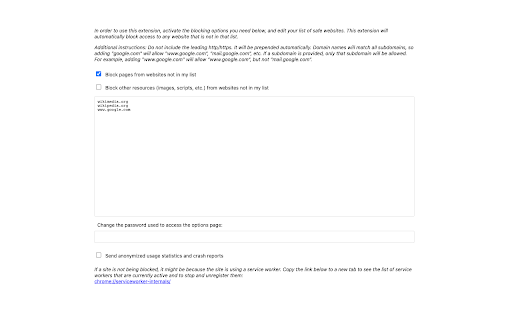
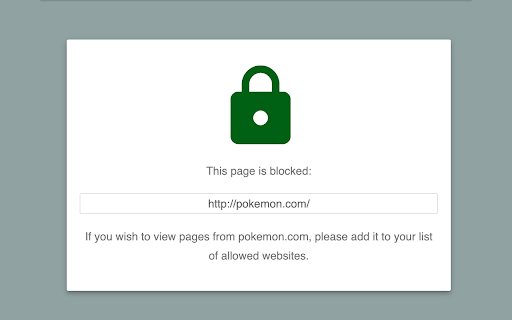
Browser extension that automatically blocks all pages from any website that is not in your list of allowed websites. YAM is an open-source, privacy-focused website manager. You create a list of allowed websites, and this extension will block access to all pages that are not in that list. The list is synchronized through Chrome to all of your devices, so you can log into Chrome with your child's account, add or modify entries in the list and they will synchronize in near real-time to a child's computer. You can also choose to block all content from other sites, but this requires a more complex configuration since many pages require content from other sites to operate correctly.

Policy Control
Policy Control is an extension that helps you easily adjust all content settings (via contentSettings API) from the toolbar popup UI. These settings are adjusted on a website (domain) basis. Once you open the toolbar popup UI, the tab URL will appear at the top section in the UI as a pattern (i.e. http://example.com/*). Adjust what you need for this pattern and then reload the webpage. Please note, all changes are auto-saved to the memory. If you want to reset the content setting changes to the default values, please press the reset button at the top toolbar. Note: The extension interface supports dark mode. To switch the interface theme to dark, please press the moon icon in the top-right toolbar. To report bugs, please fill out the bug report form on the addon's homepage (https://mybrowseraddon.com/policy-control-wext.html).

Web3 Whitelist
The "Web3 Whitelist" Chrome Extension is a simple tool designed to enhance security when navigating the web3 ecosystem, which includes decentralized finance (DeFi), wallet sites, and NFT marketplaces. Malicious sites pose significant security risks in this space. By restricting browser access to a predefined list of trusted domains and your personally trusted custom whitelist, this extension reduces the risk of phishing attacks and scams. Using Chrome's declarative net request API, it ensures that only whitelisted domains are accessible. The extension is open-source, completely free of charge and licensed under the MIT license.

AllowList
Block everything by default. Only allow sites you add. Scripting API for Focus Mode automation. Stay focused and boost your productivity with AllowList—a powerful allowlist-based site blocker for Chrome. By default, AllowList blocks all websites. You decide which sites deserve your attention by adding them to your allowlist. Perfect for students, professionals, traders, writers, and anyone serious about minimizing distractions. Features: - Block everything by default, whitelist only what you need - Quick-add current site or domain with one click - Manage multiple allowlists for different contexts (Work, Learning, Deep Focus, etc.) - Pre-built templates for common use cases - Keyboard shortcuts for power users (Cmd/Ctrl+Shift+L to add, Cmd/Ctrl+Shift+K to switch lists) - Detailed analytics dashboard to track your focus patterns - Cross-device sync via Google Account - Free and open-source Perfect for anyone who wants maximum control over their browsing habits.

YouTube Channels Whitelist
Would you like to see only some specific content in your YouTube searches or recommendations? With this extension you can just type the name of the channel you would like to appear and everything else will be filtered out. Important! You can always activate or deactivate the filter by turning on/off the toggle switch icon.
