
aecadjcfnagbeilifdcgpgibhclcjkgh
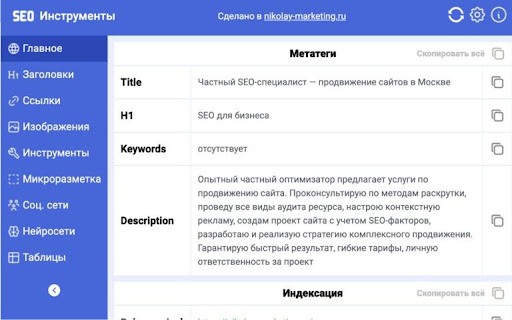


Оптимизируйте свой сайт с помощью мощных SEO инструментов для анализа, аудита и отслеживания позиций Полный анализ по SEO: метатеги, заголовки, изображения, ссылки, микроразметка, индексация, пререндеринг JS, выгрузка таблиц, подсветка рекламы и другое SEO Tools — это мощное SEO-расширение для Chrome, объединяющее все ключевые функции для эффективного SEO-анализа и аудита сайта. Идеально подходит для SEO-специалистов, веб-разработчиков, маркетологов, владельцев бизнеса и контент-менеджеров, которым важно контролировать поисковую оптимизацию в режиме реального времени. 🔎 Основные возможности: • Полный SEO-аудит сайта в один клик: автоматический парсинг мета-тегов (title, description, keywords), H1, каноникала и микроразметки • Проверка индексации страницы и всего сайта через robots.txt и операторы site:, host: • Отображение и подсветка noindex, nofollow, внешних ссылок, скрытых блоков • Быстрый просмотр микроразметки без дополнительных расширений — всё в одном • Пререндеринг JavaScript — расширение анализирует страницу так же, как поисковые роботы • Отключение CSS и JavaScript — удобно для технического SEO и анализа доступности • Копирование и скачивание любого элемента: таблиц, изображений, ссылок, мета-тегов • Выгрузка таблиц, например, с донорами с Miralinks — в 1 клик • Подгрузка WHOIS-данных: возраст домена, информация о владельце, геолокация • Поиск сайта на Яндекс.Картах — прямо из интерфейса расширения • Подсветка рекламы и своих сайтов в SERP Яндекса и Google • Иконка расширения меняется, если страница закрыта от индексации • Удобные ссылки на внешние SEO-инструменты — для всех ежедневных задач в SEO 💡 Вместо того чтобы использовать 5–7 разных плагинов, вы получаете всё в одном инструменте для повседневной SEO-рутины — быстро, удобно и результативно. SEO Tools активно развивается, и в будущих версиях мы добавим: 1. Улучшение юзабилити и устранение багов на основе обратной связи 2. Подгрузку данных с внешних сервисов через API 3. Текстовый анализ: вода, уникальность, плотность ключей и другое 4. Расширенный технический аудит сайта — CMS, JavaScript, технологии 5. Нейросети.

Website SEO Checker
Get free on-page SEO report by 100+ parameters with the best website SEO checker ☑️ Overview – quickly check essential SEO data: URL structure, metadata, indexation, and canonical settings. ☑️ Content – analyze headings, keyword density, text length, and text-to-code ratio for better structure. ☑️ Links – identify external, internal, and subdomain links, plus dofollow/nofollow status and anchor text. ☑️ Hreflangs – instantly verify hreflang setup and language targeting for international SEO. ☑️ Images – detect missing alt/title tags, broken images, and check sizes with on-page highlighting. ☑️ Structured Data – instantly identify and validate Schema.org markup for better SEO performance. ☑️ PageSpeed – measure mobile and desktop performance with actionable optimization insights. ☑️ GSC+GA4 Insights – assess search performance & indexing plus user behavior and conversion metrics. ☑️ Issues & Monitoring – detect SEO issues, track technical changes, and monitor page updates over time. Deep dive into Sitechecker Chrome Extension’s capabilities to unlock the full potential of your SEO workflow. 1️⃣ Get a quick technical overview of any page to ensure it meets SEO best practices. • Inspect URL structure, status code, and page size. • Review meta title, description, and H1 heading. • Analyze indexation settings, including robots meta tags, X-Robots-Tag directives, and robots.txt rules. • Validate canonical tag settings to prevent duplicate content issues. 2️⃣ Analyze content structure to improve keyword relevance and readability. • Review heading hierarchy (H1–H6) and highlight them on the page. • Copy the entire heading structure in one click for easy documentation. • Measure text length in words and characters. • Calculate text-to-code ratio to optimize content efficiency. • Get keyword density insights for single, two, and three-word phrases. 3️⃣ Audit all links on a page to improve internal linking and track external references. • Detect external, internal, and subdomain links. • Check dofollow/nofollow status and analyze HTTP response codes. • Review anchor text usage and link destinations. • Search for specific links and highlight them directly on the page. • Copy all detected links in one click for easy analysis and outreach. 4️⃣ Ensure proper hreflang implementation for international SEO. • Detect missing or incorrect hreflang attributes. • Validate language targeting and regional settings. • Check backward links to confirm proper hreflang setup. 5️⃣ Optimize images to improve SEO and user experience. • Identify missing alt and title attributes. • Detect broken images and oversized files. • Highlight image details directly on the page for easy fixes. 6️⃣ Validate structured data for better search visibility. • Detect Schema.org markup and review structured data implementation. • Identify missing or incorrect structured data elements. • Ensure key rich snippet attributes are correctly applied. 7️⃣ Measure page speed and get actionable insights for optimization. • Check page loading speed for desktop and mobile. • Identify slow-loading elements affecting performance. • Get recommendations to improve Core Web Vitals. 8️⃣ Unlock real-time GSC + GA4 insights to track performance, user behavior, and conversions. • View clicks, impressions, CTR, and average position over 7/30/60/90 days. • Analyze top search queries and how they drive traffic. • Inspect URL crawling, indexing status, and mobile usability issues. • Measure user behavior with engagement metrics like bounce rate and average session duration. • Track conversions with key events and key event rate. • Break down performance by traffic source (Google Organic, Direct, Social, Bing, etc.). 9️⃣ Monitor SEO issues and track page changes over time. • Detect technical errors, broken links, and missing metadata. • Track content updates and structural modifications. • Get alerts for critical SEO changes.

SEO Checker Tool - Get Free SEO Audit Analysis
Analyze your on-page SEO in one click, get customized suggestions and improve your rankings. Use our SEO Checker Tool, it's free! [🔍 Analyze On-Page SEO] Get personalized suggestions and improve your rankings. Use the SEO Checker Tool – it's free! [❓ Is your page optimized for search engines?] Analyze any web page FOR FREE with our SEO extension for Google Chrome! Generate a complete SEO audit in just one click and discover your SEO score. 🛠️ SEO Checker is your essential SEO toolbox, always at hand to optimize your web page quickly and easily. Generate an SEO report to monitor content, loading time, duplicate titles, and other on-page SEO factors. 1️⃣ Go to the URL of the page you want to analyze. 2️⃣ Click on the extension icon. 3️⃣ ✨ That's it! Within seconds, SEO Checker will generate a complete page analysis, packed with suggestions and tips for optimization. Follow the instructions and fix all the issues affecting your ranking on major search engines like Google, Bing, Yahoo!, DuckDuckGo, Ecosia, and many more. [🚀 Why should you use SEO Checker?] 🔹 SEO Checker is the "Made in Italy" SEO tool by SEO Tester Online, used by millions of users worldwide. 🔹 It automatically and accurately monitors all the factors affecting your page's ranking. 📊 Analyze your competitors Scan your competitors' pages and discover their SEO strengths and weaknesses. 📈 Get more traffic Climb the SERP rankings by optimizing your page and increasing the number of visitors to your website. ⚠️ Detect errors Your website might not be fully optimized for every crucial SEO factor. Quickly find the issues that are hurting your ranking on Google and other search engines. 💡 Receive personalized suggestions For each issue found, SEO Checker will provide step-by-step recommendations to improve your SEO score. 🏷️ Title, description, heading tags (H1, H2, etc.) 🔗 URL optimization, HTTP/HTTPS status codes 🔑 Used keywords, content, alt text in images, and meta description 📊 Structured data ⚡ Loading speed on mobile and desktop devices 🤖 Robots.txt and sitemap 📣 Open Graph, Twitter Card, social plugins, and Facebook share count ✨ And much more! [📩 Want to give us feedback?] Help us improve our extension! Send us your suggestions at 📧 info@seotesteronline.com ⭐ Do you like the SEO Checker Tool? Leave us a review! Your support is important!

SEO Buddy - On-Page SEO Analyser
A complete On-Page SEO tool to help you analyse your webpage and optimize it for better ranking SEO Buddy is a complete On-Page SEO tool to help you analyse your webpage and guide you to optimise it for better ranking. ✅ Analyse On-Page SEO: This extension analyse the existing On-Page SEO following good practices and get a performance score ✅ Reliable Benchmark: Most essential On-Page SEO conventions are used to calculate the score of your current On-Page SEO score. ✅ Checklist for Improvement: It suggests checklist containing best practices to improve the SEO ranking. ✅ Detail overview of each factors: All the best On-Page SEO practices are presented in a detail manner like External/Internal/ Broken Links, Images missing alt, useful integrations etc. ✅ Technologies Detection: It has technology detection feature like Built-With and Wappalyzer to detect which technologies are being used on the webpage. ✅ Super fast and efficient: On-Page SEO analysis are done very efficiently within seconds ensuring reliable results. ✅ Clean and User friendly UI/UX: Ensuring a great experience is important to us. In every aspects we tried to guide the user through as less cluttered informations as possible. Besides all the above mentioned features, we are actively working bringing newer features. If you have questions, concerns or feature request, please send an email to rahulbaruri1@gmail.com. We will to reply you as early as possible.

SEO Analyzer: One-Click Website Audit
Quickly access your website's SEO metrics. Analyze titles, tags, links, headings, and more for a complete overview. Want to know how your site is performing in search results? Our 𝗦𝗘𝗢 𝗔𝗻𝗮𝗹𝘆𝘇𝗲𝗿 is a powerful SEO optimization checker that gives you instant insights into your website’s performance. With this website page SEO checker, you can run a complete SEO on-page analysis and identify areas for improvement in seconds. ✅ 𝗧𝗶𝘁𝗹𝗲 & 𝗟𝗲𝗻𝗴𝘁𝗵 𝗖𝗵𝗲𝗰𝗸 – Ensure your page title is optimized and within the ideal length for better visibility. ✅ 𝗠𝗲𝘁𝗮 𝗗𝗲𝘀𝗰𝗿𝗶𝗽𝘁𝗶𝗼𝗻 𝗥𝗲𝘃𝗶𝗲𝘄 – Analyze your description for engagement, length, and click-through improvements. ✅ 𝗨𝗥𝗟 & 𝗖𝗮𝗻𝗼𝗻𝗶𝗰𝗮𝗹 𝗧𝗮𝗴𝘀 – Verify main and canonical URLs to follow SEO best practices. ✅ 𝗠𝗲𝘁𝗮 𝗥𝗼𝗯𝗼𝘁𝘀 𝗖𝗼𝗻𝘁𝗿𝗼𝗹 – Check robots tags to manage crawling and indexing efficiently. ✅ 𝗛𝗲𝗮𝗱𝗲𝗿𝘀 𝗢𝘃𝗲𝗿𝘃𝗶𝗲𝘄 (𝗛𝟭–𝗛𝟲) – Get a clear breakdown of your headings for structured on-page SEO analysis. ✅ 𝗜𝗺𝗮𝗴𝗲 𝗖𝗼𝘂𝗻𝘁 & 𝗔𝗟𝗧 𝗧𝗮𝗴𝘀 – Find missing ALT attributes to improve SEO and accessibility. ✅ 𝗟𝗶𝗻𝗸 𝗔𝗻𝗮𝗹𝘆𝘀𝗶𝘀 – Review internal and external links for better navigation and authority flow. ✅ 𝗢𝗽𝗲𝗻 𝗚𝗿𝗮𝗽𝗵 & 𝗧𝘄𝗶𝘁𝘁𝗲𝗿 𝗗𝗮𝘁𝗮 – Optimize your content for social sharing and visibility. ✅ 𝗥𝗼𝗯𝗼𝘁𝘀.𝘁𝘅𝘁 & 𝗦𝗶𝘁𝗲𝗺𝗮𝗽.𝘅𝗺𝗹 – Confirm essential files for proper search engine indexing. 💡 With this free SEO checker, you’ll uncover hidden issues, fix technical gaps, and optimize your website for higher rankings. The SEO analyzer is perfect for webmasters, marketers, and businesses looking to maximize visibility and improve performance.
