
aeapffmgbamdjlckmheidmpmjhkagagm
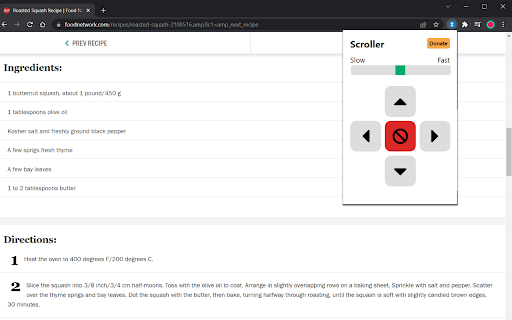
Chrome extension that scrolls up, down, left and right. Scroller is a simple auto-scroller that allows you to scroll up, down, left, right with various speeds.

Reader Tools
Auto-scroll extension for reading web pages with continuous or interval scrolling modes If you are an enthusiastic or a manwha lovers, you should use this extension, this will help you to read making you dont need your mouse. Imagine you are in your lunch time at work, and you are eating, and decide to read a manwha while you eat, with this extension you dont need to keep scrolling the page by your own, you can set a speed and control using the spacebar only.

Auto Scroll Search - Scroll Infinite Pages
Search and automatically scroll pages that load more data when you scroll, like Facebook or Twitter feeds. With Auto Scroll Search you can search on pages that load more page data when you scroll, like infinitely scrolling pages or feeds. The extension will keep scrolling the page until it finds your search term or you tell it to stop. TO USE: 1. Install the extension 2. Click the Auto Scroll Search icon (∞🔍) in the top right corner of your browser 3. A search bar will appear at the top of the page and you can enter your search term there and click Search. The page will start scrolling if no results are found or you go past the last result. FEATURES: ✔ Smoothly auto-scrolls pages to load more content ∞ ✔ Works on any site or any page with scrolling — X, Facebook, Instagram, Youtube, etc. 🌐 ✔ Choose 'Click button' to auto-click buttons to load more content 👆 ✔ 'Stop' button stops scrolling 🛑 ✔ Pauses between scrolls to let new content load and not spam websites 🚯 ✔ Navigate easily between search results with first, previous, next, and last buttons in the search bar ⏮ ◀️ ▶️ ⏭ ✔ Switch tabs while your search runs and Auto Scroll Search will notify you in the tab title when a result is found 🚨 ✔ 'Scroll into view' button lets you scroll the page to the currently highlighted search result if you scroll away 👀 ✔ Works on pages without scrolling / dynamically loaded content too 😄 This is the 🆓 BETA VERSION. Some things may not work correctly because the internet is a big place. If something doesn't work, please use the contact link in the bottom right corner of the search bar instead of leaving a bad review and I'll fix it :)

Auto Scroll
It automatically and smoothly scrolls through web pages, with a control panel and keyboard shortcuts; the speed is adjustable. Auto Scroll is a lightweight autoscroll Chrome extension with speed control that automatically scrolls any webpage for you — hands-free. If you've ever wanted to auto scroll in chrome while reading long articles, browsing feeds, or viewing image galleries, this auto scroller is the perfect tool. Simply hit the play button and let the page glide smoothly at your preferred pace. Adjustable speed — Choose any speed from 1 to 50, fine-tuned to your reading comfort Direction control — Scroll down or switch to scroll up with a single tap Floating control panel — A sleek, always-accessible panel sits on every webpage Keyboard shortcuts — Start, stop, and adjust speed without touching the mouse (Shift+A / Shift+S / Shift+D) Auto-pause — Automatically stops when reaching the top or bottom of the page Remembers your settings — Your speed, direction, and panel preferences persist across sessions Install this autoscroll Chrome extension today, open any webpage, and press the play button to enjoy effortless hands-free scrolling.

Auto Scroller
An auto scroller for dynamically generated content. It allows you to scroll to the bottom of the page or to its beginning.
