
adbappheegjjlocbcadjandgobfadelm

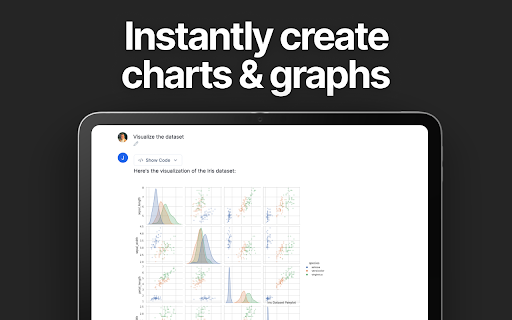


Analyze Google Sheets using Julius AI, powered by ChatGPT & Anthropic. Create graphs, write reports, and more. Visualize and Analyze your Google Sheets using ChatGPT. 🌟 Julius is your AI-powered data analyst, leveraging ChatGPT and Anthropic alongside other leading technologies. With this chrome extension, you can connect your Google Sheet to Julius AI with a click of a button. - Versatile Data Analysis 📊: Effortlessly link your Google Sheet for analysis powered by GPT-4. - Dynamic Graph Maker 📈: Generate both basic and advanced charts tailored to your specific data visualization needs. - Data Insights Made Easy 💡: Group, filter, and transform your data with intuitive controls. - Write Reports with AI 📝: Draft concise papers & reports using the same technology behind ChatGPT. 🚀 How to use the Julius AI Chrome Extension 2️⃣ Navigate to the Google Sheet you'd like to analyze 3️⃣ Set the Google Sheet sharing settings to Public 4️⃣ Click "Analyze with Julius ⚡️" in the top right of the Google Sheet Julius is free to download and use. With Julius AI, you don't just analyze data; you unlock its true potential. Transform the raw data in your Google Sheet into meaningful insights, create compelling models, generate clean graphs, and make informed decisions with ease. Experience the future of data analysis today! 🎉

YouTube Summary with ChatGPT & Claude
Summarize YouTube videos, web articles, and PDFs to save time, powered by ChatGPT, Claude, Mistral AI, and Gemini. YouTube Summary with ChatGPT & Claude is a free Chrome Extension that lets you quickly summarize YouTube videos, web articles, and PDF you're consuming. Use this extension to save time and learn more quicker. YouTube videos, web articles, and PDF summarization functions are powered by ChatGPT (OpenAI), Claude (Anthropic), Mistral AI and Google Gemini. ## What are the benefits of using YouTube Summary with ChatGPT & Claude? The main benefits are saving time, increasing productivity, and improving learning. YouTube Summary with ChatGPT & Claude reduces the need to watch long videos when you're just looking for the main points. The summaries let you absorb information quickly so you can spend time on other tasks. ## How do I use YouTube Summary with ChatGPT & Claude? Using YouTube Summary is easy. After installing the browser extension, simply open a YouTube video you'd like to summarize. Click the YouTube Summary icon in your browser toolbar, and it will generate a summary and provide an option to access the video transcript if available. You will see a summary of the video with or without timestamps. You can click on the timestamps to jump to the corresponding part of the video. You can also click the "Copy Transcript" button to copy the transcript of the YouTube video to your clipboard. ## Can I customize the length of the YouTube video summaries? Yes, you can customize the length of the video summaries generated by YouTube Summary. Adjust the settings within the extension to tailor the summaries to your preferred level of detail. Also, you can customize the prompt to use to summarize the content. ## Is YouTube Summary with ChatGPT & Claude suitable for educational purposes? Yes, YouTube Summary with ChatGPT & Claude is a valuable tool for educational purposes. It provides concise summaries and transcripts that can aid in research, studying, and learning from YouTube videos. ## Can YouTube Summary with ChatGPT & Claude handle videos in languages other than English? Yes, YouTube Summary is capable of summarizing videos in multiple languages, making it a valuable tool for international users. You can also choose what language you want the transcript to be in. Fore more details, please visit the website: https://glasp.co/youtube-summary

TubeLens - AI YouTube Summary, Mind Map, Search & Comment Insights
Your AI co-pilot for YouTube. Find smarter, learn faster, remember more. A 2-hour tutorial, but you only need 3 key steps. A foreign-language talk you wish you could understand. 1,000+ comments you'll never read. TubeLens uses AI to handle all of it—so you get the value without the time. Why You Need TubeLens ⏱️ Hours of video → 2-minute read Get AI-generated summaries with key points and timestamps. Skip the fluff, jump straight to what you need. 🧠 Finally understand complex topics Turn any video into a visual mind map. See how ideas connect, navigate by topic, and actually retain what you learn. 💡 Know what people really think Analyzing 500 comments by hand? TubeLens reads thousands in seconds—showing you sentiment, trending questions, and what your audience actually wants. 🌍 Break the language barrier Watch any video in any language with side-by-side bilingual transcripts. Search, loop sections, and export subtitles in your language. 💬 Ask your video anything Chat with one video or multiple videos at once. Ask questions, compare viewpoints, and master key takeaways in minutes—without watching a single second. 🔍 Search smarter, not harder One topic, 1,000+ videos—which one is right for you? TubeLens analyzes them all and picks the best match, so you don't have to. ✨ All-in-one - Summary, mind map, transcript, comments, chat, search. One extension, everything covered. 🎯 Lives inside YouTube - No switching tabs, no copy-pasting. Everything appears right where you watch. 🚀 Ready in seconds - Install, sign in with Google, done. No complicated setup, no learning curve. 💎 Powered by leading AI - Built on the most advanced AI models to deliver accurate, high-quality results you can trust. Perfect If You... 📚 Study online courses and need better notes 🎬 Create content and want to understand your audience 💼 Research competitors or industry trends 🌏 Learn languages or watch foreign content ⚡ Value your time and hate information overload 1. Install TubeLens 2. Open any YouTube video 3. Click the TubeLens icon 4. Watch the magic happen ✨ No credit card. Just install and go. What You Get (Free Forever) ✅ AI video summaries with highlights ✅ Interactive mind maps ✅ Full transcript access with search ✅ Comment sentiment analysis ✅ Bilingual subtitle support ✅ AI chat with videos ✅ Smart video search 🔐 Your data stays safe. We never store your video content or personal information. 🤖 Powered by GPT, Claude, Gemini—the world's most advanced AI models. Install TubeLens now—your next YouTube video is already waiting to be unlocked.

Superjoin - AI Assistant for Google Sheets
Your AI genie inside Google Sheets. Clean data, build dashboards, write formulas & automate anything with just plain English Automate, Analyze, and Act—Directly in Your Sheets. Superjoin AI Copilot is your smart assistant for Google Sheets™. It helps you automate tedious tasks, analyze data, and build reports—fast. Just type what you need in plain English, and Superjoin does the rest. Clean messy data, generate complex formulas, create charts, and automate workflows without writing a single line of code. Superjoin turns Google Sheets™ into a powerful, AI-driven workspace that saves time and boosts productivity for teams in Sales, Marketing, RevOps, Finance, and beyond. 🔑 Key Features ✅ Data Cleaning & Preparation Remove duplicates, fix formatting, and standardize data instantly. Enrich and structure your datasets for easy analysis. ✅ Formula & Pivot Table Builder Create complex formulas and pivot tables with simple text commands. ✅ Chart Builder Generate bar charts, line graphs, and dashboards automatically. Visualize your data with just one prompt. ✅ Automated Data Analysis & Insights Get summaries, trends, and key insights from your data. Identify outliers and anomalies without manual work. Easy to Use: Works with simple text prompts—no coding required. Boosts Accuracy: AI reduces human error and ensures clean, reliable data. Ready to transform the way you work in Google Sheets™? Welcome to Superjoin AI Copilot.

Octo: AI Data Analysis & Automation for Google Sheets (ChatGPT-Powered)
Automate data analysis and schedule AI-powered insights in Google Sheets. Tired of manual spreadsheet analysis? Octo supercharges your Google Sheets workflows using advanced AI. Trusted by 200+ teams, Octo instantly turns your data into clear, actionable insights - no coding required. Designed by analytics experts with 15+ years of experience, Octo empowers anyone to elevate their data analysis effortlessly. 🔹 Data Analysis & Insights 💬 Chat with Data: Ask questions in plain English and get instant, AI-powered insights. 🧹 Smart Background Data Cleaning: Auto-fill missing values, fix headers, merge messy sheets. ⚡ 1-Click AI Data Analysis: Summarize data, detect trends, and surface takeaways instantly. 🧠 Smart Suggestions: Guided prompts to uncover insights you might miss. 📈 Advanced Analytics: Trend detection, pattern recognition, and predictive insights. 🔹 Charting & Visualization 🎨 Automated Visualization Picks: AI recommends the best chart (bar, line, pie, etc.) for your dataset. 📊 AI Chart Generation: Instantly create clean, insightful charts. ⚙️ Flexible Chart Picker: Switch between chart types (bar, line, pie, etc.) with ease. 🌀 Animated / Progressive Line Charts (new): Show evolving trends dynamically, with MP4 export. 📝 Chart Annotations (new): Add text explanations directly on charts to highlight key insights. 🔹 Sharing & Automation 📄 One-Click PDF Export: Turn analysis + charts into professional reports. ⌚ No-Code Automation: Schedule reports to be delivered automatically. 📅 Conditional Notifications: Alerts when your data changes, emailed in real time. 🤔 Why Choose Octo over Standard ChatGPT? ⚠️ Data Limitations: OpenAI’s ChatGPT is excellent but limits data processing size, often truncating critical information leading to inaccurate analysis. ✅ Seamless Integration: Octo integrates seamlessly with Google Sheets for accurate and context-aware data analysis. 🌐 Superior AI Models: Utilizes cutting-edge models like GPT-5, o3, Gemini-2.5 Pro, and Claude 4.0 for the best analysis quality, speed, and reliability. 🔎 Accuracy & Consistency: Octo ensures analyses are precise, reliable, and consistently aligned with your data context. 🎉 Quick Setup & Seamless Onboarding: Get started instantly - no technical skills required. 🔮 Contextual Insights: Proactive analysis suggestions based on your specific data. 🚧 Continuous Improvement: Driven by passion, our team innovates and rolls out enhancements weekly, ensuring quality, speed and magic. 💼 Perfect For Marketing & Sales Teams: Automate campaign analysis, sales forecasting, and pipeline management. Finance Professionals: Streamline monthly financial reporting, KPI tracking, and budget reviews. Academic Researchers: Efficiently analyze complex datasets with powerful AI tools. Start using Octo today and unlock the power of AI for your spreadsheets. 🛠️ Easy Installation 1. Click "Add to Chrome". 2. Open any Google Sheet. 3. Activate Octo by clicking the "Analyze with Octo" button or accessing it via the side panel (refresh if necessary). 🔒 Privacy & Security Commitment Your privacy is paramount. Here's exactly how Octo protects your data: 🔒 Data Stays Local: Octo processes your spreadsheet data directly within your browser. No sensitive information leaves your device, ensuring complete privacy and confidentiality. 🛡️ Google-Compliant Security: Octo strictly adheres to Google Chrome Web Store's rigorous privacy and security standards. 🤝 Transparent & Minimal Permissions: We only ask for essential permissions required to deliver AI-powered analysis. We never access or store your data externally. 🔑 User Control: You maintain complete control over your data at all times, ensuring you can analyze safely and confidently. Start transforming your data analysis with Octo today - your AI assistant for smarter, faster, and privacy-first spreadsheet insights! 📪 If you have any questions or feedback, please contact us at octo.data.wizard@gmail.com. We will always be here to help you along the way.
