
adahoneonjbcodnbkdngadoffhdekhnf
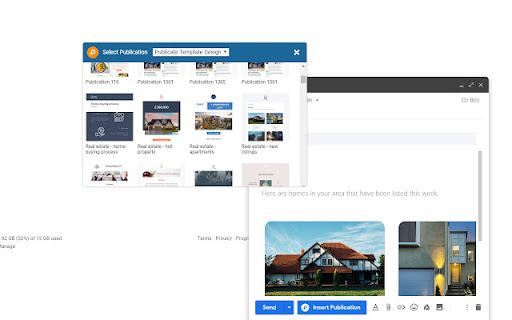
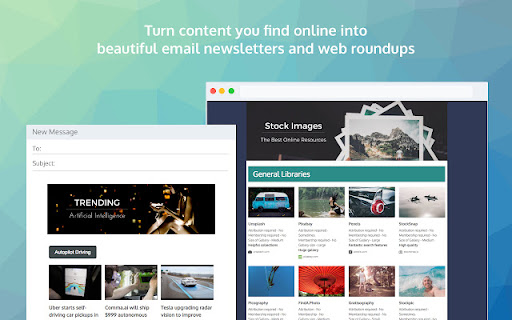

Publicate - Create Beautiful Email Newsletters and Web Roundups in minutes, from content you find online. Send beautiful mobile responsive newsletters in Gmail and Outlook. The Publicate browser extension helps you to save content for your newsletters with one click. Easily drag and drop your content to create beautiful responsive newsletters in minutes. Then browse and send your newsletters straight from inside Gmail and Outlook.

PageTrail
This Extension tracks your daily surfing activity PageTrails is designed to enhance productivity by tracking time spent on various websites. It records active browsing time, aggregates it at the domain level, and provides a concise summary of web activity. This extension is ideal for users seeking to monitor their web usage patterns and optimize their online time.

BBR Helper
This provides some advanced stats (game score, simple player rating and game box plus-minus) on multiple pages for NBA, WNBA, G-League, international leagues and college basketball. Including: - average stats by season on the player page - average stats by playoff series on the player page - average stats by player on the team_season page - average stats by player on the team_player page - average stats by player on the season_player page - single game/half/quarter stats by player on the game_boxscore page - single game and average stats on the gamelog and split pages - top 5 and top 20 average stats players on the season page - top 20 average stats players on the team_season page - top 20 average stats seasons rankings on the player page - top 50 career stats rankings on the player page - multiple stats rankings on the leader page - player awards column on team season page gBPM = (-0.55 * fga + 1.04 * fg3 + 1.39 * fg - 0.25 * fta + 0.79 *ft + 0.17 * orb + 0.27 * drb + 0.24 * (trb - orb - drb) + 1.34 * stl + 0.43 * ast + 0.64 * blk - 0.34 * pf - 0.95 * tov) / g """ , where orb is treated as 0.3 * trb and drb is treated as 0.7 * trb approximately when stats are not complete in early years.

Faro
Save pages with highlighted taglines - Bookmark manager ⨯ web highlighter Chaos in your bookmarks? Can't find what you want? They end up gathering dust? Or you don't even try and end up with 100s of open tabs? Faro is made to fix that! It's the simplest way to save & keep track of pages. With it, even thousands of saves don't get overwhelming. When saving, you highlight a sentence to act as a tagline. It helps you remember what the page is about and why you saved it. If unsure - just save whatever sentence you're reading. All saves appear on your dashboard. They come most-recent-first by default, so you don't forget what you recently saved. You can pick up your reading where you left off - no need for a separate reading list. You can also pin & archive to further arrange it. Organize them with tags. Since you're reminded what you saved and why, you can do it later. It makes your saves much easier to manage than bookmarks. Faro supports nested tags (eg: recipes/vegan), so combines the best of tags and folders. Clicking a save takes you right back to your highlight - especially useful for longer articles. Also: ➣ export to bookmarks to keep them if you uninstall Faro ➣ copy links to highlights and share them or paste into Notion, Obsidian, etc. ℹ️ About your data: When installing you can read: "it can read and change all your data on all websites" The only information that ever gets uploaded (when signed in) when you use it to save: ➣ Open page address ➣ Saved highlight/quote - what's visible in the sidebar ➣ Timestamp ➣ Debug info e.g. errors The extension also keeps track the currently open tab for each window - to update the sidebar as you navigate - but doesn't save or upload that data.

bexio Time Tracking Templates
This extension allows saving and loading of form data within the bexio time tracking page. This extension improves handling of time tracking in bexio. How? It enables the user to save the form data as templates. The templates are placed as buttons directly on the time tracking page. So with one click the form will fill out all the values you saved earlier. Sidebar These templates are also available in the panel within the browsers sidebar. In the sidebar panel you can manage the templates (edit/delete) as well as reach out to further features: ManicTime (https://www.manictime.com) You can also import entries from ManicTime and use features like, Time, Date, Billable, Notes etc. to directly apply Time entries, including selecting a template for all the other values. Data is yours only All the data is saved in your browsers storage, they are not accessible from outside nor are they sent outside of your browser. FULL FEATURE OVERVIEW & FEATURE REQUESTS & ISSUE REPORT: https://github.com/SoulcodeAgency/bexio-chrome-extension CHANGELOG: https://github.com/SoulcodeAgency/bexio-chrome-extension/blob/main/CHANGELOG.md
