
acnonhmkejidodnppipkffhfjbfiogha

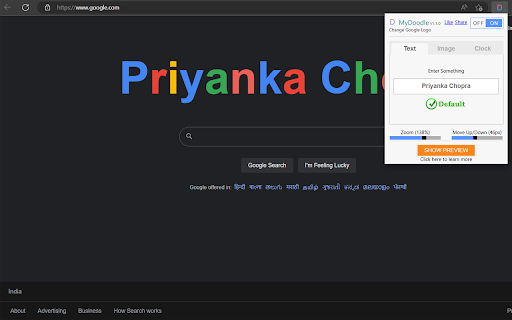
MyDoodle lets you update your default google icon with your own name or with any image on the internet on your computer's browser. In simple words you can create your own doodle very easily (Works only with Chrome and Microsoft Edge browser). After successful installation, you will need to set your own choice name or image by clicking icon D in upper right corner of your browser. Works only with all google's search engine URLs https://www.google.* You can replace your google logo with 1. Text 2. Image 3. Realtime Clock

CRXLauncher
Effortlessly Launch Chrome Extensions with CRXLauncher Manually installing .crx extension files can be complex and risky — requiring Developer Mode and manual steps that aren’t always secure. CRXLauncher provides a safer, streamlined alternative by handling installations in a controlled, sandboxed environment with full permission transparency. ★Easy Upload to Install Just select your .crx file — no need to drag and drop. ★Permission Transparency Smartly scans and displays all required permissions before installation. ★Safe & Private No tracking, no background scripts, and no unnecessary access. ★Cross-Browser Compatible Works with Chrome, Edge, Brave, Opera — any Chromium-based browser. • Select a .crx extension file from your device. • Review permissions clearly shown before any installation happens. • Approve only if you’re comfortable — nothing installs without your go-ahead. • Install the extension in just a click — no Developer Mode required. ⭐Perfect For: • Extension Developers testing their own builds • Power Users installing from trusted sources • Teams & Orgs deploying internal or private tools Note: CRXLauncher does not upload or store your extensions. Everything happens locally in your browser.

Foxified
Emulate firefox extensions in Chrome, Opera and other Chromium based browsers Emulation Sandbox Firefox addons are emulated and served in a sandboxed unique origin. WebExtension API Foxified polyfills most of the browser and Chrome APIs including XHR and webextension API Extra Layer of Protection All of the permissions are optional and requested upon plugin install Notes: - Not all Firefox extensions are supported/compatible. We have only added support for a few APIs that are stable and we are working to add more. - Foxified does not include analytics or gather any user data by itself. But you should beware when installing guest extensions.

Cat Gatekeeper
Spend too long on social media? A cat hijacks your screen. The cutest forced-break app. The official versions of Cat Gatekeeper are only those linked from this page and the official website. Please be careful of apps or websites with similar names. ・The desktop app is now available! ・Added support for the Brave browser! ・Changed the default time setting from 30 minutes to 10 minutes! ・A new cat now appears at random! ・You can now add any target sites you like! ※ On sites with frequent page changes or reloads, tracking may reset more easily. We recommend using this on social media, video sites, or other services where you stay on the same site for a while. ※ If the display or behavior becomes unstable after updating, please reload the open page once. Social media is just too hard to stop checking, isn't it? 💦🥵 What you need isn't more willpower — it's a cat that forces its way onto your screen!! You know that cat who always shows up right when you're trying to work? 🐈️ We've recreated that classic cat-owner experience in your browser. Oh well, they're too cute to stay mad at. Let's face it — humans are just servants to their cats. We are powerless against their charm. The supreme beings. The ultimate fluffballs. Let their adorableness heal you while you take a proper break. ■ Who this is for * The scrolling won't stop * You suddenly realize an hour has passed * Willpower alone just isn't cutting it ■ How to use 1. Set your usage limit (default: 30 min) 2. Set your break time (default: 5 min) 3. Set your favorite sites (default: major social media sites) 4. When time's up, a cat appears 5. Rest until the countdown ends ■ How it works * Only counts time when a target site tab is active * Tracking resets when you switch to another tab or app * After your break, the usage timer starts again ■ Supported Sites The default settings include major social media sites. You can add, remove, or change target sites from the menu. Note: Tracking may reset on sites with frequent page changes or reloads, so Cat Gatekeeper works best on social media and video sites where you stay on the same service for a while. * Page access permission is used solely to display the break overlay (cat overlay). * No data is collected or transmitted externally. * Free, no ads Get the desktop app for use beyond the browser https://zokuzoku.github.io/cat-gatekeeper/desktop/

CRX Emulator
Emulate CRX files in your browser CRX Emulator allows you to test and run Chrome extensions (.crx files) securely in a sandboxed environment, ensuring complete privacy and isolation from your browser. Whether you're a developer testing your extensions or a user verifying an offline extension, CRX Emulator offers a safe, installation-free solution with no data tracking. 🔒 Privacy & Security Runs in a Secure Sandbox – CRX files are executed in an isolated environment, preventing unauthorized access to your browser data. No Installation Required – Test extensions without modifying your browser settings. Zero Tracking – We do not collect, store, or transfer any data to third-party servers. Local Storage Only – Your settings and data remain inside your browser and are never accessed or shared. Privacy policy No unnecessary data tracking – The extension only requests permissions required for its core functionality. All optional permissions require user approval – The extension will not access websites or perform actions without user consent. Local storage only – Any stored data remains in the browser and is never sent to external servers.
