
acjkbnlfijcimdefnmllcbpekmkbafib
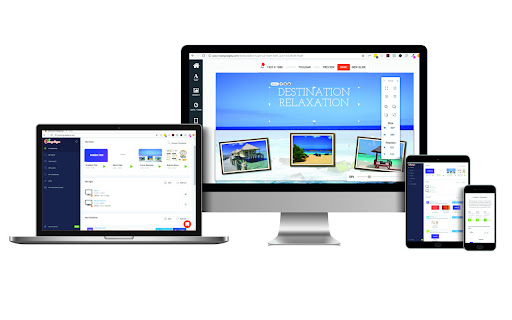

Turn any TV into a digital display and showcase your social media feeds, weather, real time news and more. Deliver your message. Mango Signs digital signage player allows you to turn almost any device into a digital sign and manage it from anywhere. All you need is internet access, and your signage will be up and running in no time. Simply create your free account at mangosigns.com and use the Chrome extension to turn your browser into a Sign player. Cast to your TV to use as temporary signage. Pick from a selection of constantly growing templates and customize to make it your own. Then create a schedule with a start and and end date and you're finished. Share your social media on your signs with instant updates shown on your sign. Get started today at by downloading the app and visiting mangosigns.com.

Remote Player for VLC™
Controls VLC player via your browsers toolbar popup! Remote Player for VLC™ is an extension that lets you control the VLC media player via your browser's toolbar. Before using the addon please make sure: 1. VLC application is running on your machine (PC/MAC). 2. You have set the required VLC password. To do so, please follow the below steps: a) In VLC app, please head to: Tools > Preferences > Show Settings > All > Advanced Preferences b) Then, mark the option in: Advanced Preferences > Interface > Main Interfaces > Web c) Then set a desired password here: Advanced Preferences > Interface > Main Interfaces > Lua > Lua HTTP d) Restart the VLC application for changes to take effect. Next, please open the toolbar popup UI in your browser and enter the above password in the input field (when the login window appeared). This password is used to connect the browser with the VLC media player (via AJAX technology). Once the password is set, you will see a simple media player for controlling VLC remotely. Note: Remote Player for VLC™ does NOT belong or relate to the official VLC (VideoLAN) application at all. It is an unofficial extension that is developed and maintained independently. The official VLC software is only released for desktop machines. This unofficial extension is a wrapper to the original VLC application and tries to make it usable as a browser extension. To report bugs, please fill the bug report form on the addon's homepage (https://mybrowseraddon.com/remote-vlc-player.html).

Play in VLC™
Detect streamable video and audio sources and offer to play them in VLC multimedia player "Play in VLC" is a browser extension to send all detectable video and audio sources to the well-known VLC multimedia player. The extension detects all the media for the current page and displays the total number of the detected media sources in the badge area. You can left-click on the toolbar button to send these media sources to the VLC player. Also, the extension has right-click context menu item for video and audio elements to send them directly to the VLC player. You can use the right-click context menu item over the toolbar button to copy the detected media sources to the clipboard. Note: This extension needs a native-client to be able to communicate with the VLC player. This native-client is available for Windows, Linux, and Mac OS. There is no support for other operating systems. --- Legal VLC is a trademark of VideoLAN non-profit organization, registered in the U.S. and other countries. This extension is an independent project and has no relationship to VLC team or VideoLAN organization.

YouTube No Cast
Removing YouTube cast button. It just removes YouTube cast button.

Valotalive Digital Signage Player
Valotalive Digital Signage player for Chrome Browser. Use this when you want to use a PC/laptop as a digital signage screen. Valotalive is the leading digital signage service making your Workplace more productive, transparent and fun. Valotalive Digital Signage Player turns any computer with Chrome into a live Info Screen. ★ With Valotalive you can: * Group your displays and target content accordingly * Connect to different data sources with Apps * Combine Apps and create a Flow of live information and data visualizations * Manage local and global network of digital signage Screens with live and visual information Flows ★ With Valotalive Digital Signage Player: * Transform any device with the Chrome Extension into a Valotalive screen without entering you credentials in the device. Install this extension to Chrome browser in your media player. Connect your display - log in to your Valotalive Account at https://valota.live
